10 11
12
13
14
15
16
18
17
19
20
21
22232425
26 27 28
29
30
31
32
33
34
Mode button
Power button
Mode switchover knob is available in 6 modes: Camcorder mode, Camera
mode, Recording mode,MP3 Play mode, File Playback mode and Setup
mode.
Press this button to switch on the camera in case of the power-off state,
and press this button for 3 seconds to switch off theCamera in case of the
power-on state.
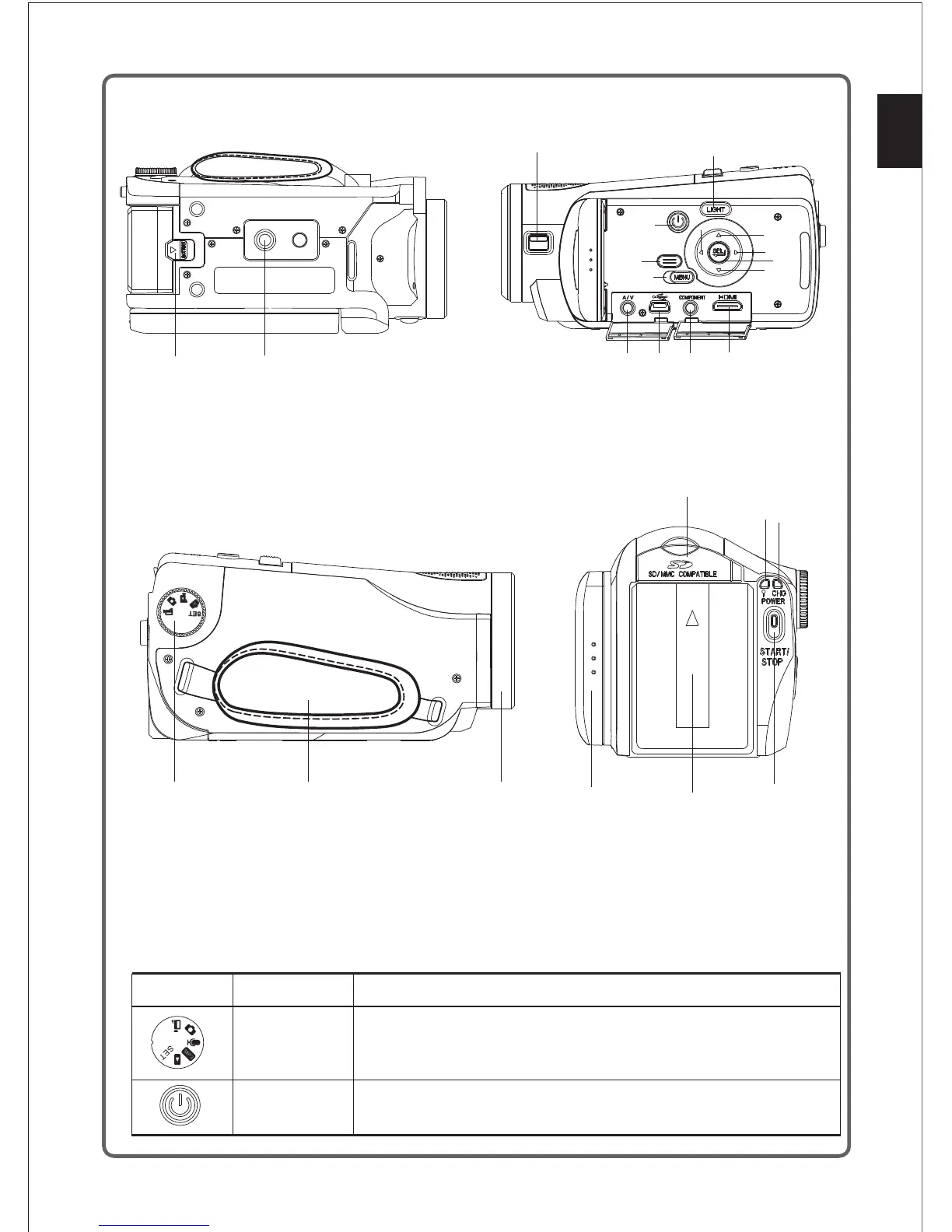
10. Battery pack;
11. Tripod hole;
12. Switch of lens cover;
13. Power button;
14. Disp button;
15. Menu button;
16. LED fill light button;
17. Left button;
18. Up button;
19. Right button;
20. Enter button;
21. Down button;
22. HDMI output interface;
23. Headset output interface (optional);
24. USB output interface;
25. AV output interface;
26. Mode knob;
27. Wristband;
28. Focusing ring;
29. LCD display screen;
30. Battery;
31. Start/Stop button;
32. Power indicator light;
33. Charging indicator light;
34. SD card cover;
Please refer to the following table for the functions of the buttons.(if the camcorder has the
MP3 function)
Button Designation
Function
English
7



 To Next Page