ENGLISH
3
Basic button function setting:
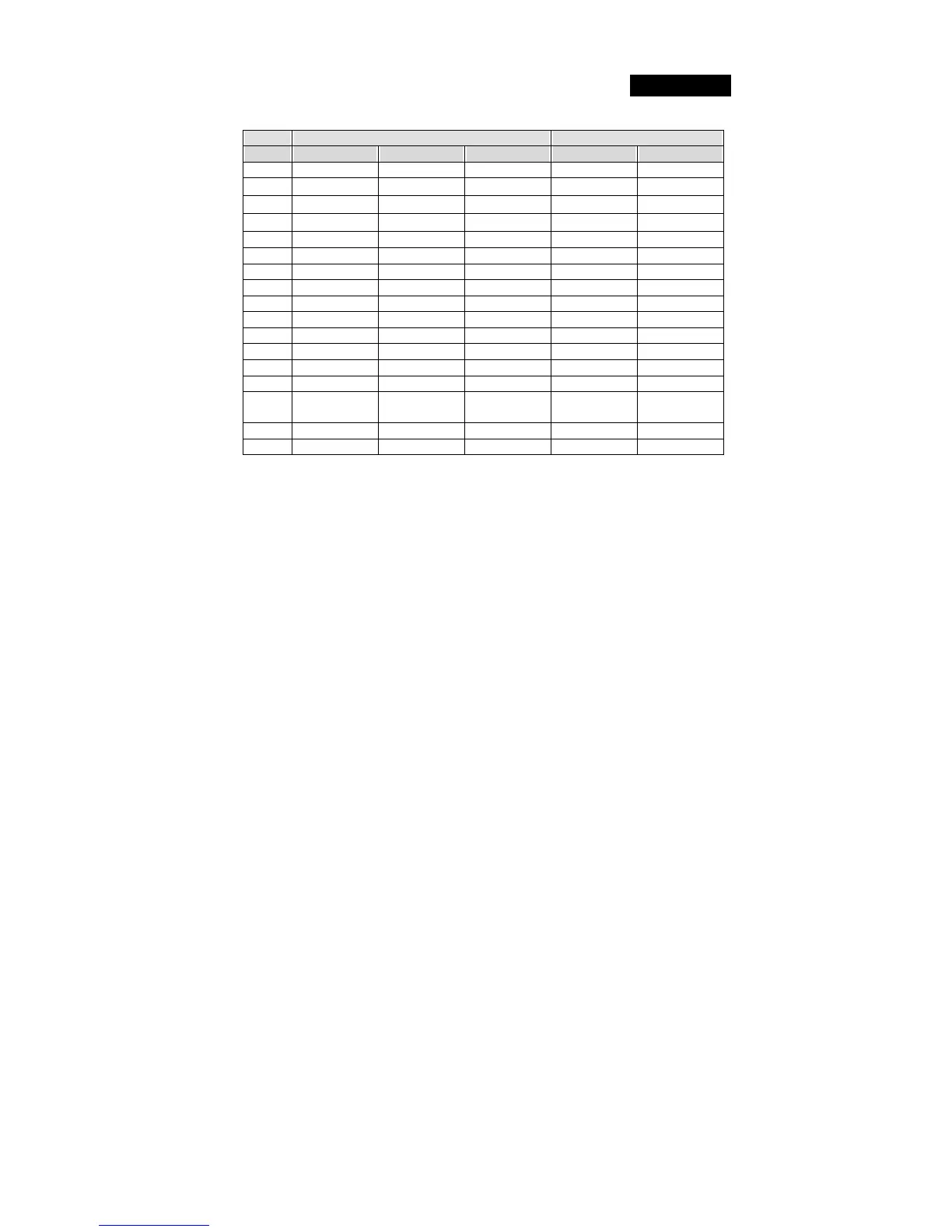
1. Play Station and PC function comparison chart
Play Station PC
Key Digital Analog Car Digital Analog
1 X X I 1 1
2
□ □
II 3 3
3
○ ○
A 2 2
4
△ △
B 4 4
5 L1 L1 L 5 5
6 L2 L2 L 7 7
7 R1 R1 R 6 6
8 R2 R2 R 8 8
9 Select Select Null 9 9
10 Start Start Start 10 10
11 Null L3 Null 11 11
12 Null R3 Null 12 12
D-Pad D-Pad D-Pad D-Pad X,Y-Axis POV HAT
Mode Mode Mode Mode Mode Mode
Steering
X-Axis
Left / Right
X-Axis X-Axis X-Axis X-Axis
Pedal_L Y-Axis/Down Y-Axis/Down II Y-Axis/Down Y-Axis/Down
Pedal_R Y-Axis/Up Y-Axis/Up I Y-Axis/Up Y-Axis/Up
2. Program function setting:
In some games, the foot pedals will not be activated automatically. If you want to use the
pedals instead of the analog function buttons on the Twin Wheel, please follow these
steps below:
Press the Program button and the LED will be lit.
Then push down one of the two pedals (should push it down over 10 degrees), at the same
time, press one of the Analog buttons that you wish to set up. (╳, ○, □,△, L1, L2, L3,
R1, R2, R3). Then press the Program button again to complete the set up. Use the same
steps to set up the other pedal.
Note1:The Program function only can be activated under Digital & Analog modes. Under
Car mode, the Program function will not be activated.)
Note2: To terminate the programmed functions, unplug the wheel’s cable and re-plug it to
the PS2 console, and the programmed function will be reset.






 To Previous Page