ENGLISH
1
How to use the manual?
The game controller is compatible with PC, PlayStation®2 and PlayStation®.
For PC users, please refer to the section A of “Installation for PC system”.
For PlayStation®2 and PlayStation®, please refer to the section B of “Installation for
PlayStation®2 and PlayStation®”.
A. Installation for PC system
1. Make sure you turn your computer on.
2. Insert the driver’s disc into the CD-ROM drive,
and the setup program will start automatically. If
not, start the setup program manually by selecting
Start/Run and type in “E:\setup” (Where “E:”
represents the location of the CD-ROM drive),
then press the Enter key.
(If you are using Windows 98, just follow the
instructions on the screen to finish the
installation)
3. Please follow the instructions on the screen to finish the driver installation. (Some
operating systems will install the DirectX program automatically first, so just follow the
instructions on the screen to finish the program installation.)
4. After the software installation is completed, you can plug the USB connector of the cable
to the USB port on your computer or to a USB Hub.
Note: Please power on your USB Hub after connecting this device, because it needs at
least 500mA to operate vibration motors.
5. Click Start / Settings / Control Panel and double click on the “Game controller” or
“Gaming Options” icon.
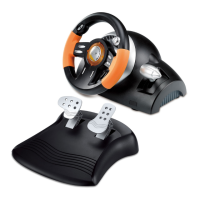
6. Attach the racing wheelbase to a sturdy tabletop, or a similar surface. Then use the suction
cups on the wheelbase and the C-clamps to secure the wheel to the tabletop.
7. Place the pedals on the floor in a convenient-to-reach location and not on an easy-to-slip
surface.
8. Plug the pedal’s connector (RJ-11) to the steering wheel.
9. In the “Game controller” or “Gaming Options” screen, you can calibrate and test your
game controller before you play any game.
10. When you finish the calibration and test, you can now play any game.
Important:
1. The driver will work with the DirectX 7.0a or a newer version in PC system. Please check
the DirectX version on your system, and upgrade if necessary.

 Need help?
 General







 To Next Page