This document provides operating instructions for Genlab Classic Incubators and Ovens, designed for various laboratory applications. The devices are manufactured by Genlab Limited, located at Tanhouse Lane, Riverview Industrial Estate, Widnes, Cheshire WA8 0SR, England. For support, Genlab can be reached at Tel: +44 (0)151 424 5001, Fax: +44 (0)151 495 2197, and their website is www.genlab.co.uk.
Function Description
Genlab Classic Incubators and Ovens are designed to provide a controlled temperature environment for various applications, including the incubation of microbiological specimens and heating liquids. The units are equipped with both a control thermostat and an overheat thermostat to ensure precise temperature regulation and safety. The primary function is to maintain a stable internal temperature, which is crucial for sensitive processes.
Important Technical Specifications
The units are available in two main voltage configurations:
- 240-volt units: These units come supplied with a mains connection lead and a correctly rated fuse. The fuse rating and other electrical details are provided on a voltage plate riveted to the back of the unit. It is critical to replace fuses only with those of the correct rating.
- 110-volt units: These units are supplied with a cable but without a plug or fuse. They require wiring by a suitably qualified electrician according to the following connections:
- BROWN: 'L' Live pin
- BLUE: 'N' Neutral pin
- GREEN/YELLOW: 'E' Earth pin
The fuse requirement for 110-volt units should be referenced from the voltage plate.
WARNING: It is explicitly stated that the oven must NOT be connected to a D.C. mains supply, as this will result in serious damage.
Usage Features
- Unpacking: Before use, all packing material must be removed from between the shelves and the inner walls of the oven.
- Shelf Positioning: Shelves should be positioned appropriately within the work chamber.
- Temperature Monitoring: A suitable thermometer should be placed into the top tubular, with its bulb approximately two inches into the chamber, to monitor the internal temperature.
- Power On: The unit is switched 'ON' using the mains switch, which is indicated by a green lamp.
- Overheat Thermostat Setting: The overheat thermostat dial (red cap) should be turned to approximately 10°C above the desired working temperature for ovens, or 5°C above the desired working temperature for incubators.
- Control Thermostat Setting: The control thermostat dial (white cap) is used to set the desired working temperature. The unit should be allowed to heat up and maintain a steady state before any further adjustments are made.
- Fine-tuning Overheat Thermostat: For a closer overheat thermostat setting, at the working temperature, the overheat dial can be turned downscale until its indicator lamp is ON. Then, the knob should be advanced very slowly upscale until the indicator lamp is just extinguished.
- Overheat Protection System: If the chamber temperature rises above the overheat set temperature, a red lamp will illuminate, and the heat control circuit will be disabled. Control will switch back to the main temperature control once the chamber temperature falls below the overheat set temperature. If the red lamp remains on or frequently comes on, it indicates a potential problem with the unit, and the supplier should be consulted.
- Dial Locks: The dials can be locked using the provided Allen key. It is important not to remove the dial lock, as it forms part of the scale end stop.
- Safety for Microbiological Work: When used for microbiological specimens, careful consideration of the unit's siting and use is essential to ensure safe operating conditions. Appropriate safety precautions and guidelines (e.g., from The Department of Education and Science) must be followed strictly to protect users from infection and cultures from contamination.
- Heating Liquids: If liquids in partially sealed vessels are to be heated, the temperature setting must prevent appreciable pressure build-up. The risk of explosion increases if the temperature setting exceeds the liquid's boiling point. Therefore, vessels requiring heating SHOULD NOT be completely sealed.
- Flammable Solvents: These units are not suitable for use with flammable solvents where the solvent concentration could reach flammable or explosive levels.
- Unauthorized Tampering: When the unit is in use, the thermostat/heating control should be locked if a dial lock is fitted, and/or a notice warning against unauthorized tampering with the temperature setting or work in progress should be prominently displayed.
Maintenance Features
Routine Checks (On Each Occasion of Use):
- Supply Lead and Plug Top: Check for sound and undamaged condition of the supply lead and plug top.
- Mains Supply Connection:
- Verify supply switch operation.
- Ensure the green supply indicator is working.
- At working temperature, confirm that the heat indicator (amber lamp) cycles on and off without the overheat (red lamp) illuminating.
- Perform a temperature check using a suitable temperature probe inserted 100mm into the oven chamber via the top vent.
Preventative Maintenance:
- Cleanliness: Ensure the unit is maintained in a clean, dry condition and stored in a normal warm atmosphere when not in use.
Minimum Recommendation (Every Six Months):
- Plug Top Connections: Check that plug top connections are tight and the fuse rating is correct.
- Overheat Protection System: Check the operation of the overheat protection system by raising the desired temperature above the overheat temperature.
- Electrical Safety Check: Carry out an electrical safety check (Portable Appliances) using an appropriate appliance tester operated by a competent person.
- Control Temperature: Check that the control temperature is maintained within limits.
- Manufacturer Service: The manufacturer can offer the above service upon request.
General Cleaning:
- Spills: Mop up any spilled liquid from the floor of the unit immediately.
- Sample Placement: Do not place samples directly on the chamber floor.
- Electrical Components: Take normal precautions to prevent water from coming into contact with electrical components.
- Outer Surfaces: Clean outer surfaces with a warm, damp, soapy cloth or any proprietary cleaner suitable for a painted surface. Avoid using solvents or harsh abrasives.
- Work Chamber: The work chamber can also be cleaned using the same method as outer surfaces.
Replacement Parts:
- When ordering replacement parts, always quote the model and serial number, which are found on the voltage plate on the back of the unit. Fitting instructions are supplied with any replacement parts ordered.

 Need help?
 General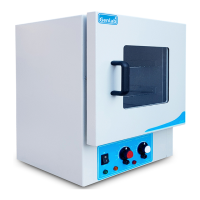

 To Next Page