Figure 62 ePlex Level Template
Note: Use the same + and – readings from the dual axis level to indicate tilt direction: + in X means left
up; + in Y means front up.
Extend all floating feet on Base and Tower down to the bench and turn 1/8 rotation to stabilize the
feet on the bench.
Install and secure the cosmetic side panels to the outer right and left sides of the ePlex system and
mount barcode scanner.
Proceed to the Operational Qualification QWI4024
The front Tower fascia(e) must NOT be installed until after completion of the OQ.
All other covers/fascia(e) can be installed.
Appendix
DXL360S Dual Axis Inclinometer Calibration.
Find a location on a flat, not necessarily level, surface with edges that can act as references for
positioning the gauge repeatedly in the same place.
Press power button to turn on
Press and hold the ANGLE/SET button to enter Menu mode.
Use up arrow to select Calibration, press ANGLE SET.
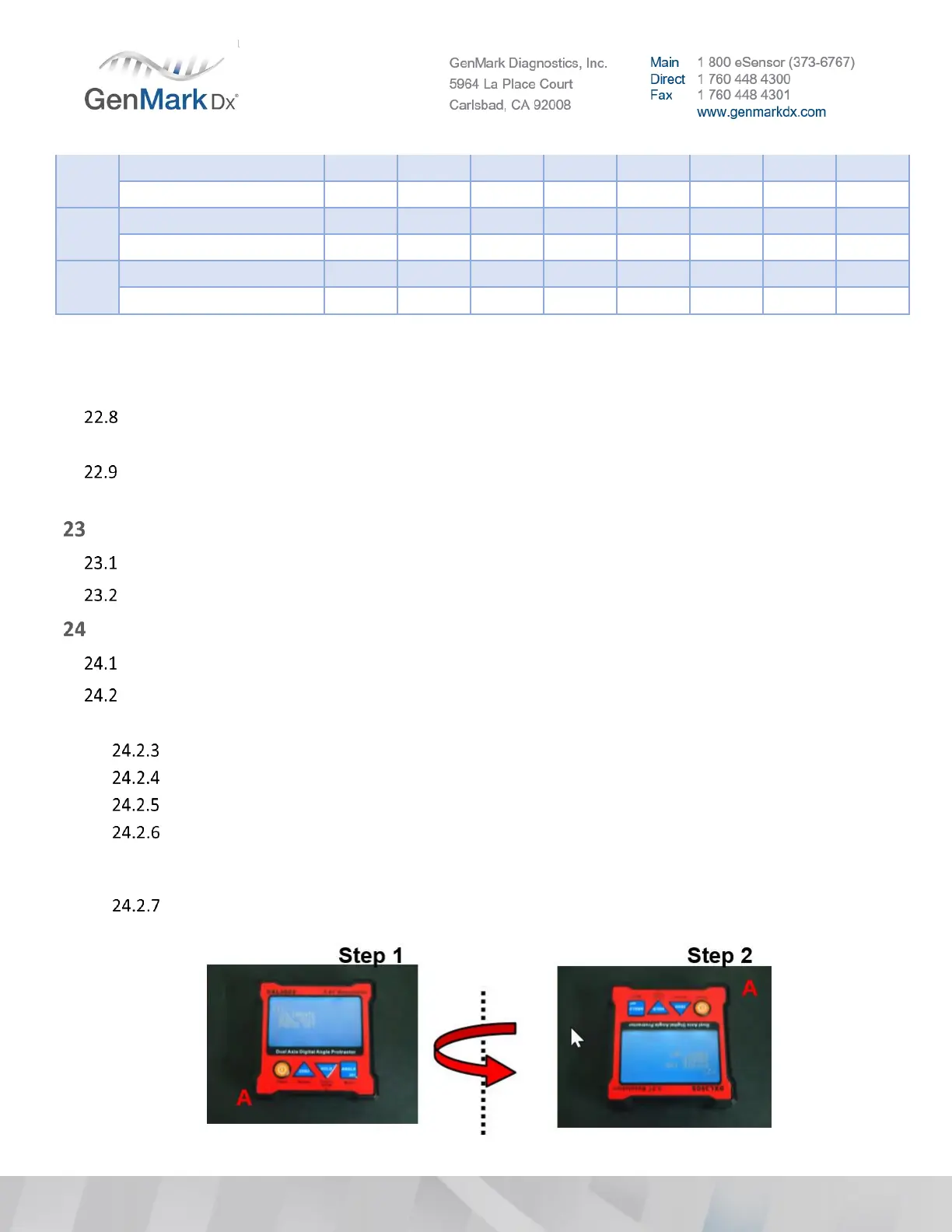
STEP 1: Place the unit on a flat table (no need for a perfectly level table) LCD display
‘CALIBRATE DUAL AXIS PRESS SET’, press SET and buzzer will beep; wait until the beep sound
stop. While the buzzer is beeping keep the unit stable.
STEP 2: Rotate the unit 180° on same plane with the other side against the same place. Press
the SET button again and wait for the beeping to finish.



 To Next Page
 Loading...