EasyManua.ls Logo

GENMAX PARALLEL KIT - User Manual

GENMAX PARALLEL KIT
8 pages
Print Icon
To Next Page IconTo Next Page
Loading...
INVERTER GENERATOR
PARALLEL KIT
USER,S MANUAL & OPERATION INSTRUCTION
SAVE THIS MANUAL: This manual contains important information regarding safety,operation,
maintnance and storage of this product. Before use, read carefully and understand all cautions,
warnings, instructions and product labels. Failure to do so could result in serious personal injury
and/or property damage.
GENMAX PARALLEL KIT

Questions and Answers

Summary

Important Safety Instructions

Set Up Precautions

General guidelines for safely setting up the parallel kit and generators.

Operating Precautions

Critical warnings and instructions for safe operation of generators and parallel kit.

Service Precautions

Guidelines for safe servicing, cleaning, and maintenance of the parallel kit.

Operation

Components and Panel Overview

Identifies parallel kit components, outlets, and panel indicators for operation.

Troubleshooting

Common Issues and Solutions

Identifies common problems, their causes, and solutions for the parallel kit.

Overview

This document is a user manual and operation instruction for the GENMAX Inverter Generator Parallel Kit. It provides essential information regarding the safety, operation, maintenance, and storage of the product.

Function Description:

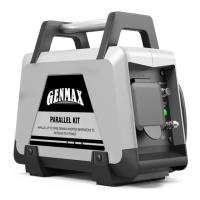
The GENMAX Inverter Generator Parallel Kit is designed to connect two identical GENMAX inverter generators to increase their combined power output. This allows for the operation of higher-wattage tools or appliances than a single generator could handle. The kit consolidates the output of two generators into a single parallel device, offering both a 120-Volt, 50-Amp outlet and a 120-Volt, 30-Amp outlet for connecting loads. It includes all necessary cables and connectors for parallel operation, as well as a ground terminal for external grounding.

Important Technical Specifications:

  • Voltage: 120V
  • Output Current: 80A (combined from a 50A socket and a 30A socket)
  • Maximum Parallel Power: Up to 9600 peak watts when connecting two generators. The manual also notes that three generators can be connected in parallel, though the specific configuration for three generators is not detailed beyond the total power limit.
  • Outlets:
    • One 120-Volt, 50-Amp Outlet: Capable of carrying a maximum of 50 amps.
    • One 120-Volt, 30-Amp Outlet: Capable of carrying a maximum of 30 amps.
  • Connectors: Red and Black connectors for parallel outlets, and a ring-type ground connector.
  • Safety Features: Reset breaker for overload protection, pilot light indicating output status.

Usage Features:

  • Compatibility: Exclusively designed for use with two identical GENMAX Inverter Generators. The manual explicitly warns against using two different generator models or attaching the Parallel Kit to only one generator.
  • Setup: The Parallel Kit can be set up on the ground or clipped to one of the two generators. It requires a flat, level, dry, and well-ventilated surface for operation.
  • Connection Process:
    1. Ensure generators are turned off before connecting the Parallel Kit.
    2. Connect the red connectors from the Parallel Kit to the red parallel outlets on both generators.
    3. Connect the black connectors from the Parallel Kit to the black parallel outlets on both generators.
    4. Connect the ground connector (ring) from the Parallel Kit to the ground terminal of one generator, and then connect the ground bolt on the parallel component to a ground screw using a ground cable, tightening the screw.
    5. Fully insert all cable plugs into outlets.
    6. Turn on one generator, then the second.
    7. Verify that the "Output" lights on both generators are green.
    8. Turn the "LOW IDLE" switch to "ON" on both generators.
    9. Attach the load to the Parallel Kit outlets.
  • Overload Protection: The Parallel Kit features a reset breaker. If the inverter is overloaded, the breaker will trip, and the engine will continue to run, but there will be no output. To reset, unplug devices, reduce the load, and push the reset breaker.
  • Pilot Light: A green pilot light indicates that the parallel box output is active.
  • Safety Guidelines:
    • Always operate generators outdoors and far from openings to avoid carbon monoxide buildup.
    • Do not exceed the maximum power rating of the generators.
    • Avoid connecting or disconnecting load connections while standing in water or on wet ground.
    • Do not touch electrically energized parts or non-insulated conductive objects.
    • Wear safety goggles during setup and use.
    • Keep children and pets away from the operating Parallel Kit.
    • Do not drive, drag, or place objects over Parallel Kit cords, and do not walk on them.
    • If one generator shuts off during use, disconnect the load until it can be restarted to prevent generator damage.
    • Do not attach a heavy load to any other outlet on a generator that has a Parallel Kit attached.

Maintenance Features:

  • Pre-Use Inspection: Before each use, inspect the Parallel Kit and generators for damaged, loose, or missing parts, including loose hardware, cracked/broken parts, damaged electrical wiring/cable insulation, and any other condition affecting safe operation. Do not use if damaged.
  • Cleaning: Keep all electrical equipment clean and dry. After use, wipe external surfaces with a clean cloth.
  • Wiring and Terminals: Replace any wiring where insulation is cracked, cut, abraded, or degraded. Replace worn, discolored, or corroded terminals, and keep them clean and tight.
  • Professional Service: Do not alter or adjust any sealed parts of the equipment or its engine. Only a qualified service technician should adjust parts that affect engine speed. For repairs, use only identical replacement parts by a qualified repair person. Do not attempt service or maintenance procedures not explained in the manual or if uncertain about safe execution.
  • Storage: Store the equipment out of reach of children.
  • Troubleshooting: The manual includes a troubleshooting section for common issues like "Parallel Kit doesn't have power" (possible causes: not plugged in, circuit breaker tripped, needs service) and "Overload indicator flashes" (cause: rated load capacity exceeded). Solutions are provided for these issues.

GENMAX PARALLEL KIT Specifications

General IconGeneral
BrandGENMAX
ModelPARALLEL KIT
CategoryPortable Generator
LanguageEnglish

Related product manuals