04 Product Functions and Introduction
20
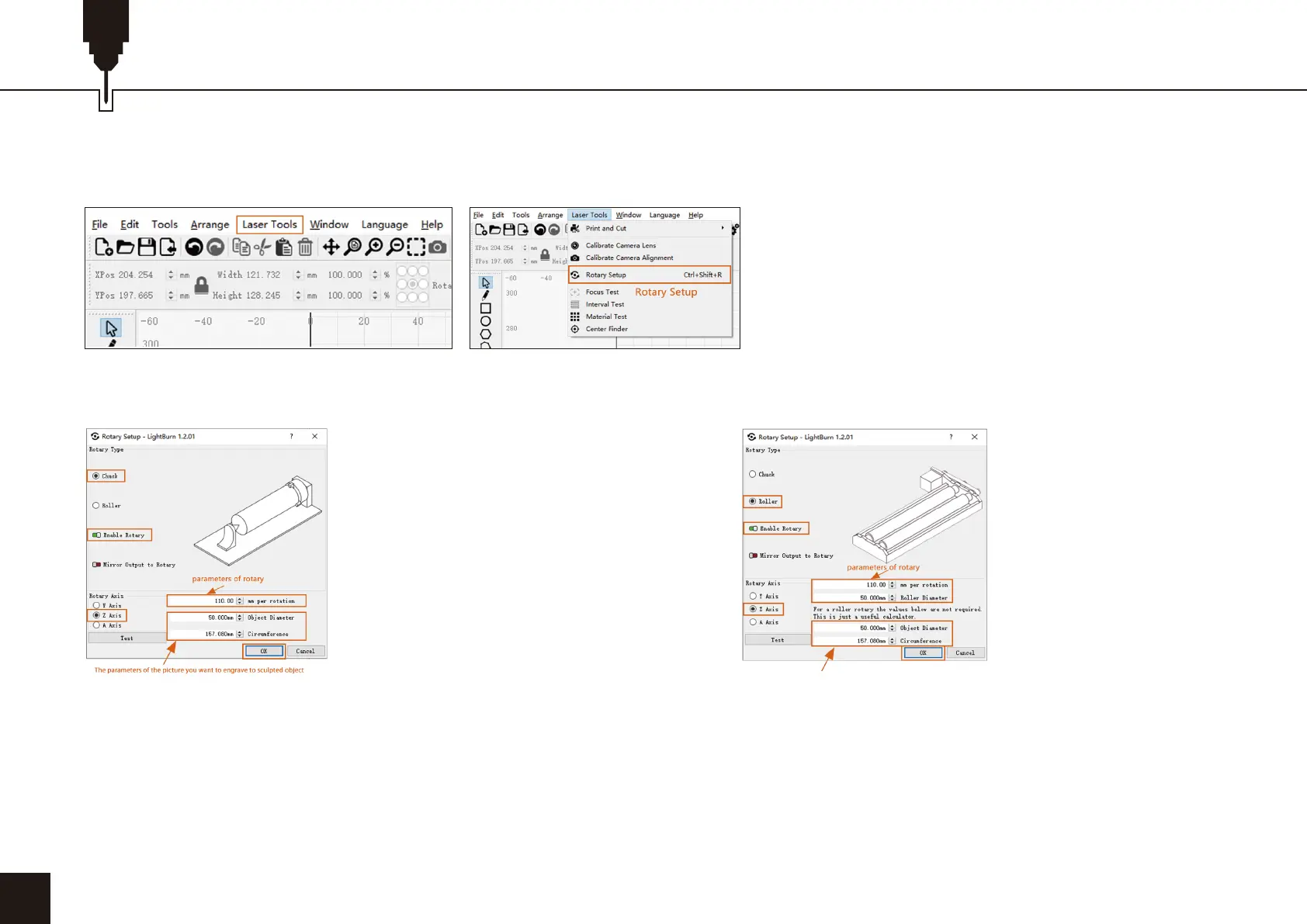
2. Open the rotation settings window and set the parameters.
2.1 Open the rotation settings window, click "Laser Tools" on the toolbar, then click "Rotary Setup”.
2.2 Set the correct parameters in the rotation
setting window, as shown in the figure.
2.3 Set the correct parameters in the rotation
setting window, as shown in the figure.
Steps:
(1) Select the type of rotation “Chuck”.
(2) Open "Enable Rotary”.
(3) Select the "Z-axis" rotation axis.
(4) Enter the parameters of the rotating device (fixed value).
(5) Enter your object parameters: the actual measured diameter
circumference of the object to be measured.
Steps:
(1) Select the type of rotation “Roller ”.
(2) Open "Enable Rotary”.
(3) Select the "Z-axis" rotation axis.
(4) Enter the parameters of the rotating device (fixed value).
(5) Enter your object parameters: the actual measured
diameter circumference of the object to be measured.
The parameters of the picture you want to engrave to sculpted object


 To Next Page
 Loading...