Need help?
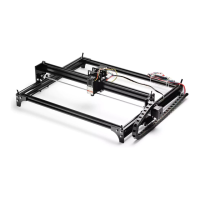
Do you have a question about the Genmitsu L8 and is the answer not in the manual?
Covers critical safety protocols, operating procedures, laser risks, and environmental considerations.
Highlights critical safety notices like eye protection, keeping hands clear, and proper machine shutdown procedures.
Illustrates front, rear, left, and right views, detailing ports, switches, and interfaces.
Details focus adjustment and provides cutting/engraving depth guidelines for various materials and laser powers.
Explains safety features like tilt/alarm protection and details LED status, barometric pressure, and flame indicators.
Covers honeycomb panel installation, air assist setup, and introduces supported software like LightBurn and LaserGRBL.
Discusses coordinate systems, camera use in LightBurn, offline operation, and rotary engraving setup.
Guides on installing drivers and the CutLabX software on Windows operating systems.
Provides instructions for installing drivers and the CutLabX software on Mac operating systems.
Steps to connect the phone to the machine's WiFi network and use the CutLabX APP.
Instructions for connecting the mobile phone to the machine via the user's home network.
Covers questions on format size, laser source, power loss, and engraving quality issues.
Addresses material compatibility, curved surfaces, reflective materials, and processing effects.
Discusses software download, supported formats, tutorials, and troubleshooting common software problems.
Details procedures for adjusting X/Y axis belts and synchronization wheels for proper machine movement.
Covers cleaning and maintaining the laser nozzle and lens to ensure consistent power output and performance.
 General
| Category | 3D Printer |
|---|---|
| Build Volume | 300 x 300 x 400 mm |
| Nozzle Diameter | 0.4mm |
| Filament Diameter | 1.75mm |
| Heated Bed | Yes |
| Supported Materials | PLA, ABS, PETG, TPU |
| Frame Material | Aluminum |
| Bed Temperature | Up to 100°C |
| Nozzle Temperature | Up to 260°C |
| Connectivity | USB, SD Card |
| Power Supply | 24V |

 To Next Page