• It is recommended that your e-bike be inspected by an author
ized GenZe dealer or at a GenZe Service Center at least once
a year. Find the nearest to you by calling us at
1-855-GO-GENZE.
• If your e-bike fails to work properly, consult your retailer.
• It is important that your e-bike is well maintained in order to
prolong its life.
• Ensure the brake pads are promptly replaced when they
become worn out.
• GenZe recommends the use of genuine replacement parts.
• Any injury or damage resulting from the failure to fully
understand this manual or negligence will not be covered
under the warranty.
7. Inspection, Maintenance & Dimensions
22 / 23
• Recharge the battery fully before leaving it for an extended period
of time. Make sure that it is recharged at least once every 10 days
whether you use it or not. (Note that recharging may not be possi
ble once a battery becomes fully discharged.)
• Protect the battery from rain or moisture, which could cause failure.
• Charge the battery in environments between 15°F and 100°F.
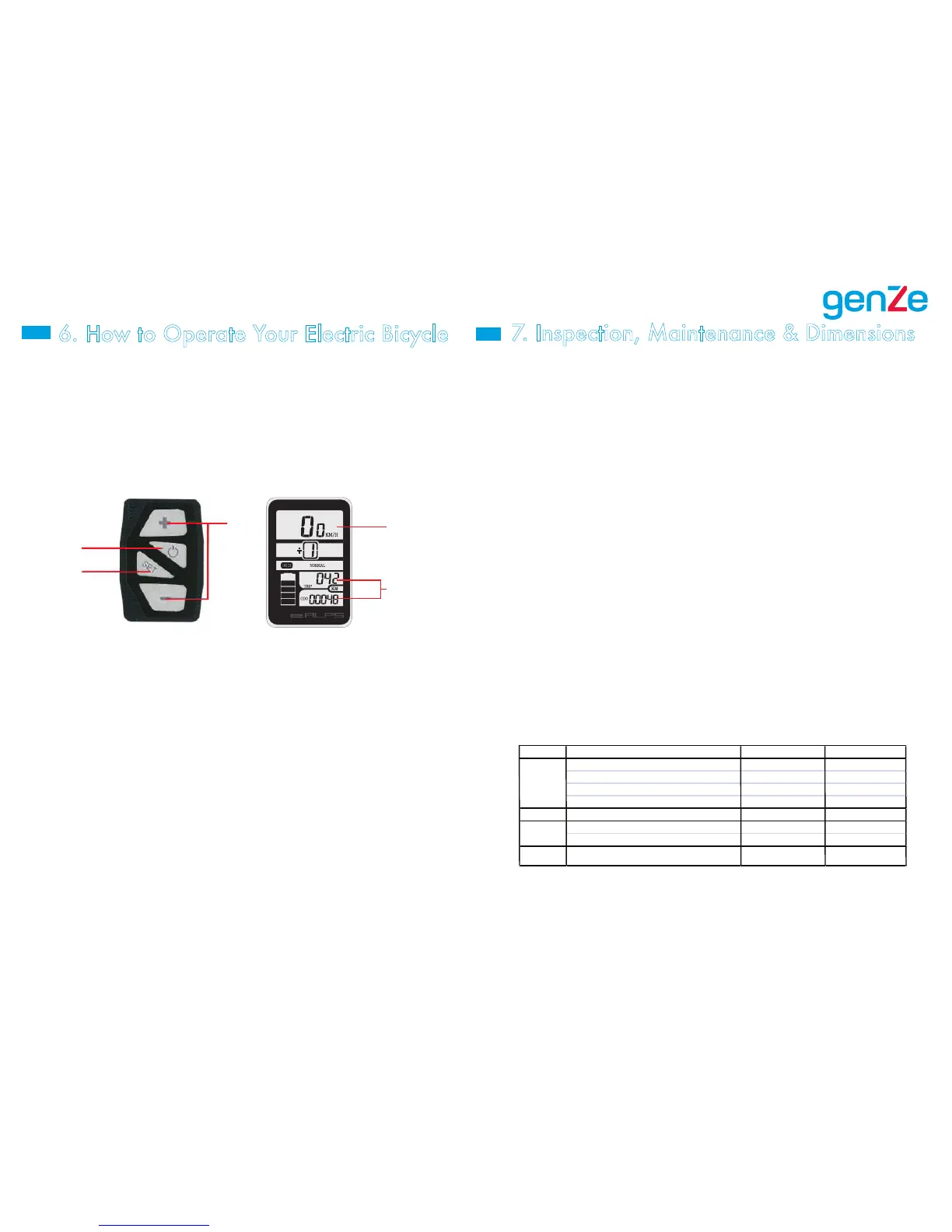
1. On/Off Switch: Turns the system power on or off and controls the
backlight operation. To turn on the system, press the button once. To
turn off the system, press and hold the button two seconds until the
display turns off. To enable the backlight mode for riding in low-light
situations, with the system already turned on, press and quickly
release the button. Complete the same action to turn the backlighting
mode off.
2. Mode Switch: Used to enter into the setup menu for pedal-assist
mode adjustment. To change from “NORMAL” to “POWER” assis
tance modes, press and hold the button for five seconds. The menu
will change to only display the mode selection screen. Using the “+”
or “-“ buttons, you can select either “NORMAL” or “POWER” assist
modes. Once youʼre satisfied with your selection, press the “SET”
button to cycle to the trip odometer. Here, you can reset the trip
odometer by holding down “-“ briefly. Press “SET” once more to
cycle back to the main screen display.
3. Riding Mode Switches: Press to change riding modes between Level
1 (lowest level of assist) and Level 5 (highest level of assist). To cycle
from KPH to MPH, or vice-versa, press and hold both the “+” and
“-“ buttons simultaneously on the pedal assist control module for 5
seconds. To engage the walking mode, press and hold “+”. Releas-
ing the button will immediately cease walking mode. Holding down
“-“ for approximately three seconds will also reset the trip odometer.
4. Riding Speed Indicator: Indicates the current speed of the e-bike.
5. Distance Covered: Indicates the distance the
e-bike has covered.
Names and Functions of the Instrument Panel
1
2
3
4
5
6. How to Operate Your Electric Bicycle


 To Next Page
 Loading...