20 / 21
6. How to Operate Your Electric Bicycle
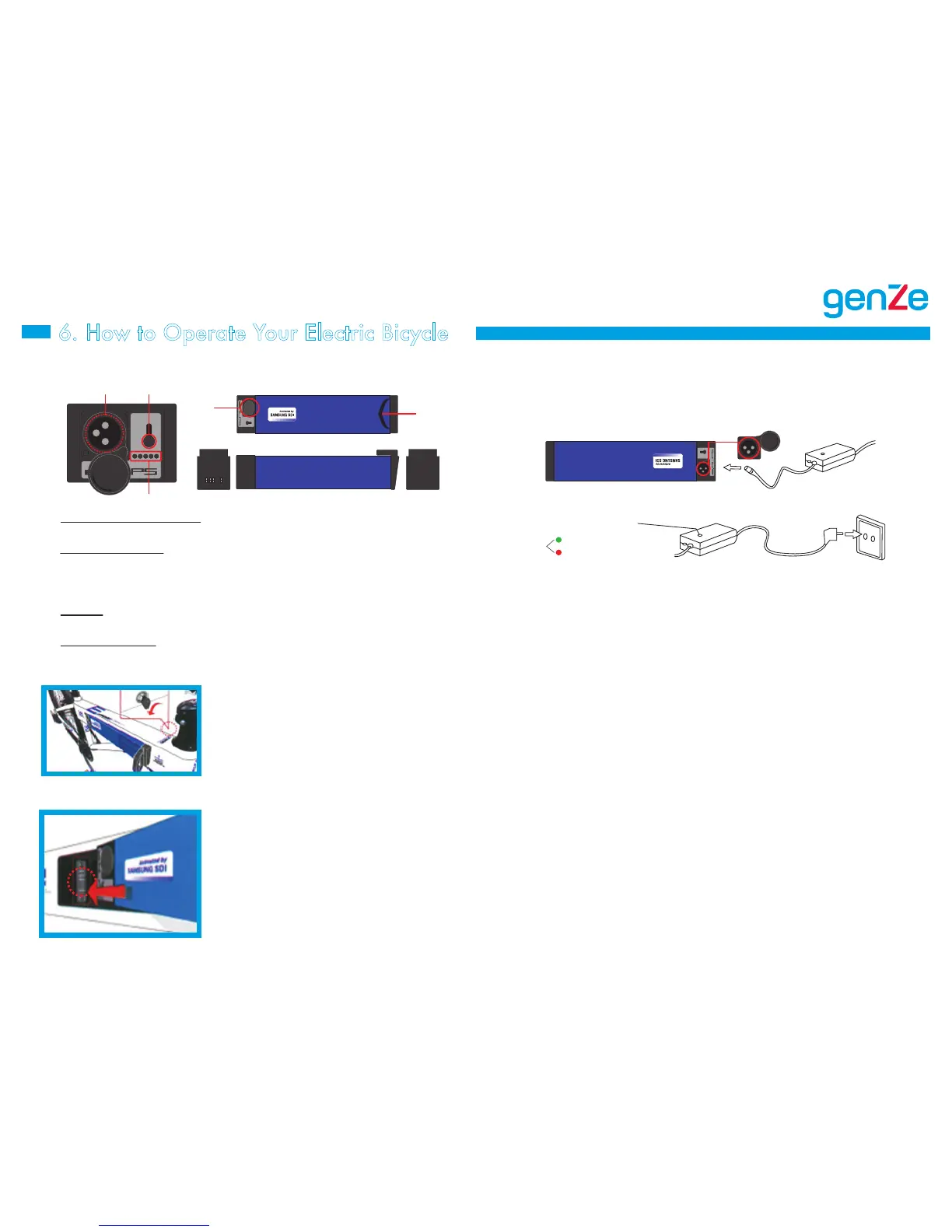
1. Battery Indicator Switch – Press to see the indication of
battery charge.
2. Battery Indicators – The battery charge status is indicated in five
levels including the last indicator which will show as red, but only
when the battery is low. Recharge the battery when two or fewer
indicators are shown.
3. Handle – Rotate and hold the key lock to the left and pull the
handle to remove the battery.
4. Recharging Inlet – Located beneath the on/off switch. Connect
the recharging jack here.
Definitions of Highlighted Parts
Recharging the Battery
Recharging Indictor
Green - Fully charged
Red - Charging
1. Fully insert the lower end of the battery into
the battery compartment ensuring that the
bottom edge of the battery lines up with bottom
edge of the compartment.
2. Press the top of the battery into the compart-
ment until the latch engages the battery and it
locks in place.
1. Ensure that the e-bike is at a standstill.
2. Rotate the battery lock counter-clockwise
to unlock.
3. With the lock rotated, pull the handle to
remove the battery.
(As mounted)
How to Remove the Battery
How to Mount the Battery
4 1
1
3
2
1. With the battery installed or removed from the frame, connect
the charger to the battery pack.
2. Connect the charger to an 110v power outlet.
3. You can monitor the charging progress by observing the colored
LED lights. When the light is red, the battery is charging. When
the light is green, charging is complete.
4. Once charging is complete, disconnect the charger from the
outlet and disconnect the charging cable from the battery pack.
• Do not move the charger and battery while charging is
in progress.
• Use the charger in a well-ventilated place free from moisture.
Do not leave anything flammable or explosive near
the charger.
• Ensure that the charger is out of reach of children.
• Only use the certified charger provided and always follow the
instructions to recharge correctly.
• To extend the batteryʼs life, recharge it immediately after it
has discharged.


 To Next Page