11/22
6.3.3/ Grams of fat consumed
The following display concerns the fat which you have actually lost during your workout in grams (g). During
long periods of exercise, the body mainly provides energy to the muscles from two sources:
- Sugars (rapidly usable energy for relatively short, intense workouts; stores amount to a few dozen minutes
at most).
- Fats (more difcult to use but stored in generally almost unlimited quantities). The body will use fats for
basic tasks (temperature regulation or very long low-level workouts).
The watch knows these physiological rules and, depending on the intensity and duration of your workout, will
tell you the number of grams of fat that providing this type of energy has consumed.
If you aim to lose weight, we advise you to maximise fat-based energy consumption by
performing long-lasting low-level workouts.
6.3.4/ Target zone in kilocalories per hour (kcal/h)
This function is also new. It means you can manage your training better, using energy expenditure as the
main parameter. A target zone is an energy expenditure zone in which you want to perform your workout.
The watch will alert you if your workout is too intense, and you are tiring yourself out by drawing too heavily
on your sugar reserves, or, conversely, your workout is too light (to consume fats effectively, for example).
On the second line of the display you can read off the desired instant minimum and maximum energy
expenditure values, and an ON/OFF indicator which shows whether or not it is activated. This target zone is
set in SETTINGS mode.. See the corresponding section for more information.
NB: 1. The stopwatch can only be started or stopped when it is displayed on the screen.
2. When the user changes mode while the stopwatch is running, a symbol is displayed in all other modes.
3. The stopwatch can measure a duration from 0 to 23h 59min 59s.
4. When the user starts the stopwatch for his or her new workout, the data stored in DATA mode from the
last workout is deleted (see DATA mode).).
6.3.1/ Instant heart rate
The following display concerns current heart rate. Heart rate is displayed in beats per minute (bpm).
6.3.2/ Total calories burned
The following display relates to energy that you have expended since beginning exercising, from when you
started the stopwatch. This value is given in Kcal. This gure takes into account all body energy expended,
particularly your basal metabolic rate
1111
EN
6.2/ Main information display:
In this mode the main data item is instant energy expenditure, given in kilocalories per hour.
Instant energy expenditure values are calculated using heart rate and other settings according to certain
rules. Both modes – CALORIES and CARDIO – therefore function in very similar ways.
IMPORTANT:
• For instant energy expenditure information, you must wear your strap (do not forget to moisten it). If it is
correctly tted it will automatically emit a heart rate signal. For more information on tting the strap, see
diagram 1 and chapter 5.1 relating to the detection of the signal.
• It is particularly important, for the information displayed to be reliable, to check before using the CALORIES
mode, that you have entered the correct information (your weight, target zones) in the SETTINGS mode
(see chapter). If not, the values given by the watch may be incorrect
Instant
heart rate
Instant
calorie expenditure
Grams
of fat consumed
Target zone in
kilocalories per
hour (kcal/h)
The wider public confuses "calories" and "kilocalories" despite there being a factor of
1000 between them. For example: it is commonly thought that "100g of chocolate equals
550 calories" whereas in fact 100g of chocolate equals 550 kilocalories. We therefore
give energy values in kilocalories, so that they can be understood easily and above all
so that they can be directly compared with the units used by the food industry.
6.3/ Secondary information display
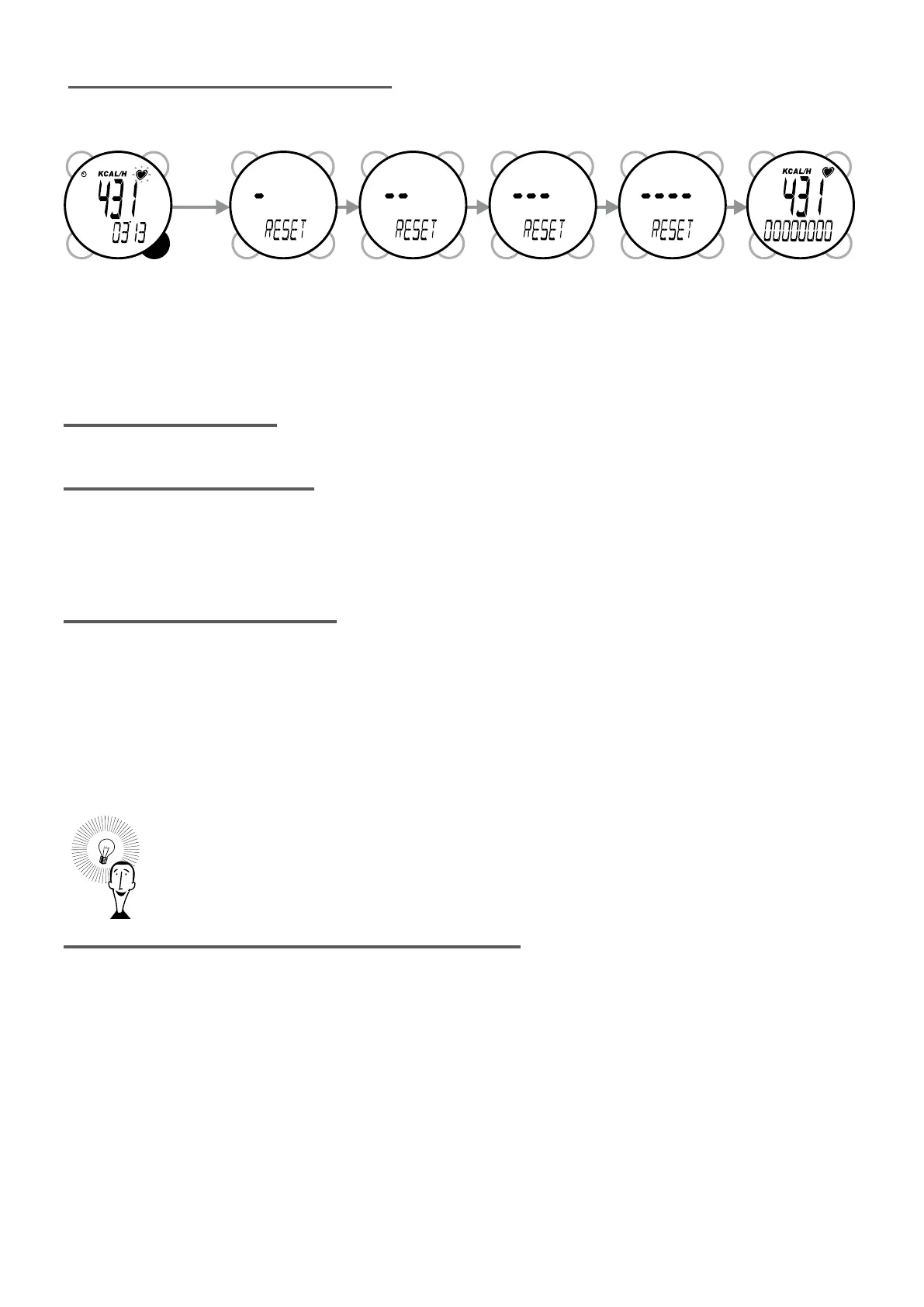
You can change secondary information in the second line by pressing VIEW. Press START/STOP to start
the stopwatch. Then press START/STOP again to stop it. Hold down VIEW for 3 seconds to reset it.


 To Next Page
 Loading...