17/22
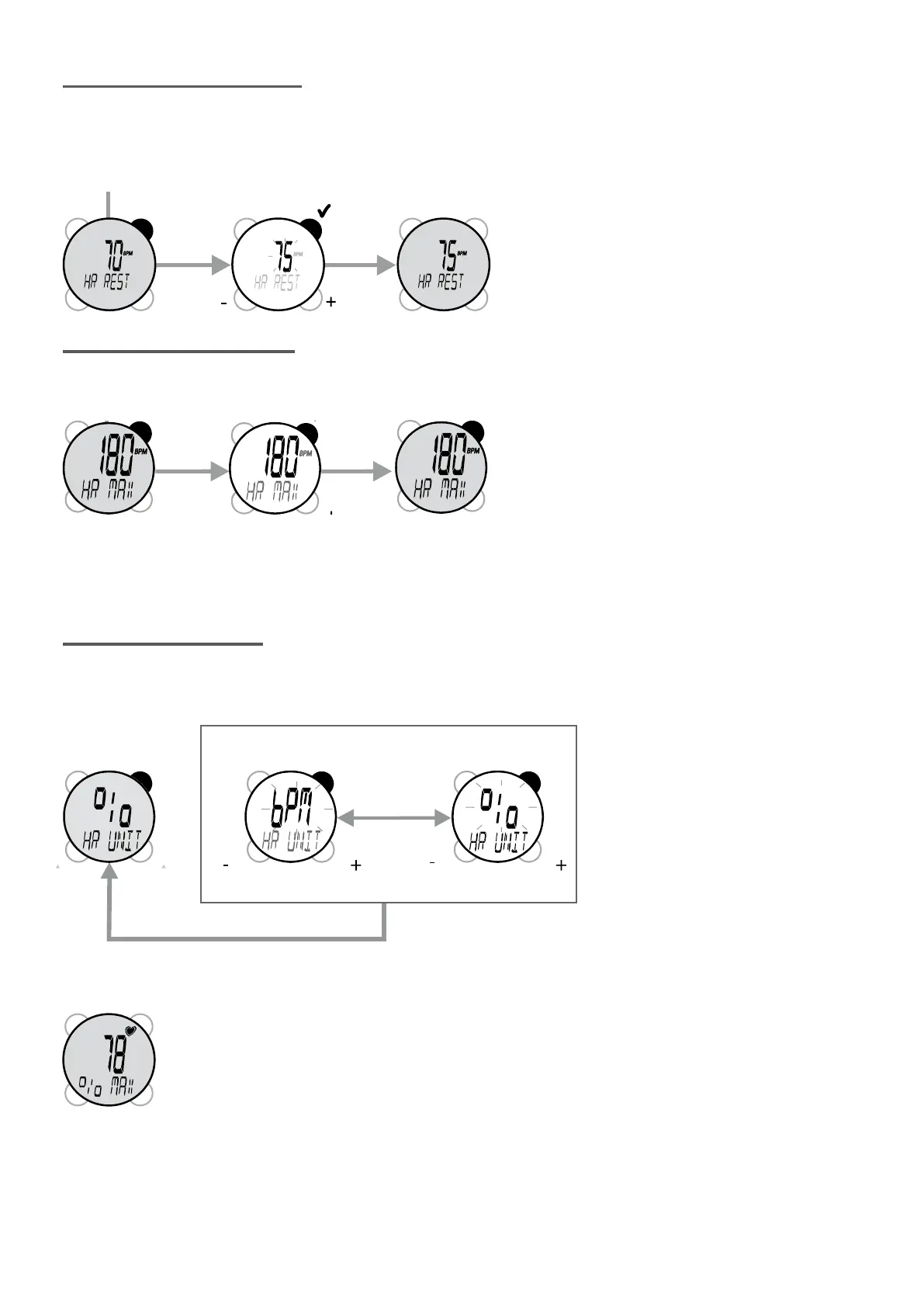
Setting your resting heart rate
Your resting heart rate is used to calculate the grams of fat burned during the workout. To determine it, after
waking up, stay lying down. Measure your heart rate after a few minutes; try to remain as calm as possible.
Repeat the procedure on several consecutive days and take the average of these values.
It is entered in the same way as the other
settings (STR/STP)to select it, VIEW and
MODE to adjust value, STR/STP to validate).
Entering maximum heart rate
The maximum heart rate is the highest heart rate that you can reach when exercising. By default it is 220-
AGE
Enter it in the same way as for other settings
(STR/STP to select it, VIEW and MODE to
adjust its value, STR/STP to conrm its value).
Setting heart rate display
This setting enables you to display your hear rate and target zone gures, either in beats per minute, or
percentages of maximum heart rate. You can use the unit that is most convenient to you.
When entering cardio mode, the display of heart rate as a percentage of maximum rate is shown by the
following temporary screen:


 To Next Page