16/22
VIEW
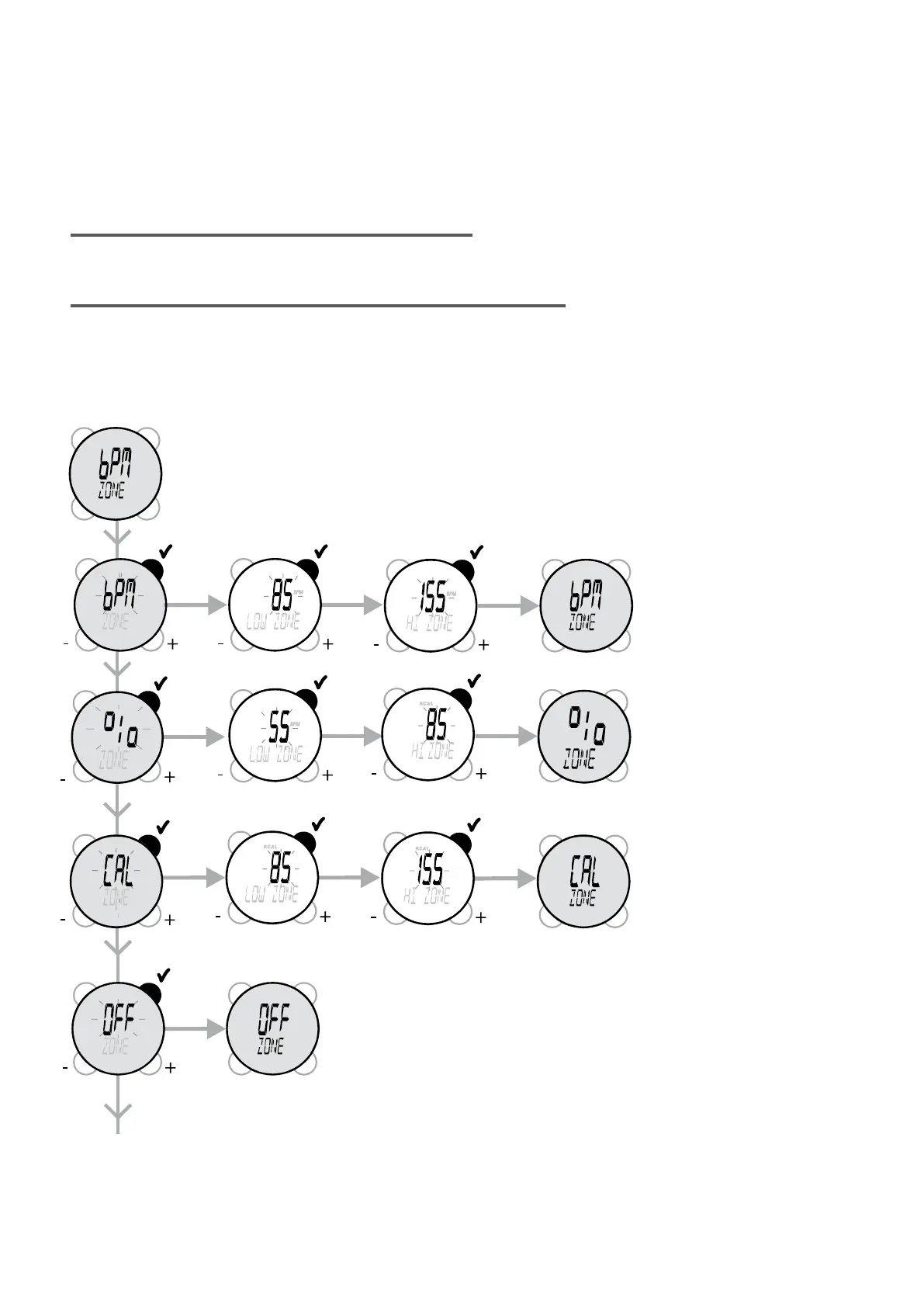
Either the target zone is deactivated (ZONE: OFF), or it is activated and is displayed in beats per minute
(BPM)or maximum heart rate (%) or calorie expenditure (CAL).
Modifying the lower and upper values in one of the three display modes will automatically convert the values
in the other two modes.
If you wish to change the target zone mode used, select it with STR/STP, then change it by pressing VIEW.
The watch will show the selected mode and the zone values alternatively.
The heart rate target zone is used in cardio mode only.To enter the values in the target zone in percentages
of maximum heart rate, select %, to enter the values in the target zone in beats per minute, select BPM.
Select the unit (Bpm or % max HR) that you are most familiar with to enter your values.
The calories per hour target zone is used in the Calories mode only.
To enter the Calories per hour target zone values, select CAL. Then conrm with STR/STP. The target zone
will then be (ON).
You can then select the (LOW ZONE) (scroll through the values using VIEW (+) and MODE (-) then validate
with START/STOP) and then the (HI ZONE).


 To Next Page