8/22
• Before using the cardio mode, we also advise you to check that you have entered the correct gures (your
height, weight, target zone) in the SETTINGS mode (see chapter relating to this). If not, the values given
by the watch may be incorrect.
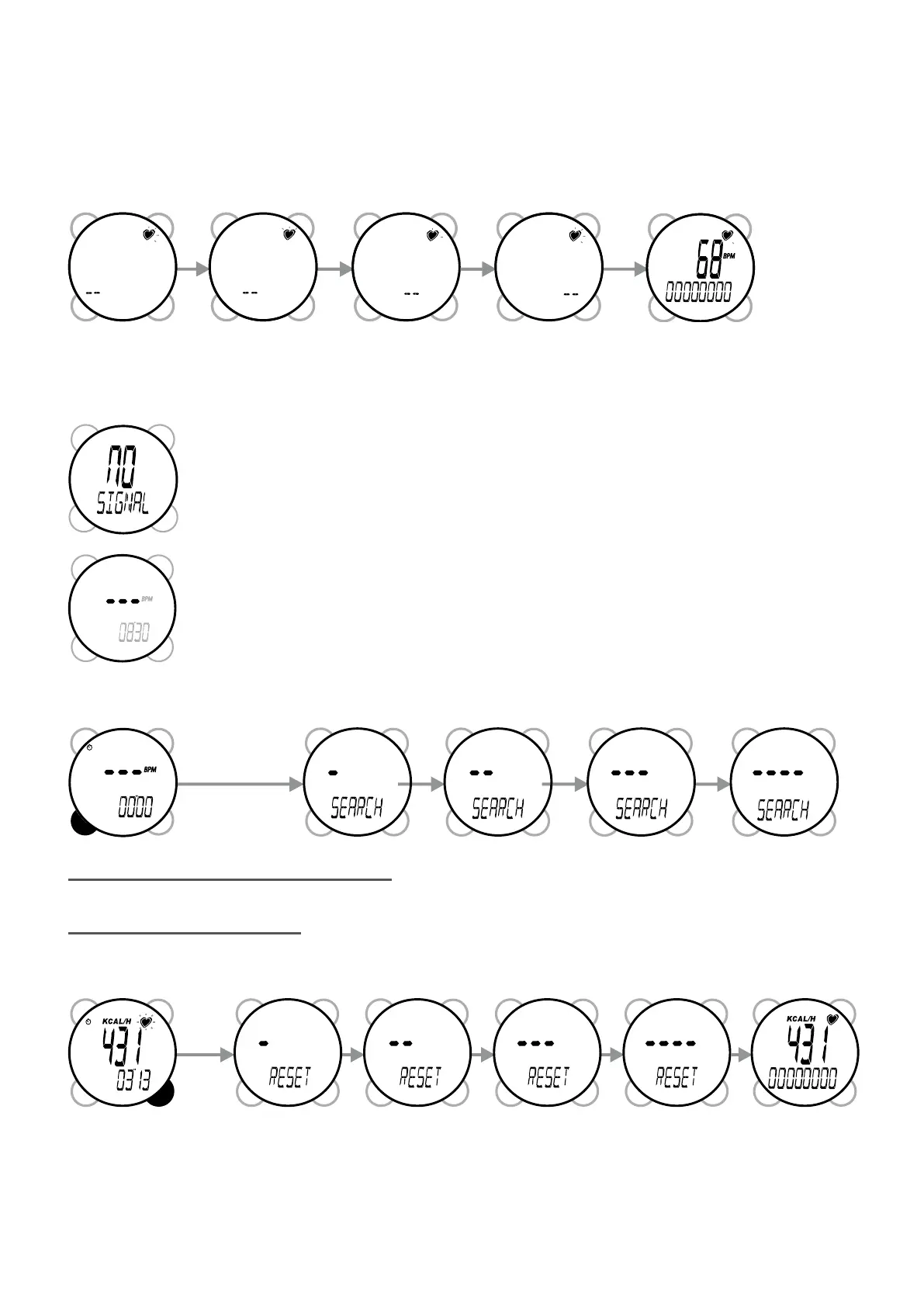
When entering CARDIO mode, the watch will search for a signal.
It will automatically receive the signal if it is within range of the strap. If this is the case, the symbol (heart) on
top left of screen will ash and the heart rate will be displayed on the main line.
"If the signal is not found, the watch will display "NO SIGNAL".
If the link is broken for more than ve minutes, the display changes to ---.
5.2/ Secondary information display
You can change the secondary information on the second line by pressing VIEW.
5.2.1/ Training stopwatch
This is the standard display when entering cardio mode. Press START/STOP to start the stopwatch. Then
press START/STOP again to stop it. Hold down VIEW for three seconds to reset it.
NB: 1. The stopwatch can only be started or stopped when it is displayed on the screen.
To reactivate the search for a signal, press the "MODE" button for three seconds


 To Next Page