EasyManua.ls Logo

Getronic GT915 - Set Functions Table and Legend; Function 1: Handsets Self-Coding

Getronic GT915
16 pages
Print Icon
To Next Page IconTo Next Page
To Previous Page IconTo Previous Page
Loading...
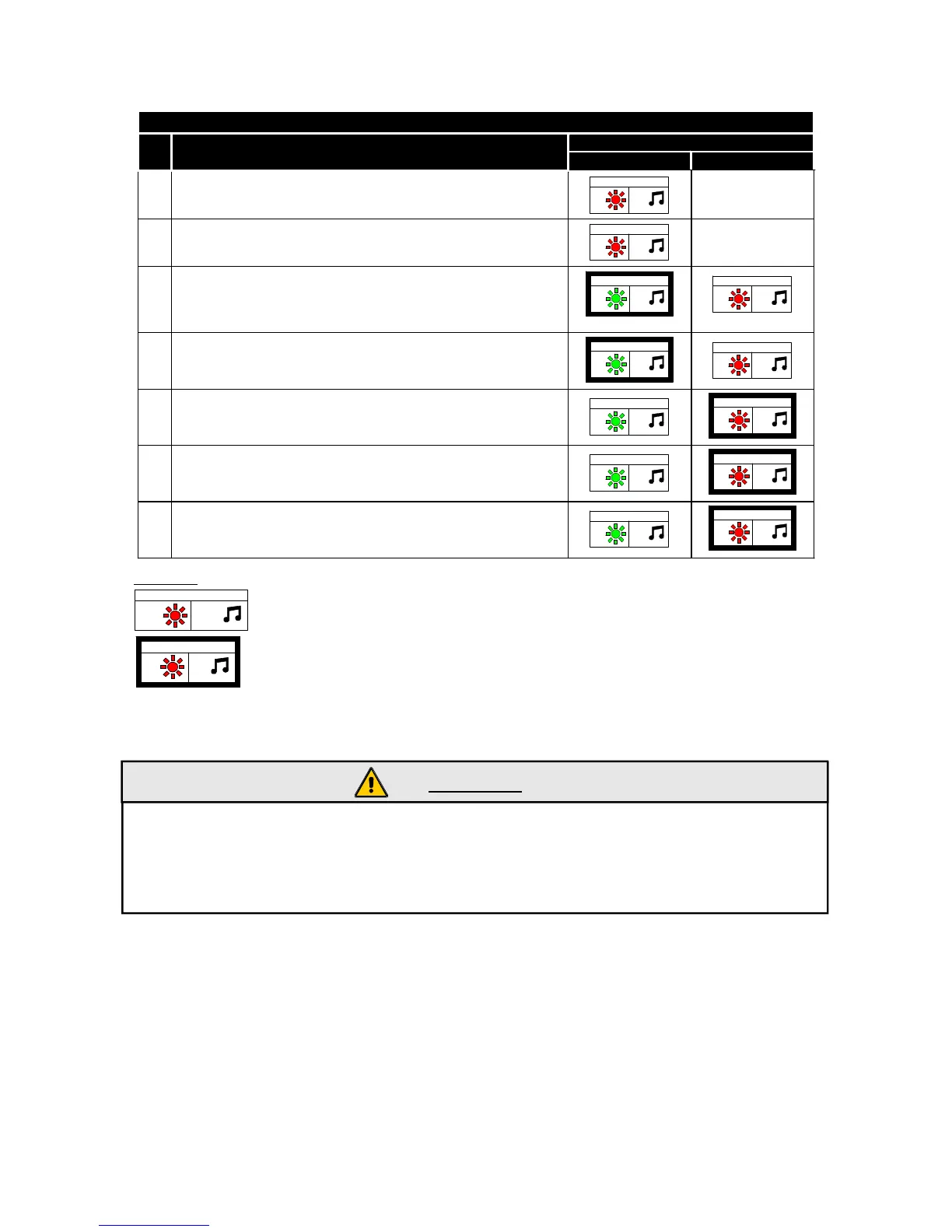
SET FUNCTIONS TABLE
FUNCTION STATE
No.
DESCRIPTION
ENABLED DISABLED
1
HANDSETS SELF-CODING
RED
1
1
-
2
RAPID TEST
RED
2
2
-
3
COMFORT CLOSINGS
GREEN
3
3
1” unlock - 1” lock
RED
3
3
1” unlock - 40” lock
4
ACOUSTIC SIGNAL WHEN ARMING/DISARMING
GREEN
4
4
RED
4
4
5
BLINKER COMMAND
GREEN
5
5
RED
5
5
6
DOORS PIN SWITCH POLLING MANAGEMENT
GREEN
6
6
RED
6
6
7
POSITIVE DOORS PIN SWITCH MANAGEMENT
GREEN
7
7
RED
7
7
FUNCTION STATE
FUNCTION STATE
N1
N
N2
N
N = N = Function No.
N = LED flashes No.
N = Beep
12
1
2
No.
SET UP
PREDEFINED
LEGEND:
- Function No. 1: HANDSETS SELF-CODING .
WARNING:
- When you have entered the function of the first handset which is self-coded it deletes
all the other handsets memorised.
- If you want to add one or additional handsets you have to self-code all of them.
- If you try to self-code an handset twice consecutively or the maximum handsets
number has been reached the system emits 3 beeps to indicate there is a problem.
With the function No.1 it is possible to self-code new handsets to the control unit up to a
max of 8.
1 - Select the function and press the “ON/OFF” handset button to be self-coded.
2 - The system will indicate the correct handset self-coding with a flash of the GREEN
LED and a beep.
9

Related product manuals