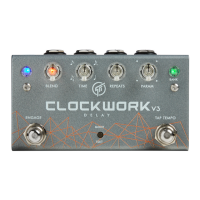
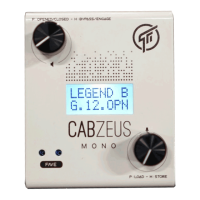
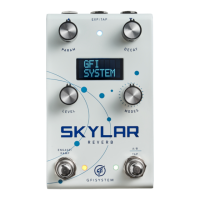
The GFI System DUOPHONY is an advanced parallel blender pedal designed to integrate seamlessly into an effects chain, allowing users to blend signals from two or more sources. It extends the basic concept of parallel signal blending to its full potential, offering extensive control over signal paths and processing.
Function Description:
The Duophony operates as a "Parallel Blender" pedal, mixing signals from various sources, primarily effects. This allows for combining different types of effects, enhancing or altering their sound, and creating new sonic textures. Unlike traditional series chaining of effects, the Duophony enables parallel processing, offering greater flexibility in sound design. For example, it can blend delay and reverb effects, or combine fuzz, overdrive, and distortion in a "dirt section cocktail." It also supports blending a clean (unprocessed) signal with processed sounds to retain low-end frequencies that might otherwise be lost.
The pedal features two independent effects loops, Loop X and Loop Y, each with its own send and return jacks. All analog signal paths are stereo, unless otherwise noted. A "BLEND ENGINE" mixes the signals from Loop X, Loop Y, and the dry signal, outputting to stereo Out-L and Out-R jacks. A Digital Controller manages MIDI and Expression/Aux inputs, influencing the blend engine and other parameters.
Important Technical Specifications:
- Input Impedance: 1 MOhm (Inputs, Returns)
- Output Impedance: 500 Ohm (Outputs, Sends)
- Current Draw: 165 mA
- Dimension: 9.7 x 12 cm (3.8 x 4.7 inch)
- Power Source: 9VDC (negative center)
- Signal Paths: True stereo on all (inputs, outputs, and effect loops)
- Presets: 16 preset locations, organized into 8 banks (2 patches per bank)
- MIDI: Standard MIDI controller compatible (Program Change, Control Change, MIDI Clock) via 1/8" TRS to DIN5 mapping. MIDI channel is configurable (1-16).
- Expression Pedal: Wiper-to-Tip polarity, 10 KOhm resistance, TRS cable.
- Aux Switches: Supports single, dual, or triple-button switch boxes (Normally-Opened, Momentary).
Usage Features:
Controls:
The Duophony features two rotary touch sliders for mix control. Sliding clockwise increases the proportion of Loop Y in the mix, while counter-clockwise increases Loop X. The mix proportion is indicated by CYAN (Loop Y) and GREEN (Loop X) LED colors.
- Independent Left and Right Mixes: The two sliders can independently set the mix for Left and Right channels. By default, sliders are "synced." To operate them independently, press and hold the touch button while operating a slider.
- Dry Level Control: The pedal can blend a clean (dry) signal into the mix. The upper slider controls the dry level for the Left channel, and the lower slider for the Right channel. Dry level is indicated by BLUE LED color. Tapping the touch button toggles between MIX control and DRY LEVEL control.
- Speed & Depth Control: The Duophony includes a modulation engine. The touch sliders control modulation speed (upper slider) and depth (lower slider), indicated by a single BLUE LED.
- Gain Controls: Independent gain controls for Loop X and Loop Y are positioned after the loop return, allowing for cutting and boosting gain from mute to +6 dB. Pushing a gain knob/button mutes/unmutes the corresponding effects loop.
Modes and Routing:
The Duophony offers three parallel blend modes and two routing options:
- Blend Modes:
- XY Mix: Loop X and Loop Y are mixed proportionally (e.g., if Y is 30%, X is 70%). Marked by VIOLET LED.
- Y plus [X]: Mix control functions as a level control for Loop Y (0-100%), while X is always 100%. Marked by BLUE LED.
- X plus [Y]: Mix control functions as a level control for Loop X (0-100%), while Y is always 100%. Marked by RED LED.
- Routing Options:
- Parallel: Loop X and Loop Y are combined in parallel.
- Series: Loop X and Loop Y are combined in series (Loop Y << Loop X). In this mode, the Mix control is disabled.
These options are configured per preset in the Options menu.
Each knob also functions as a button, supporting TURN, PUSH or TAP, HOLD, and TWIST (press and turn) operations.
- Y Knob: Adjusts Loop Y gain (Turn), toggles Loop Y on/off (Push), enters Globals menu (Hold), sets Expression mapping (Twist).
- X Knob: Adjusts Loop X gain (Turn), toggles Loop X on/off (Push), enters Options menu (Hold), sets Modulation on/off (Twist).
- Touch Button: Scrolls through slider functions (Push/Tap), unsynchronizes sliders (Hold).
Navigating Presets:
- Calling a Preset: Press footswitch A or B to recall the corresponding patch in the current bank.
- Bypassing the Pedal: Press the footswitch corresponding to the currently active preset.
- Changing Banks: Press both footswitches simultaneously to increment the bank number, or turn the X or Y knob to scroll through banks.
- Saving Presets: Press and hold both Y and X buttons, then turn a knob to select the bank, and press footswitch A or B to save.
Accessed by holding the X knob for 2 seconds. Settings are per preset.
- Phase X: Normal (unaltered) or Inverted (shifted by 180°) for Loop X, useful for phase cancellation issues.
- Trails: Enabled/disabled. Allows delay/reverb tails to fade out when bypassed.
- Hz/Bpm: Modulation speed display mode.
- Subdiv: Modulation tempo subdivisions (Whole, Half, Quarter, Dotted 8th, Eighth, Triplet, 16th).
- Tempo: Global (follows global tempo) or Preset (uses saved value).
- PC State: Engage (loads in engaged state via MIDI PC) or Bypass (loads in bypassed state via MIDI PC).
Accessed by holding the Y knob for 2 seconds.
- Input: Mono or Stereo signal input.
- Banks: Restrict the number of accessible preset banks (2 to 8).
- Midi Ch.: Set MIDI channel (1 to 16).
- Switch B: Configure footswitch B as Preset switch or Tap-tempo switch. (Tap-tempo halves available presets).
- PowerUp: Pedal powers up in bypassed or engaged state.
- Fave: Select a "favorite" patch (1A to 16B) for quick recall via an Aux switch.
- AuxTip, AuxRng, AuxT+R: Assign functions to external Aux switches (Bank Up/Down, Toggle X/Y Loop, Fave, Bypass, Toggle P/S Routing, Toggle LFO, Tap-Tempo).
Modulation (Modulated Blending):
Applies an LFO waveform to modulate the blending of X and Y effects, creating dynamic sound variations.
- Enabling/Disabling: Twist the X knob.
- Setup Menu: Appears when modulation is enabled.
- LFO Shape: Turn Y knob (8 shapes: Sine, Triangle, Exponential, Sawtooth, Reverse Sawtooth, Square, Pulse1, Pulse2).
- LFO Mode: Turn X knob (Normal or Panning).
- LFO Speed/Depth: Upper touch slider for speed, lower for depth.
- Tempo: Can be set via touch slider, tap-tempo (Footswitch B), or MIDI clock.
- Notes: When modulation is active, touch slider changes to Mix parameter are overridden by LFO control until modulation is disabled.
Expression Pedal:
Maps expression pedal control to Mix, Dry Level, LFO Speed, or LFO Depth. Only one parameter can be mapped at a time.
- Connection: Must be connected before powering up.
- Mapping: Twist the Y knob to select the parameter.
- Heel/Toe Values: Turn Y knob for Heel value, X knob for Toe value.
Aux Switches:
External switch boxes can remotely access various functions (bank up/down, favorite preset, toggle routing, etc.). Must be connected before powering up.
MIDI:
Supports Program Change (PC) for calling presets, Control Change (CC) for controlling functions/parameters, and MIDI Clock for LFO tempo sync.
- PC Messages: PC0 for Patch A (Bank 1), PC1 for Patch B (Bank 1), etc.
- CC Messages: Control Loop X/Y on/off, Modes, Routing, Phase X, Expression, Tap-Tempo, Subdivision, Bypass/Engage, Mix (Left/Right), Dry Level (Left/Right), LFO Speed/Depth, LFO on/off.
Example Applications:
- Mono or Stereo Use: Supports both mono (TS) and stereo (TRS) connections for inputs, sends, and returns. TRS-to-Dual Mono cables are needed for stereo pedals with separate L/R jacks.
- Amps FX Loop: Connect amp's SEND to Duophony's IN, and Duophony's OUT(S) to amp's RETURN.
- Looper Switcher: Integrate with a looper switcher (with MIDI output) to control reverb and delay pedals individually using Duophony's Loop-On/Loop-Off function, leveraging its parallel/series routing.
Maintenance Features:
Resetting the Pedal:
Two types of resets can be performed independently:
- Factory Reset: Reverts all presets to factory default settings, overwriting user presets. (Hold footswitch A while powering up, then press A to confirm).
- Global Settings Reset: Reverts global configurations to factory settings, without affecting saved presets. (Hold footswitch B while powering up, then press A to confirm).
Firmware Update:
- Connect the pedal to a computer via USB.
- Open the GFI Firmware Updater software (available for Mac and Windows).
- Click "Load Firmware File" and select the .fdt file.
- Click "Run Update" to start.
- Recommendation: Backup existing presets using the Firmware Updater software before updating.

 Need help?
 General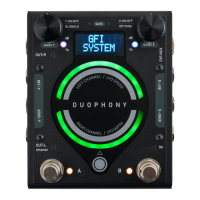

 To Next Page