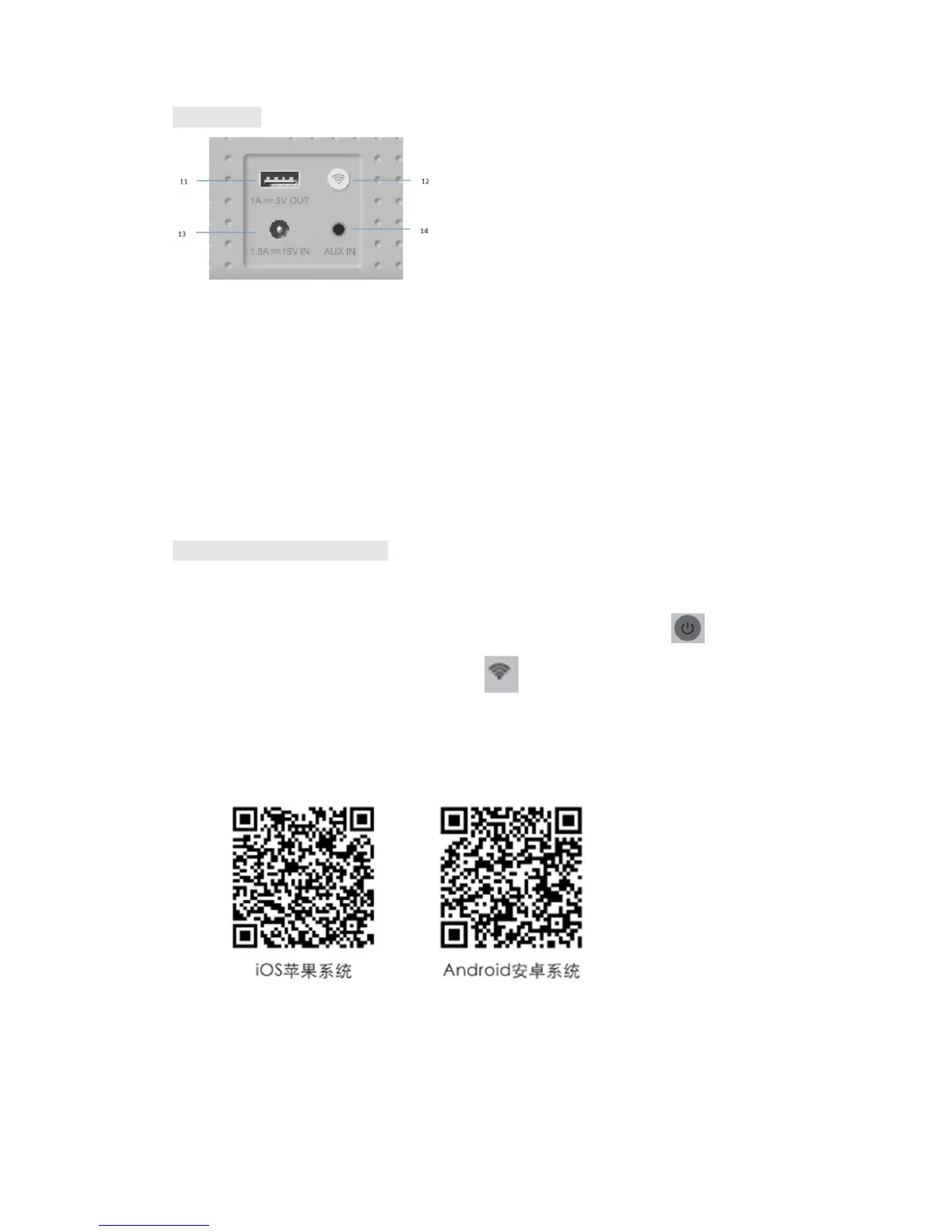
Back Panel
11. 5V/1A USB charge
12. Wi-Fi Connection button
Under Wi-Fi mode:
Short press it to restore to reset Wi-Fi
Long press it for 5 seconds to restore factory settings
Under Bluetooth mode, short press it to unpair the current Bluetooth device,
and reenter the Bluetooth search status
13. Power interface
14. AUX port(3.5mm audio input port)
Use Wi-Fi connection mode
Step one: Take out E5 device and its accessories, connect it to the power
adapter to automatically power on, or long press Power button for three
seconds to power on, select Wi-Fi mode , and blue LED indicator blinks.
Step two: Download and install the APP “GGMM-E series” from the Apple App
store, or from Google Play Store, smart devices can also scan the QR codes to
install the App.
Step three: Turn on Wi-Fi in the Settings of your smart device, select your
Wi-Fi network and input the password. Open the APP of “GGMM-E series”, set
the networking according to prompts on the APP interface, Wi-Fi is
successfully connected when blue LED of E5 is always on.


 To Next Page