2
Display and buttons
Note:
After connecting the power, Press "
" and " " simultaneously for 3s to turn on or turn
off panel child lock function.
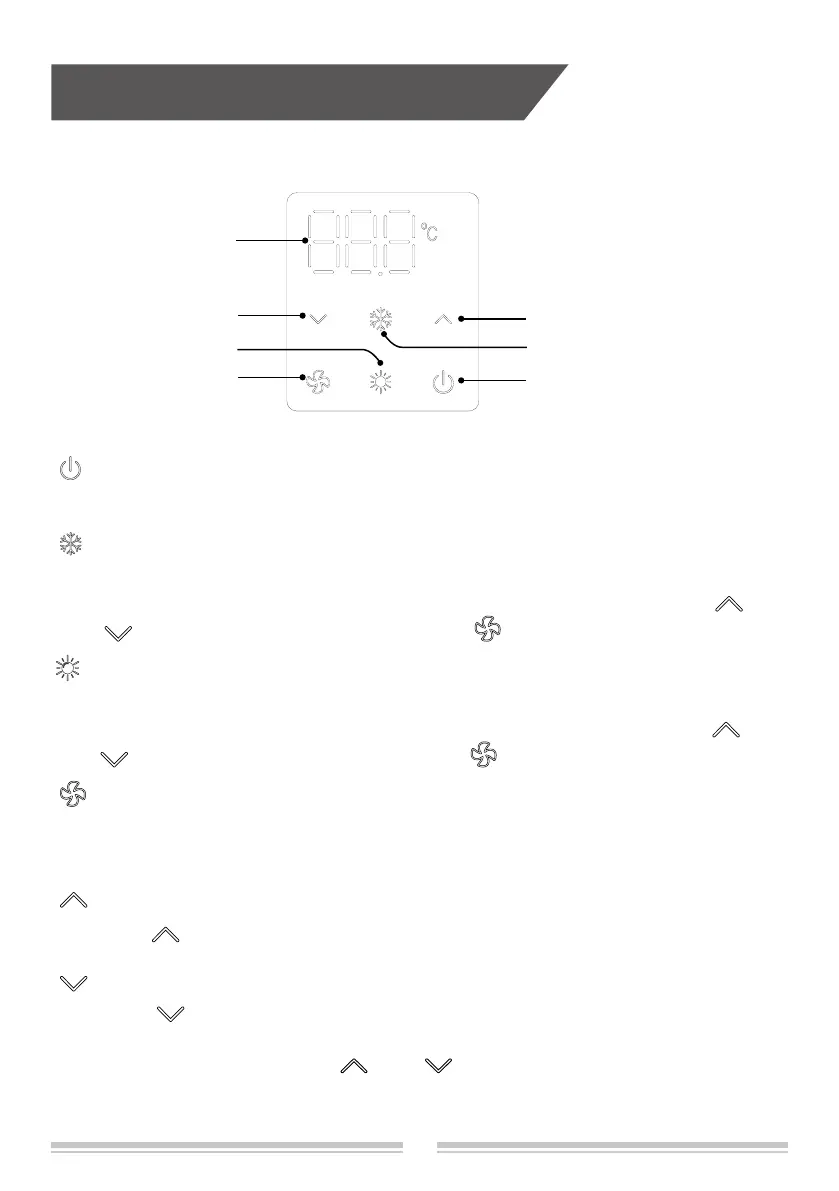
ON/OFF button
Press this button can turn on or turn off the air conditioner.
Cooling button
Press this button , air conditioner will operate automatically according to ex-factory
setting(Cooling mode, setting temperature is 26
℃
, fan speed is Auto). Press "
" or
" " button to adjust set temperature. Press " " button to adjust fan speed.
Fan button
Pressing this button can adjust fan speed(Auto, Low, Mid, High, Turbo), display show
the matched sign: AU, 1, 2, 3, 4.
Increase button
Press " " button once increase setting temperature 1
℃
.
Decrease button
Press " " button once decrease setting temperature 1
℃
.
ON/OFF button
Cooling button
Fan button
Increase button
Decrease button
Display
Heating button
Cooling button
Press this button , air conditioner will operate automatically according to ex-factory
setting(Heating mode, setting temperature is 22
℃
, fan speed is Auto). Press "
" or
" " button to adjust set temperature. Press " " button to adjust fan speed.


 To Next Page