
 Need help?
Do you have a question about the Gigabyte B360M GAMING HD and is the answer not in the manual?
Safety guidelines and procedures to prevent hardware damage during installation.
Step-by-step guide for installing the Central Processing Unit (CPU) onto the motherboard.
Instructions on how to properly install RAM modules, including dual-channel configuration.
Guidelines for installing add-in cards into PCI Express slots.
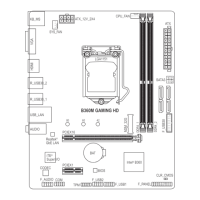
Details on internal headers and connectors on the motherboard for system components.
Settings for CPU, memory, and voltage adjustments for performance tuning.
 General
| Non-ECC | Yes |
|---|---|
| Memory channels | Dual-channel |
| Memory slots type | DIMM |
| Number of memory slots | 2 |
| Supported memory types | DDR4-SDRAM |
| Maximum internal memory | 32 GB |
| Supported memory clock speeds | 2133, 2400, 2666 MHz |
| Supported memory module capacities | 16GB |
| Component for | PC |
| Power source type | ATX |
| Motherboard chipset | Intel® B360 |
| Audio output channels | 7.1 channels |
| Motherboard form factor | micro ATX |
| Motherboard chipset family | Intel |
| Windows operating systems supported | Windows 10 |
| Processor socket | LGA 1151 (Socket H4) |
| Compatible processor series | Intel Celeron, Intel Core i3, Intel Core i5, Intel Core i7, Intel Pentium |
| Ethernet interface type | Gigabit Ethernet |
| BIOS type | UEFI AMI |
| ACPI version | 5.0 |
| BIOS memory size | 16 Mbit |
| Supported storage drive types | HDD & SSD |
| PCI Express x1 slots | 1 |
| Number of SATA III connectors | 4 |
| Number of Parallel ATA connectors | 0 |
| USB 2.0 ports quantity | USB 2.0 ports have a data transmission speed of 480 Mbps, and are backwards compatible with USB 1.1 ports. You can connect all kinds of peripheral devices to them. |
 Weight and Dimensions
| Depth | 185 mm |
|---|---|
| Width | 226 mm |


 To Next Page