- 19 -
2-7 Onboard Button and LEDs
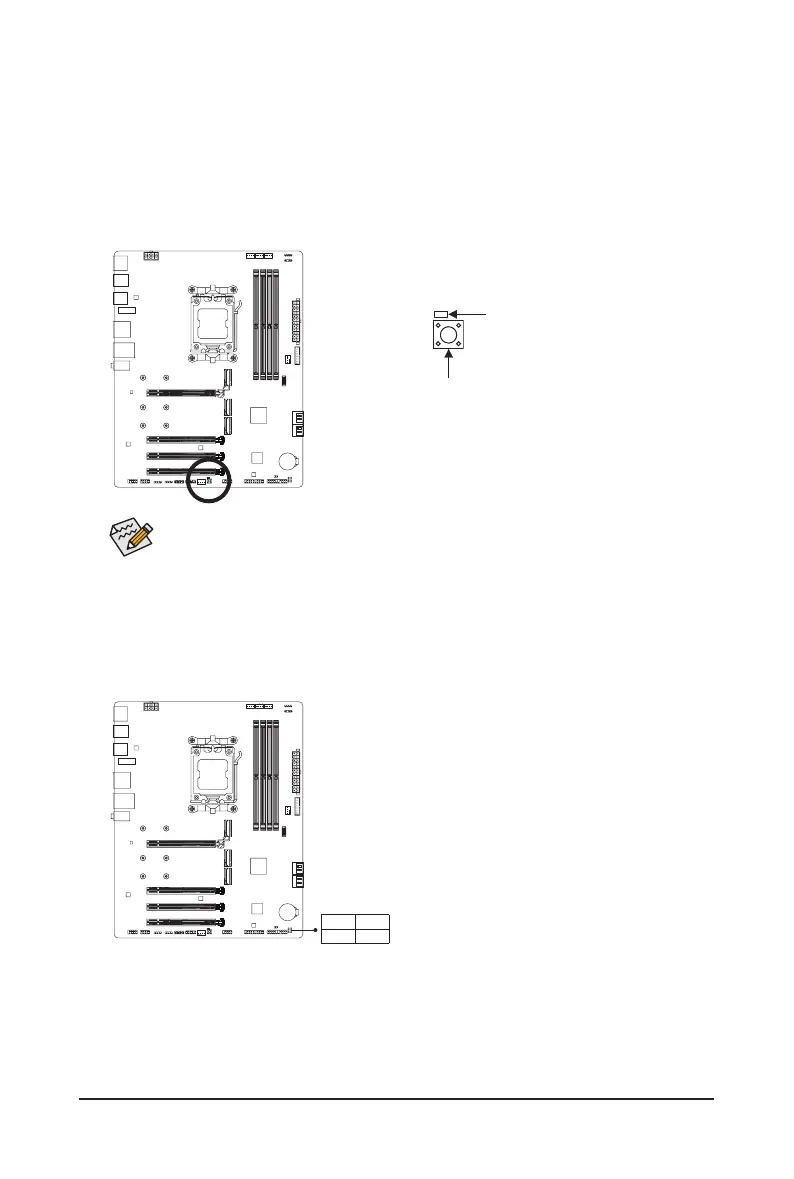
QFLASH_PLUS (Q-Flash Plus Button)
Q-Flash Plus allows you to update the BIOS when your system is off (S5 shutdown state). Save the latest BIOS
on a USB thumb drive and plug it into the dedicated port, and then you can now ash the BIOS automatically by
simply pressing the Q-Flash Plus button. The QFLED will ash when the BIOS matching and ashing activities
start and will stop ashing when the main BIOS ashing is complete.
To enable the Q-Flash Plus function, please navigate to the "Unique Features" page of GIGABYTE's
website for more information.
QFLASH_PLUS
QFLED
Status LEDs jk
The status LEDs show whether the CPU, memory, graphics card, and operating system are working properly
after system power-on. If the CPU/DRAM/VGA LED is on, that means the corresponding device is not working
normally; if the BOOT LED is on, that means you haven't entered the operating system yet.
CPU: CPU status LED
DRAM: Memory status LED
VGA: Graphics card status LED
BOOT: Operating system status LED
CPU DRAM
VGA BOOT
j Only for B650 EAGLE AX.
k Only for B650 EAGLE.




 To Next Page