4
Setting up the telephone for use
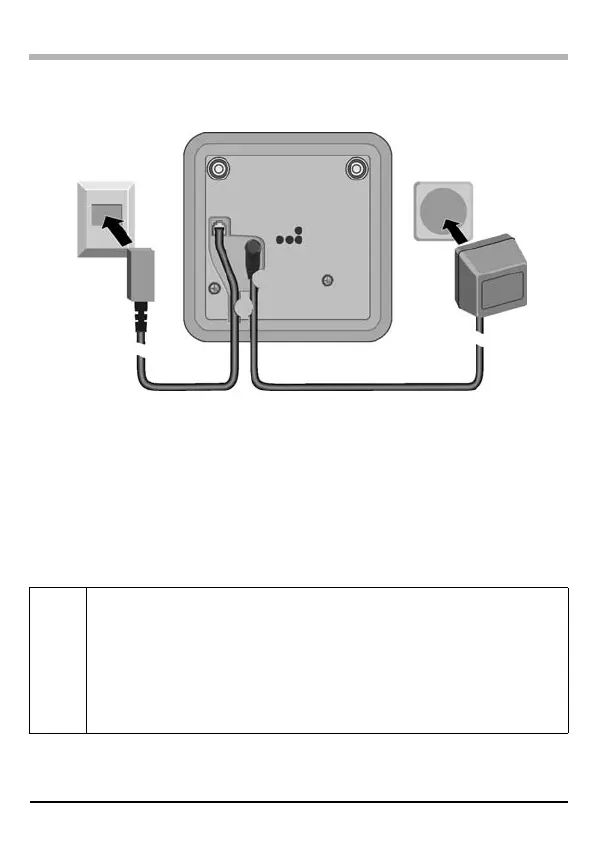
Connecting the base station
◆ Insert the round jack on the mains cable into the socket on the
underside of the base.
◆ Position cable in the cable recess (for strain relief).
◆ Plug the power supply unit into your power outlet.
◆ Insert the square jack on the telephone cable supplied into the socket
on the underside of the base.
◆ Position cable in the cable recess.
◆ Plug the telephone jack into the phone socket.
i
◆ Only use the power supply unit supplied as indicated on the
underside of the device.
◆ If you buy another cable, ensure that it has the correct
assignment.
Germany: 3-4 assignment of telephone lead/EURO CTR37.
◆ Keep the power supply unit plugged in at all times to ensure
your phone is ready for use whenever you need it.
Power supply unit
with mains cable
(220/230 V)
Phone jack with
phone cord
Ontario.fm Seite 4 Freitag, 28. November 2003 2:35 14


 To Next Page