Lombok A130/AL130A/A230/AL230A / Großbritannien / A31008-M2412-L101-1-7619 / Lombok.fm / 12.02.2013
Version 4, 16.09.2005
2
ECO DECT
During a call, the level of the handset's radio signal adjusts automatically according to
the distance between the handset and base station: the shorter the distance, the lower
the signal strength (radiation).
The handset’s radio signal is switch
ed off when it is in standby mode. The base station,
however, maintains contact with the handset with fewer radio signals.
In addition, the base station radio signa
ls are switched off when the No Radiation
setting is enabled.
MENU
¤ u Settings ¤ OK ¤ u Base ¤ OK ¤ u ECO DECT ¤ OK ¤ No Radiation
¤ OK (‰= radiation switched off, icon ½ in the left-hand corner of the display)
Please note
◆ All registered handsets must support this feature.
◆ For quick connection of incoming calls the handset repeatedly switches to recep-
tion mode for short periods. This incre
ases energy consumption and therefore
reduces the standby and talk times.
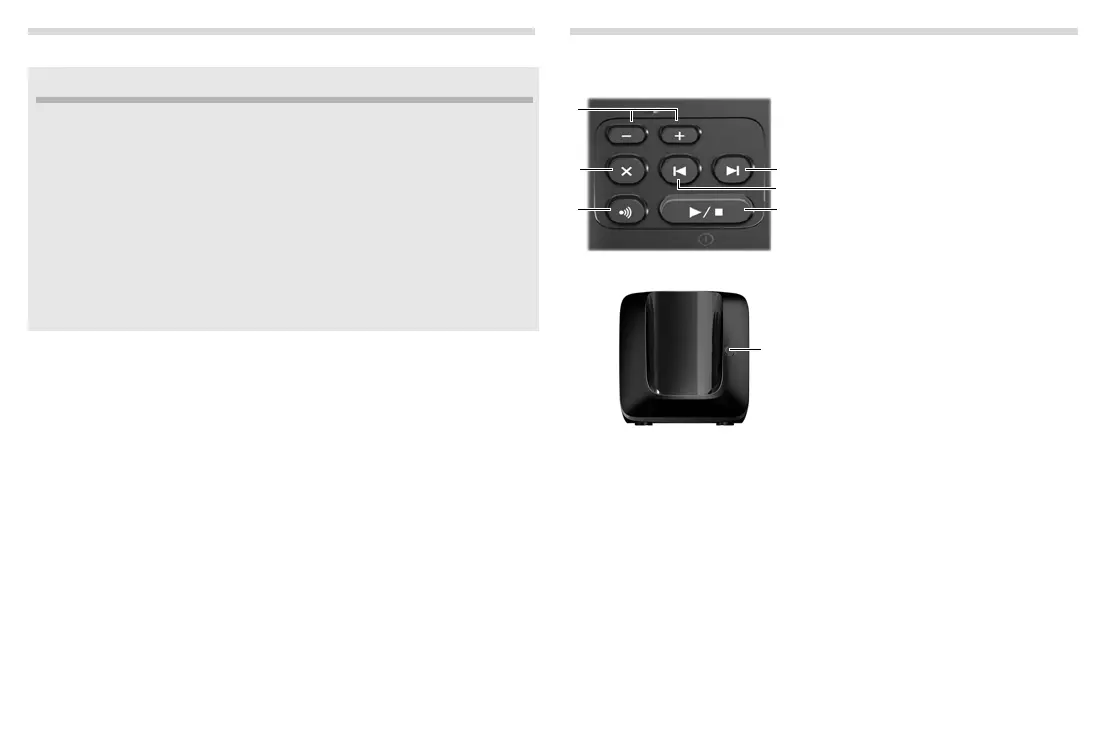
The base station at a glance
Base A130/A230
Base AL130A/AL230A
1 Registration/paging key:
Search for handsets (press briefly, "Pag-
ing"
¢ page 10).
Register handsets (press and hold
¢ page 10).
2 Volume keys: (– = quieter; + = louder)
During message playback: adjust the
speaking volume.
While phone is ringing: adjust ringer
melody volume.
3 Play/Stop key:
Switch answer machine on and off (press
and hold);
play back new messages from answer
machine (press briefly);
during message playback: cancel play-
back (press briefly).
Lights up: Answer machine is activated.
Flashes: You have at least one new mes-
sage or a message is played back or be-
ing recorded.
Flashes very quickly: Full memory.
During message playback:
4 Skip to the start of the current message
(press once) or go to the previous
message (press twice).
5 Go to the next message.
6 Delete current message.



 To Next Page