4
Gigaset A475/A475A (A415x) / BE-NL / A31008-M2501-M201-1-3F19 / Penguin.fm / 31.07.2017
Template Bali, Version 1, 16.02.2012
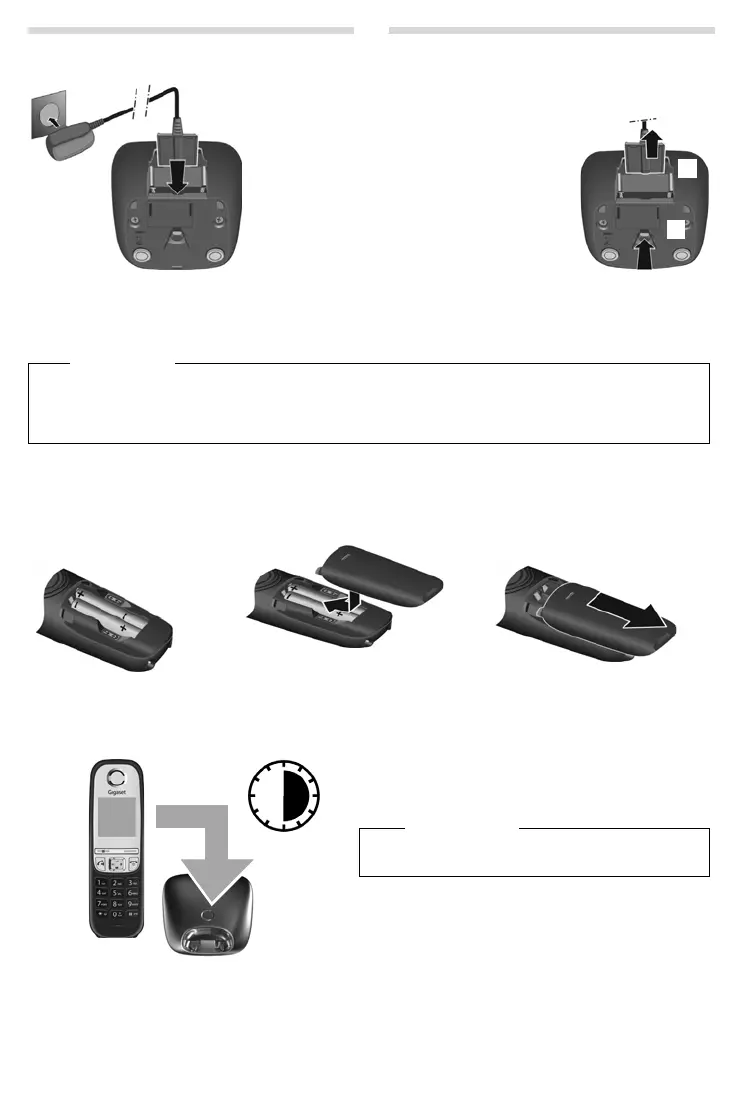
Connecting the charging cradle (if included)
Setting up the handset for use
The display is protected by a plastic film. Please remove the protective film!
Inserting the batteries and closing the battery cover
Initial charging and discha
rging of the batteries
The correct charge status can only be displayed if the batteries are first fully charged and discharged.
Warning
Use only the rechargeable ba
tteries recommended by Gigaset Communications GmbH (¢ page 17), i.e., never use
conventional (non-rechargeable) batteries as this could resul
t in significant health risks and personal injury. For
example, the batteries could explode. The phone could also malfunction or be damaged as a result of using batter-
ies that are not of the recommended type.
¤ Connect the flat plug from the power
supply
1.
¤ Plug the mains adapter into the plug
socket
2.
If you need to disconnect the plug from the
charging cradle, press the release button
3
and disconnect the plug
4.
1
2
3
4
¤ Insert the batteries
with the polarity in the
correct direction.
The polarity is indicated in
the battery compartment.
¤ Insert the battery cover from
the top.
¤ Then slide the cover upwards
until it clicks into place.
To open the battery cover, for instance to
replace the batteries:
¤ Reach into the notch at the top of the
cover and slide the cover down-
wards.
6 h
¤ Charge the handset in the base station/charging cradle
for 6 hours.
¤ After charging, remove the handset from the base sta-
tion/charging cradle and only replace it when the batter-
ies are fully discharged.
Please note
The handset must only be placed in the designated
Gigaset base station or charging cradle.



 To Next Page