Gigaset E390-E390A / LUG_Kombi CH en / A31008-M2908-F101-1-2X19 / overview_2_A_Kombi.fm / 4/30/20
Template Module, Version 2, 20.02.2020
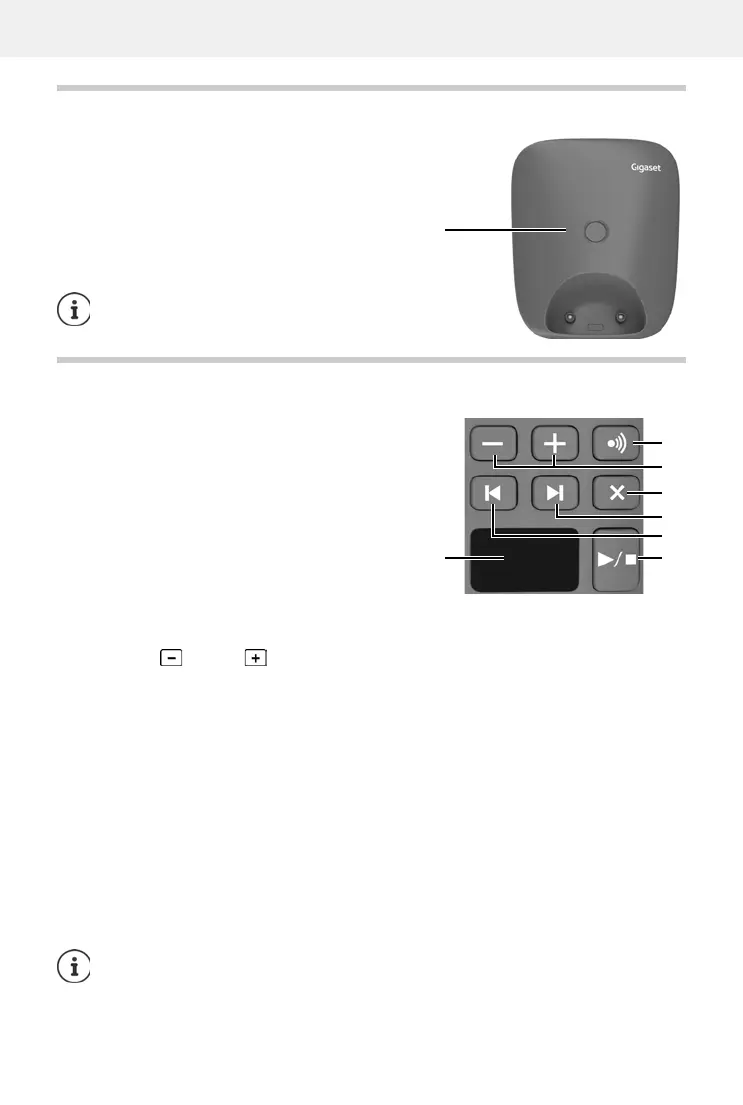
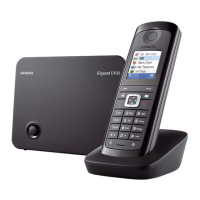
Base without answering machine
5
Base without answering machine
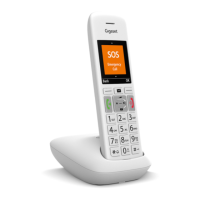
Base with answering machine
A Registration/paging key
Locate a handset (paging):
¥ Press briefly
Register handsets and other DECT
de
vices (e.g. repeater):
¥ Press and hold
The colour and shape of your device may be
different from the illustration.
A Display
Lights up: The answering machine is
s
witched on. The number of saved
messages is displayed.
00 flashing: The answering machine is
r
ecording a message.
Flashing slowly: There are new messages. The
num
ber of new messages is
displayed.
99 flashing quickly: The answering machine is full.
B Registration/paging key
Locate a handset (paging):
¥ Press briefly
Register handsets and other DECT devices (e.g. repeater):
¥ Press and hold
C Volume keys ( = quieter; = louder)
During playback: Adjusting the loudspeaker volume
During an external call: adjust the ringtone volume
D Delete key
During playback: Delete the current message
E Forward key
During message playback: Skip to the next message
F Back key
During playback (< 5 secs): Go to the start of the message
¥ Press briefly
During playback (> 5 secs): Go back 5 secs
¥ Press briefly
During playback: Go to the
start of the message ¥ Press and hold
During the time stamp announcement: Skip to previous message
¥ Press briefly
G On/Off and Playback/Stop key
Switching the answering machine on/off:
¥ Press and hold
Play new messages:
No new messages: play old messages or cancel play
¥ Press briefly
If the answering machine is being operated from a handset or if it is recording a message
(0
0 flashing), it cannot be operated from the base at the same time.



 To Next Page