PRODUCT OVERVIEW
EN
5
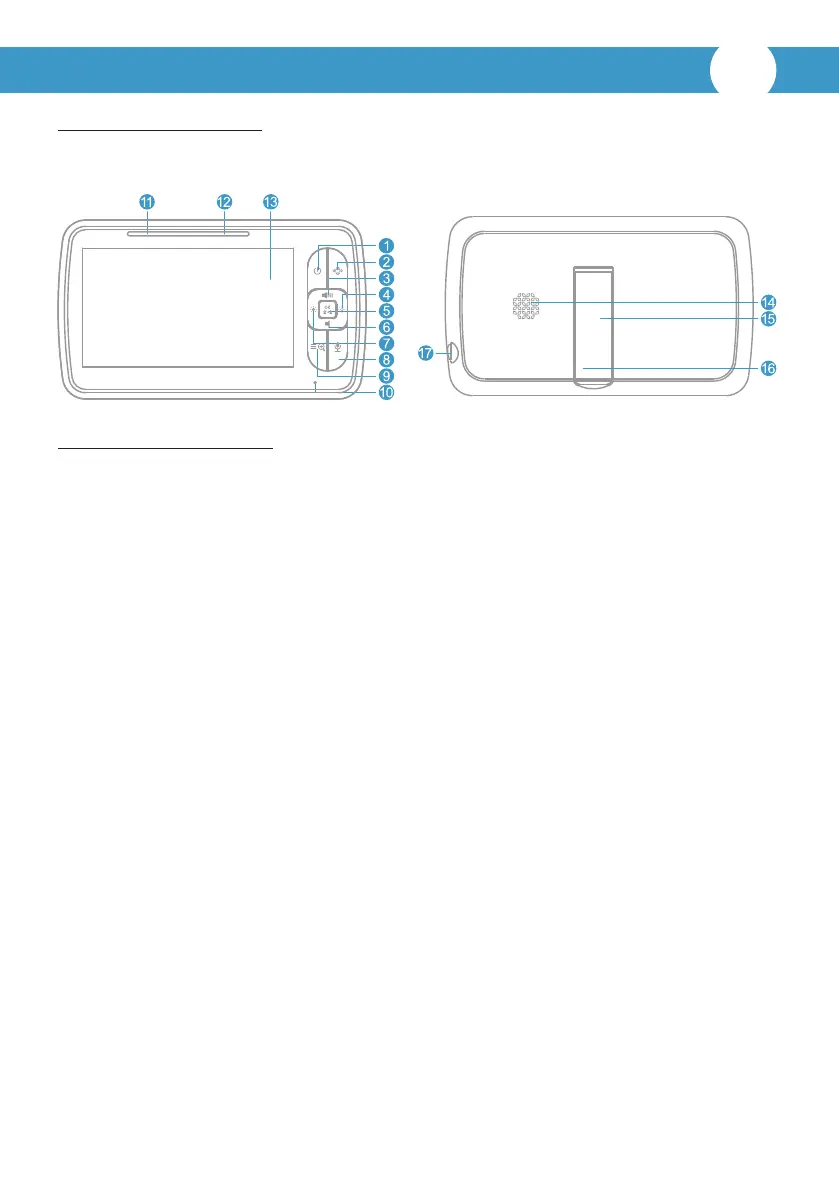
A. Parent unit overview:
1. Power key:
Long press to turn on/off the monitor; short press to screen on/off.
2. Pan/Tilt:
Press the key to enter into the Pan/Tilt mode.
3. Volume+/Up key:
Press Volume+ to increase the volume/to up the camera in the Pan/Tilt mode.
4. Brightness+/Right key:
Press the Brightness+ to increase the brightness/to right the camera in the Pan/Tilt
mode.
5. OK : Press the OK key to view/scan camera or to confirm.
6. Volume-/Down key:
Press Volume- to decrease the volume/to down the camera in the Pan/Tilt mode.
7. Brightness-/Le key:
Press the Brightness- to decrease the brightness/to le the camera in the Pan/Tilt
mode.
8. Talk to baby:
To talk, press and hold the talk key on the front of the monitor; release to turn it off.
Bear in mind that you can't listen to your baby while you're talking to them; to listen
to it, you will have to stop press this buon.
9. Menu/Exit:
Short press the Menu/Exit key the menu will pop up, and press again to Exit.
Press and hold the Menu/Exit key around 2 seconds to operate Zoom in/out.
10. MIC: Microphone to talk to the baby
This package contains:
1. Parent unit X1 | 2. Baby unit X1 | 3. Power adapter X2 | 4. User manual X1



 To Next Page