6
PRODUCT OVERVIEW
11. Power & Charging Indicator LED:
*The LED shows red when charging under the display is turn off state.
*The LED shows orange when charging under the turn on state.
*The LED shows green aer the baery is fully charged.
12. Volume LED:
When the baby unit detects the voice, the indicator light will be on, The louder the
detected sound, the more lights will light up.
13. LCD screen :
Display the baby's picture and adjustment of each buon funcon.
14. Speaker:
Hear the sound from the baby.
15. Stand:
Monitor placement stand.
16. Reset key(under the stand):
Long press the reset buon with a pin to reset the display.
17. DC-jack:
Charge the monitor by connecng the Power Adapter to the monitor and a socket.
Note:
If you want to adjust the Volume/Brightness, you have to exit the Pan/Tilt mode
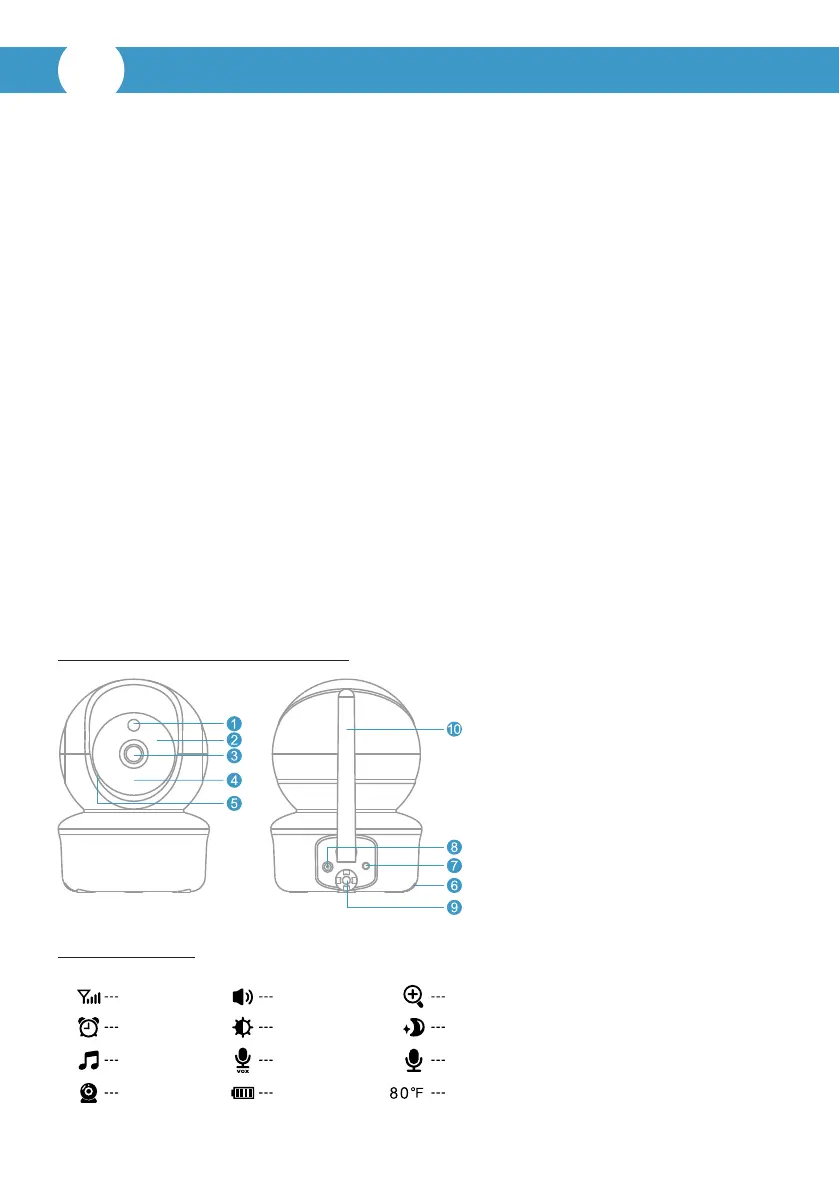
B. Baby unit (camera) overview:
1. Light sensor
2. Infrared LEDs
3. CMOS sensor
4. Power LED
5. MIC
6. Speaker
7. Pair key
8. DC-Jack
9. Temperature sensor
10. Antenna
Icons overview
Signal
Alarm
Lullaby
Camera
Volume
Brightness
VOX
Baery
Zoom
Night vision
Talk to baby
Temperature
EN



 To Next Page