OSD MODE OPERATION
Pan/Tilt
The camera unit can be remotely controlled from the monitor unit.
Step1. Press the Pan/Tilt key to enter the Pan/Tilt mode.
Step2. Press the or to lt upward or downward.
Step3. Press or to Pan le or right.
Step4. Press the Pan/Tilt key to exit the Pan/Tilt mode.
Note: During the Pan/Tilt mode cannot use the navigaon key to adjust volume and
Brightness.
Camera
7
INSTRUCTIONS FOR USE
EN
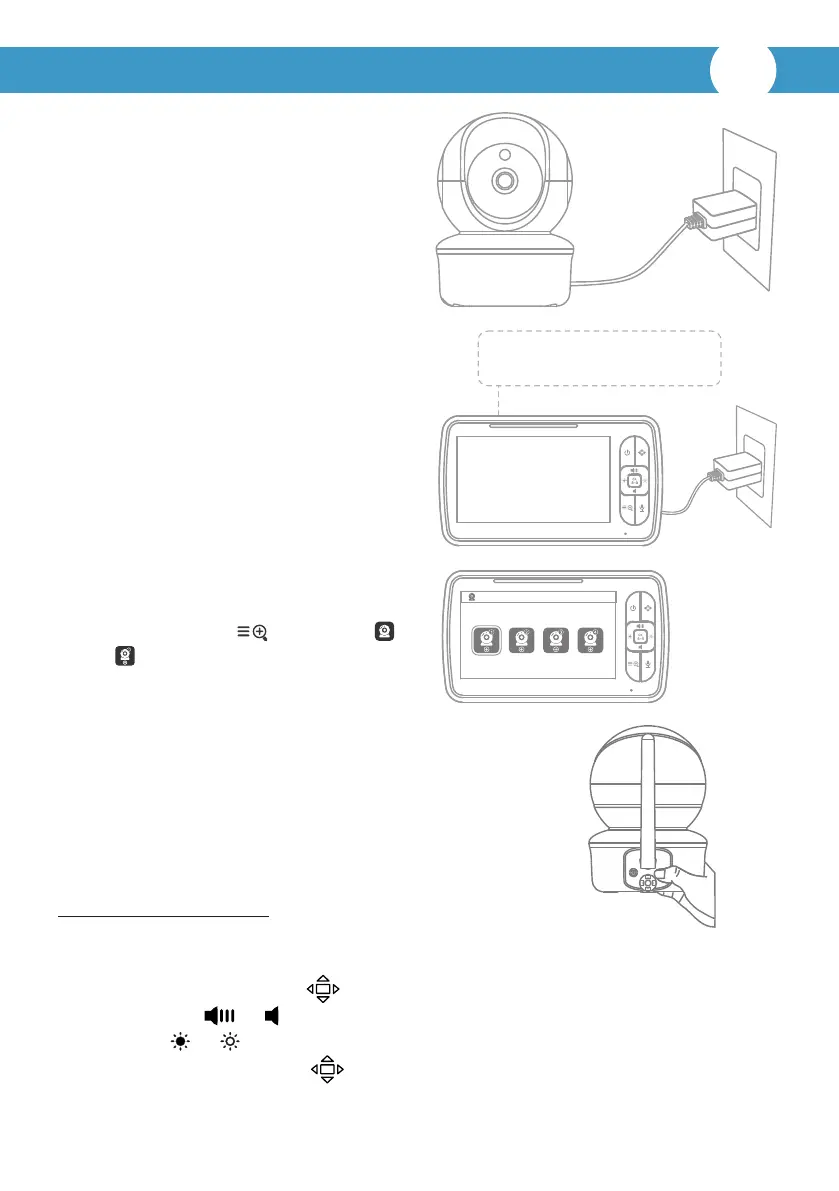
Turn on the baby unit:
Use the provided AC adapter included
in this package to connect the wall
outlet with the baby unit. Once the
adapter connects then the unit will
turn on automacally and the power
LED will light up.
Charging and turn on the parent unit:
Press and hold the power buon for 2
seconds to turn on the parent unit. We
suggest to connect the monitor to the
adapter plugged into the mains whenever
possible, in order to keep the baery
charged. Once the adapter connects then
the unit will turn on automacally and the
power LED will light up.
Charging: Red/orange
Fully charged: Green
Prepare for connecng the baby unit:
Press the MENU key and chose to
select ,press OK key for paring.
Pair the parent unit with the baby unit:
Long press the “pair” buon at the back of the baby unit
unl the parent unit shows images.
*The baby unit has already been paired with the parent
unit in factory seng, no repeated operaon is needed.



 To Next Page