Need help?
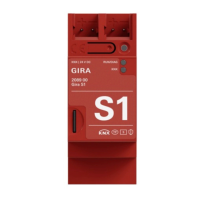
Do you have a question about the Gira S1 and is the answer not in the manual?
Basic installation steps for the Gira S1 device.
Configuring the Gira S1 using the ETS software.
Setting up the Gira S1 via the Gira Device portal.
Description of the Gira Device portal's role and use.
Configuring and controlling Gira HomeServer via Gira S1.
Accessing KNX installations remotely through the Gira S1.
Guide to installing and electrically connecting the device.
Adding the Gira S1 as a device within the ETS.
Assigning physical addresses for the Gira S1 interfaces.
Setting IP address, subnet mask, and gateway.
Steps to program the device's physical address.
How to transfer application programs and data.
Configuring general device settings.
Steps to perform a factory reset on the device.
Instructions for updating the device firmware.
First-time login and user registration process.
Step-by-step guide to register the device.
Setting up access to applications using activation codes.
Managing user roles and access groups.
Process for transferring device ownership.
Setting up various remote access configurations.
 General
| Category | Home Automation |
|---|---|
| Protection Class | IP20 |
| Operating Temperature | -5 °C to +45 °C |
| Installation | DIN rail |
| Current | 0.02 A |

 To Next Page