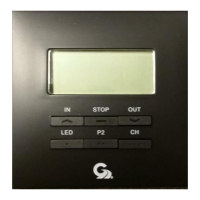
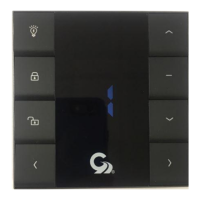
The GC660B is a single-channel RF transmitter designed to control a single awning. It operates on two 3V Lithium batteries (CR2032) and features IN, STOP, and OUT push buttons for operation, along with an LED lighting strip to indicate status. The device is designed for use with various motor controllers, including AC and DC types, and can be integrated into a Girard Systems awning setup.
Function Description:
The primary function of the GC660B is to provide remote control for a single awning. It allows users to extend (IN), stop, and retract (OUT) the awning with dedicated buttons. The device also incorporates a 24-hour clock and a 7-day calendar, enabling scheduled awning operations. This time-based functionality allows for automated control, enhancing convenience and energy efficiency.
Important Technical Specifications:
- Power Source: Two 3V Lithium batteries (CR2032).
- Control Type: Single channel RF transmitter.
- Compatibility: Designed to work with various Girard Systems motor controllers, including:
- GC136 AC Motor Controller
- GC274A / GC274B AC Motor Controllers
- 98GC74 AC Motor Controller
- GC732G DC Motor Controller
- GC1146C DC Motor Controller
- Display: Features an LED lighting strip for status indication and a digital display for time and day settings.
- Buttons: IN, STOP, OUT, LED, P2, and CH buttons for operation and programming.
Usage Features:
- Awning Control: Simple push-button operation for extending, stopping, and retracting the awning.
- Time and Day Setting:
- The device allows setting the current time (hour and minute) and day of the week.
- To set the time, press and hold the CH button until the hour starts to flash, then use IN and OUT buttons to adjust the hour. Repeat for minutes.
- To set the day, press the CH button once the minute is set, and the day will begin to flash. Use IN and OUT buttons to adjust the day.
- The clock is a 24-hour format, and the calendar is a 7-day format.
- Programming (Pairing with Motor Controllers):
- General Procedure: When pairing the GC660B with a motor controller, it is crucial to carry out the programming steps within 10 seconds of the previous one. If this timeframe is exceeded, the module will revert to factory settings, requiring the process to be restarted. It is highly recommended to read and understand the full sequence before attempting to execute it.
- GC136 AC Motor Controller:
- Ensure power is supplied to the motor controller.
- Press the Program button on the motor controller (The Green LED will start blinking).
- Press the STOP button on the GC660B (The Green LED will remain ON).
- Press the IN button on the GC660B (The Green LED will extinguish).
- Press the OUT, STOP, and IN buttons alternately on the GC660B to ensure the modules are successfully paired.
- GC274A / GC274B AC Motor Controllers:
- Remove the lid of the motor control module.
- Ensure power is supplied to the motor controller.
- Press the Program button on the motor controller (The Green LED will start blinking).
- Press the STOP button on the GC660B (The Green LED will remain ON).
- Press the IN button on the GC660B (The Green LED will extinguish).
- Press the OUT, STOP, and IN buttons alternately on the GC660B to ensure the modules are successfully paired.
- 98GC74 AC Motor Controller:
- Supply power to the motor control module (It will beep ONCE).
- Press the P2 button on the GC660B TWICE (The motor controller will beep with each press).
- Press the IN button on the GC660B (The awning should retract).
- If the awning extends instead of retracting, press the STOP button immediately, then remove power supply to the motor controller for at least 10 seconds.
- Repeat steps 1 and 2, then press the OUT button on the GC660B to complete the programming procedure.
- Ensure the awning responds correctly to the wall switch by pressing the OUT, STOP, and IN buttons alternately.
- GC732G DC Motor Controller:
- Ensure power is supplied to the motor controller.
- Press the Program button on the motor controller (The Red LED will start blinking).
- Press the STOP button on the GC660B (The Red LED will remain ON).
- Press the IN button on the GC660B (The Red LED will extinguish).
- Press the OUT, STOP, and IN buttons alternately on the GC660B to ensure the modules are successfully paired.
- GC1146C DC Motor Controller:
- Identify the Remote handset that operates the DC Motor controller for the awning. This is likely either a 98GC1063 Single channel, or a 98GC1029 Multi channel handset.
- Fully extend the awning to ensure smooth operation, and then retract the awning leaving it partially open (about 3 feet).
- Locate the P2 Button on the back of the handset.
- Supply power to the Motor controller (The GC1146C will emit a soft beep).
- Using an appropriate tool, press the P2 button on the back of the Handset TWICE (The GC1146C will Beep with each press).
- Press the P2 button on the GC660B wall switch ONCE (The GC1146C will beep again).
- Press the IN button on the GC660B wall switch and verify that the awning moves in the desired direction.
- If the awning extends at this point instead of retracting, press the STOP button immediately, then remove the power supply to the motor controller for at least 10 seconds.
- Next, repeat steps 1, 2 and 3 above, then press the OUT button on the GC660B wall switch to complete the programming procedure.
- Ensure that the awning responds correctly to the wall switch by pressing the OUT, STOP, and IN buttons alternately.
Maintenance Features:
- Battery Replacement: The faceplate of the GC660B can be easily removed by holding the module at the left and right edges firmly in one hand and pushing the STOP button with two fingers of your other hand. This reveals the battery compartment for CR2032 battery replacement.
- Awning Care: Girard Systems awnings are supplied with an electric motor appropriate to the product. During periods of heavy rain and or high wind, the awning must be closed. Never leave the awning open and unattended.
- Damage Prevention:
- Damage caused by wind and rain is not covered by warranty.
- Damage caused by failure to comply with instructions is not covered by warranty.
- Damage caused by collisions with any of the above or similar is not covered by warranty.
- Electrical System Check: Before using your awning, ensure that all of your electrical circuits are operating correctly. Recreational Vehicles can generate AC power from three separate sources: Shore Power (if connected), Generator Power (if the generator is running), and Inverter Power (batteries must be charged for inverter operation).

 Need help?
 General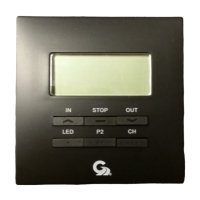

 To Next Page