60cm - ICC6GE3 & 90cm - CC96GB Ceramic Cooktops Page 8
Product Overview – ICC6GE3 & CC96GB
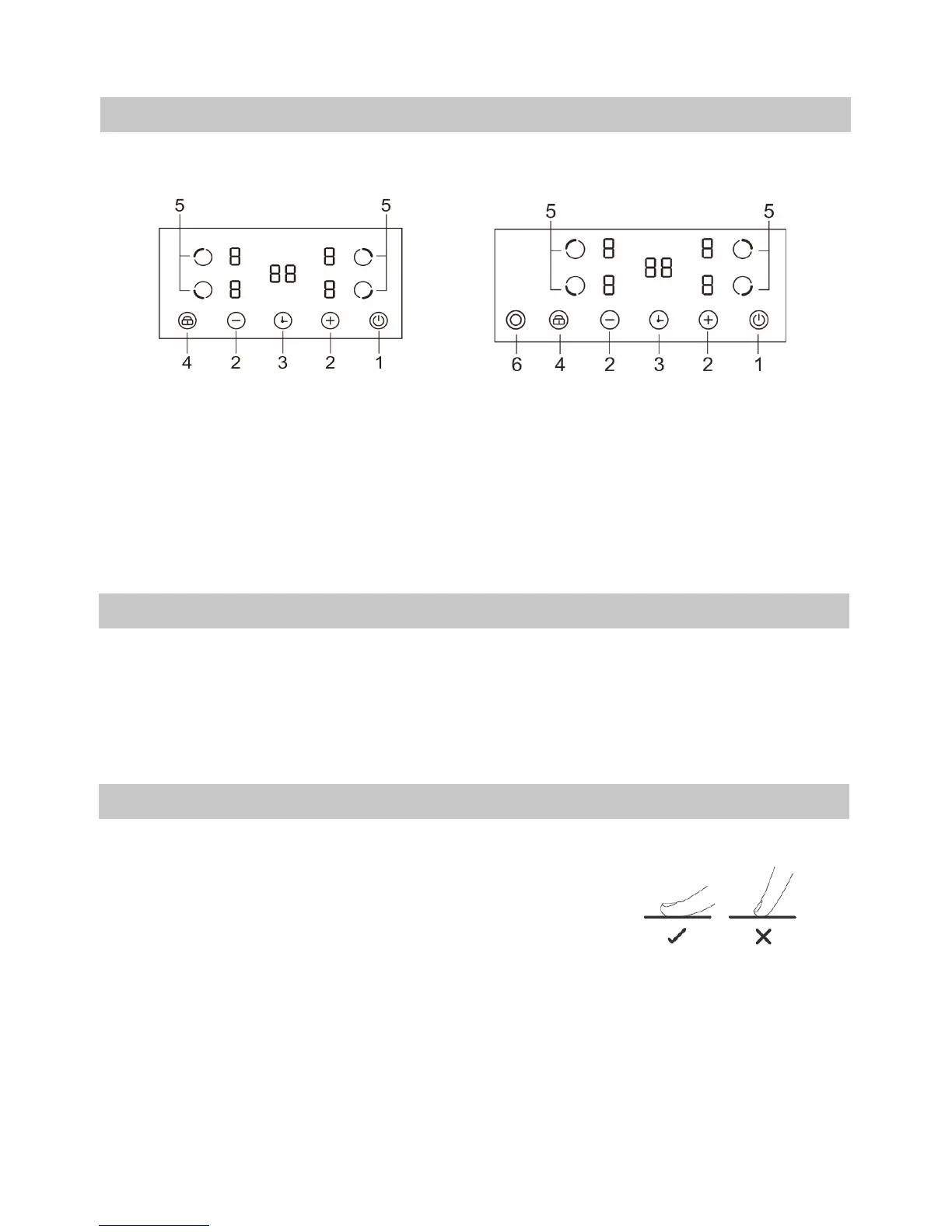
The Control Panel
1. ON/OFF switch 2. Select power level 3. Setting the timer
4. Child lock 5. Select heating zone 6. Double zone control
ICC6GE3 CC96GB
Before using your new Cooktop
• Read this guide, taking special note of the ‘Safety Warnings’ section.
• Remove any protective lm that may still be on your Induction cooktop.
• DO NOT use the cooktop if cracked or damaged in any way.
Using the Touch Controls
• The controls respond to touch, so you don’t need to apply any pressure.
• Use the ball of your nger, not its tip. See illustration.
• You will hear a beep each time a touch is registered.
• Make sure the controls are always clean, dry, and that there is no object (e.g.
a utensil or a cloth) covering them. Even a thin lm of water may make the
controls difcult to operate.


 To Next Page