EasyManua.ls Logo

Global Industrial 293065 - User Manual

Global Industrial 293065
36 pages
Print Icon
To Next Page IconTo Next Page
Loading...
1
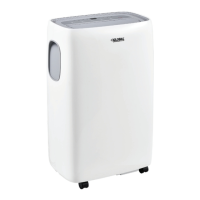
Portable Air Conditioner With Wifi
062019
User's manual Manual del usuario Manuel de l'utilisateur
Customer Service
US: 1-800-645-2986
Servicio de atención al Cliente
US: 1-800-645-2986
Service à la clientèle
Canada: 888-645-2986
WARNING
Read all instructions before use. To reduce the risk of
fire, electric shock, or injury to persons when using this
appliance, follow the following precautions:
Two people are recommended to lift and install the unit.
Remove all packing materials from the air conditioner
before use.
Make sure the air conditioner is the correct size for the
area you wish to cool.
Install the air conditioner on a sturdy, level floor capable
of supporting up to 110 lbs. Installation on a weak or
unleveled floor can result in the risk of property damage
and/or personal injury.
DO NOT operate air conditioner without the filter
securely in place. Operation without the filter could
damage the unit.
DO NOT position the air conditioner so that pets or
house plants are exposed to the direct air flow.
DO NOT attempt to repair or replace any part of your
air conditioner unless it is specifically recommended in
this manual. All other services should be referred to a
qualified technician.
DO NOT use if the power cord is worn or damaged.
Power cords should only be replaced by qualified
service technicians using genuine replacement parts.
ALWAYS Plug the air conditioner firmly and completely
into its own grounded circuit.
DO NOT plug other appliances into the same outlet.
DO NOT disassemble or modify the air conditioner or
the power cord.
DO NOT place the unit or its power cord near a heater,
radiator, or other heat source.
DO NOT use unit near flammable gases/liquids or other
combustible substances; such as gasoline, benzene,
thinner, etc.
ALWAYS grasp the plug when plugging in or unplugging
the air conditioner. Never unplug by pulling on the cord.
DO NOT start or stop operation by plugging in or
unplugging the power cord.
DO NOT use the air conditioner if it is emitting smoke or
an unusual order, unplug it immediately.
DO NOT
operate with wet hands or in a damp environment.
DO NOT clean with water. Water can enter the unit and
damage the insulation, creating a shock hazard. If water
enters the unit, unplug immediately and contact Global
Industrial Customer Service.
Use caution when removing or reinstalling the filter.
DO NOT block the air inlet or outlet of the air conditioner.
Reduced air flow will result in poor performance and
could damage the unit.
ALWAYS turn off and unplug the air conditioner when
it will not be used for an extended period of time. This
conserves energy and reduces the chance or accidents.
Secure the wheels with wheel locks to prevent the air
conditioner from rolling on smooth floors.
Close all doors and windows to the room for the most
efficient operation.
To prevent damage to the surface finish, use only a soft
cloth to clean the air conditioner. Do not use solvents,
or any strong detergent to clean.
Dispose of the water from the drain pan properly
outdoors or down a drain.
Clean the filter every two weeks, or more often
if needed.
Model 293065 0
8,000 BTU, Cool Only, Wifi Enabled, 115V
Model 292850 10,000 BTU, Cool Only, Wifi Enabled, 115V
Model 292851 12,000 BTU, Cool Only, Wifi Enabled, 115V
Model 293066 14,000 BTU, Cool Only, Wifi Enabled,115V
Model 292852 14,000 BTU, Cool with Heat, Wifi Enabled,115V
Question and Answer IconNeed help?

Do you have a question about the Global Industrial 293065 and is the answer not in the manual?

Overview

This document describes a portable air conditioner with Wi-Fi capabilities, available in several models with varying BTU ratings and functionalities.

Function Description

The portable air conditioner is designed to cool and dehumidify rooms. Some models also offer a heating function. It features an integrated circuit breaker for electrical safety, and a self-evaporating system that minimizes the need for manual drainage under normal operating conditions. The unit can be operated via a control panel on the device or a remote control. Wi-Fi connectivity allows for smart control.

Important Technical Specifications

The portable air conditioner comes in five models, each with specific BTU ratings and functionalities:

  • Model 293065: 8,000 BTU, Cool Only, Wi-Fi Enabled, 115V
  • Model 292850: 10,000 BTU, Cool Only, Wi-Fi Enabled, 115V
  • Model 292851: 12,000 BTU, Cool Only, Wi-Fi Enabled, 115V
  • Model 293066: 14,000 BTU, Cool Only, Wi-Fi Enabled, 115V
  • Model 292852: 14,000 BTU, Cool with Heat, Wi-Fi Enabled, 115V

All models operate on a 60 Hz, 115V AC outlet, protected by a 15 amp time delay fuse or circuit breaker. The unit is designed for room temperatures between 64°F-95°F (18°C-35°C) for cooling and 50°F-77°F (10°C-25°C) for heating (where applicable). The unit weighs up to 110 lbs and should be placed on a sturdy, level floor.

Usage Features

Installation: The unit requires a minimum of 18" (45cm) clearance from walls for efficient air conditioning. It comes with an exhaust hose and a window slider kit for venting warm air outside. The window slider kit is designed to fit most standard vertical and horizontal window applications and can be fastened with screws. The exhaust hose should be kept as short as possible (minimum 15.7" or 40cm) and free of sharp bends or sags to ensure optimal performance.

Operation Modes:

  • Cool Mode: Ideal for hot, muggy weather. Users can set the desired temperature between 64°F-90°F (18°C-32°C) and select one of four fan speeds: High, Medium, Low, or Auto.
  • Heat Mode (Model 292852 only): For heating rooms. Users can set the target temperature between 55°F-81°F (13°C-27°C) and choose from four fan speeds. The unit automatically defrosts in very cold rooms, displaying "Lt" during this operation.
  • Fan Mode: Circulates air without cooling or heating. The air hose does not need to be attached in this mode. Three fan speed settings are available: High, Medium, and Low.
  • Dry Mode (Dehumidifier only): Reduces room humidity. The unit should be installed with the air exhaust hose attached to vent moist air outside. Fan speed is automatically selected in this mode. Continuous drainage using a garden hose or drainage hose is required.
  • Auto Mode: The appliance automatically selects between cool, fan, or heat mode based on ambient temperature.
  • Sleep Function: Reduces noise and gradually adjusts the temperature for comfortable sleep. In Cool mode, the temperature increases by 1°F (1°C) per hour for two hours, then maintains for six hours before turning off. In Heat mode, the temperature decreases by 1°F (1°C) per hour for three hours, then maintains for five hours before turning off.
  • Timer Function: Allows users to set a delayed start or stop time (1-24 hours) to optimize energy usage.
  • Swing Function: Controls the up/down air delivery.

Control: The unit can be controlled via the integrated control panel or a remote control. The remote control has a range of up to 23 feet (7 meters) and requires two AAA 1.5V batteries. The display screen shows the active mode, temperature, fan speed, and Wi-Fi symbol. Error messages like "LE" (low temperature/frost prevention), "PF" (probe failure/damaged sensor), and "FE" (full tank) are displayed for self-diagnosis.

Water Drainage: Under normal operating conditions, the self-evaporating system minimizes the need for manual drainage. However, in prolonged or high humidity conditions, or when operating in Dry mode, manual or continuous drainage may be required.

  • Manual Draining: Involves removing the lower drain cap and collecting water in a drain pan.
  • Continuous Draining: Involves connecting a garden hose or drainage hose to the continuous drain outlet, leading it to a floor drain or bucket that is lower than the unit.

Maintenance Features

Cleaning:

  • Cabinet: Clean with a slightly damp cloth, then a dry cloth. Avoid using water, solvents, or insecticide sprays.
  • Air Filters: Clean every two weeks of operation. Remove dust with a vacuum cleaner. If very dirty, immerse in warm water (below 104°F/40°C) and rinse several times. Allow the filter to dry completely before reattaching.

Seasonal Operations:

  • Start of Season: Check power cable and plug for damage.
  • End of Season: Completely empty the unit of water by removing the cap on the condenser drain. Clean and dry the filter thoroughly before storing the unit.

Troubleshooting: The manual includes a troubleshooting guide to address common issues such as the appliance not powering on, working for a short time, not cooling effectively, emitting unpleasant smells, or displaying error messages. Solutions typically involve checking power supply, ensuring proper hose installation, closing windows/doors, removing heat sources, cleaning filters, or contacting customer service for self-diagnosis errors.

Global Industrial 293065 Specifications

General IconGeneral
BrandGlobal Industrial
Model293065
CategoryAir Conditioner
LanguageEnglish

Related product manuals