EasyManua.ls Logo

GLOBAL LINK Ultra ES Pro Smart Lock - User Manual

GLOBAL LINK Ultra ES Pro Smart Lock
20 pages
Print Icon
To Next Page IconTo Next Page
Loading...
August 2021 Page 1
Ultra ES Pro Smart Lock
User Instructions
The Global Link Ultra ES Pro Smart Lock features:
Bluetooth
®
wireless technology, allowing control of the lock with the free Global Link
Connect app and real time notifications of lock status on your smartphone or tablet
Convenient handle design, available in both right- and left-handed models
Illuminated keypad for keyless entry
Beep feedback indicating success and failure of actions as well as low battery conditions
Easy installation in standard door cutouts and direct replacement for standard travel
trailer entrance locks from:
FIC / Wesco
Bauer
TriMark
Support for two access PINs—a factory default PIN and a user PIN
Interior safety release button for emergency exit
Customer key access for alternative operation of the lock
Can be keyed-alike to match other Pro Series locks
The lock is powered by a single Type 123 lithium battery and operates with a 4-digit PIN. Each
lock has a factory default PIN that can be used at any time and cannot be erased; 1 additional
user PIN can be added.
Important: Before using the lock, record the default 4-digit PIN printed on the purple key tag
affixed to the inside handle of the lock. The factory default PIN is needed for keyless entry before
a user PIN has been added and to program / reprogram the user PIN.
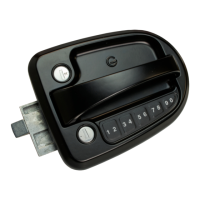
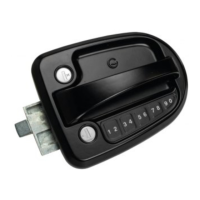
Figure 1: Global Link Ultra ES Pro Smart Lock
WARNING: Cancer and Reproductive Harm – www.P65Warnings.ca.gov.

Question and Answer IconNeed help?

Do you have a question about the GLOBAL LINK Ultra ES Pro Smart Lock and is the answer not in the manual?

Overview

The Global Link Ultra ES Pro Smart Lock is an advanced smart lock designed for travel trailers, offering both keyless and keyed operation with integrated Bluetooth® wireless technology. This lock is compatible with the free Global Link Connect app, allowing users to control the lock and receive real-time status notifications on their smartphone or tablet.

Function Description:

The primary function of the Global Link Ultra ES Pro Smart Lock is to provide secure access to travel trailers through multiple methods:

  • Keyless Entry: Users can unlock the door by entering a 4-digit PIN on the illuminated keypad. The lock supports two PINs: a factory default PIN and one additional user PIN. The factory default PIN is preprogrammed, cannot be erased, and is essential for initial setup and reprogramming the user PIN.
  • Keyed Operation: For alternative operation or in case of battery failure, a traditional customer key can be used to lock and unlock the door.
  • Bluetooth® Control: The Global Link Connect app enables remote locking and unlocking, providing convenience and enhanced security monitoring. The app displays the lock's status, including whether it's locked or unlocked, battery life, PIN code changes, and connection status.
  • Interior Safety Release: An interior safety release button ensures emergency exit from the trailer.

Important Technical Specifications:

  • Power Source: The lock is powered by a single Type 123 lithium battery.
  • PIN Length: Requires a 4-digit PIN for keyless entry.
  • PIN Support: Supports one factory default PIN and one user PIN.
  • Bluetooth® Range: The app and lock communication is supported up to a range of 120 feet (36.5 meters), depending on the environment.
  • Compatibility: Designed for easy installation in standard door cutouts and direct replacement for standard travel trailer entrance locks from FIC/Wesco, Bauer, and TriMark.
  • Handedness: Available in both right- and left-handed models.
  • Door Cutout Dimensions: Recommended 2 3/4" x 3 3/4" (minimum 2 1/2" x 3 5/8" to 3" x 4").
  • Door Thickness: Recommended 1 1/4" to 1 1/2" (most standard RV doors).
  • FCC ID: XPYNINAB1.

Usage Features:

  • Illuminated Keypad: Provides visibility for keyless entry in low-light conditions.
  • Beep Feedback: The lock provides audio cues for various actions:
    • 1 short beep: Keypress.
    • 2 beeps: Factory default PIN or user PIN entered; programming mode entered.
    • 2 ascending beeps: Unlocking successful.
    • 2 descending beeps: Locking successful.
    • 3 varied beeps: New PIN entered; programming successful; reset successful.
    • 4 quick beeps: Incorrect PIN entered; PINs did not match during programming; low battery.
  • Global Link Connect App:
    • Pairing: Downloadable from the App Store or Google Play, the app guides users through the pairing process. Bluetooth must be enabled, and Airplane Mode turned off.
    • Lock/Unlock: Tap the padlock icon on the home screen to lock or unlock the door. A red padlock indicates locked, green indicates unlocked.
    • PIN Management: Program or change the user PIN directly through the app. The app ensures the lock's PIN matches the app's programmed PIN.
    • Lock Name: Customize the lock's name within the app for easy identification.
    • Status Information: View lock status (locked/unlocked), PIN type (factory/user), battery status (normal/low), and voltage status.
    • Battery Saver: A feature that disables automatic reconnection attempts when the app loses connection, conserving battery life. Users can manually reconnect by tapping the padlock icon.
    • Removing Lock: Locks can be removed from the app if no longer needed.
  • Deadbolt Operation: The deadbolt can be operated manually from the inside using a red lever. It is recommended to lock the deadbolt during transportation for added security and to avoid using the app to operate it during transit.

Maintenance Features:

  • Battery Replacement:
    • The lock indicates low battery through a red battery icon in the app, a flashing LED on the inside keypad, and 4 quick, descending beeps with a flashing keypad light when a key is pressed.
    • To replace, loosen the captive screw on the interior battery compartment, lift the cover, remove the old battery, insert a new Type 123 lithium battery in the correct orientation, and resecure the cover.
    • It is recommended to remove the battery if the lock will be stored for an extended period.
  • Restoring Factory Settings:
    • The lock can be restored to its default factory settings, which resets the user PIN and unpairs the lock from all connected Global Link Connect instances.
    • To restore, loosen the battery compartment screw, lift the cover, and use a blunt object to press and hold the Reset button (located in the battery compartment) until the lock beeps.
  • Troubleshooting Guide: The manual includes a comprehensive troubleshooting section addressing common issues such as PIN errors, pairing problems, unresponsiveness, battery issues, and deadbolt malfunctions, providing possible causes and solutions.
  • Installation Instructions: Detailed steps are provided for installing the lock, including connecting cables, positioning the interior assembly, and securing it with screws. Proper alignment of the strike plate is crucial for optimal function.

GLOBAL LINK Ultra ES Pro Smart Lock Specifications

General IconGeneral
BrandGLOBAL LINK
ModelUltra ES Pro Smart Lock
CategoryLocks
LanguageEnglish

Related product manuals