11
10
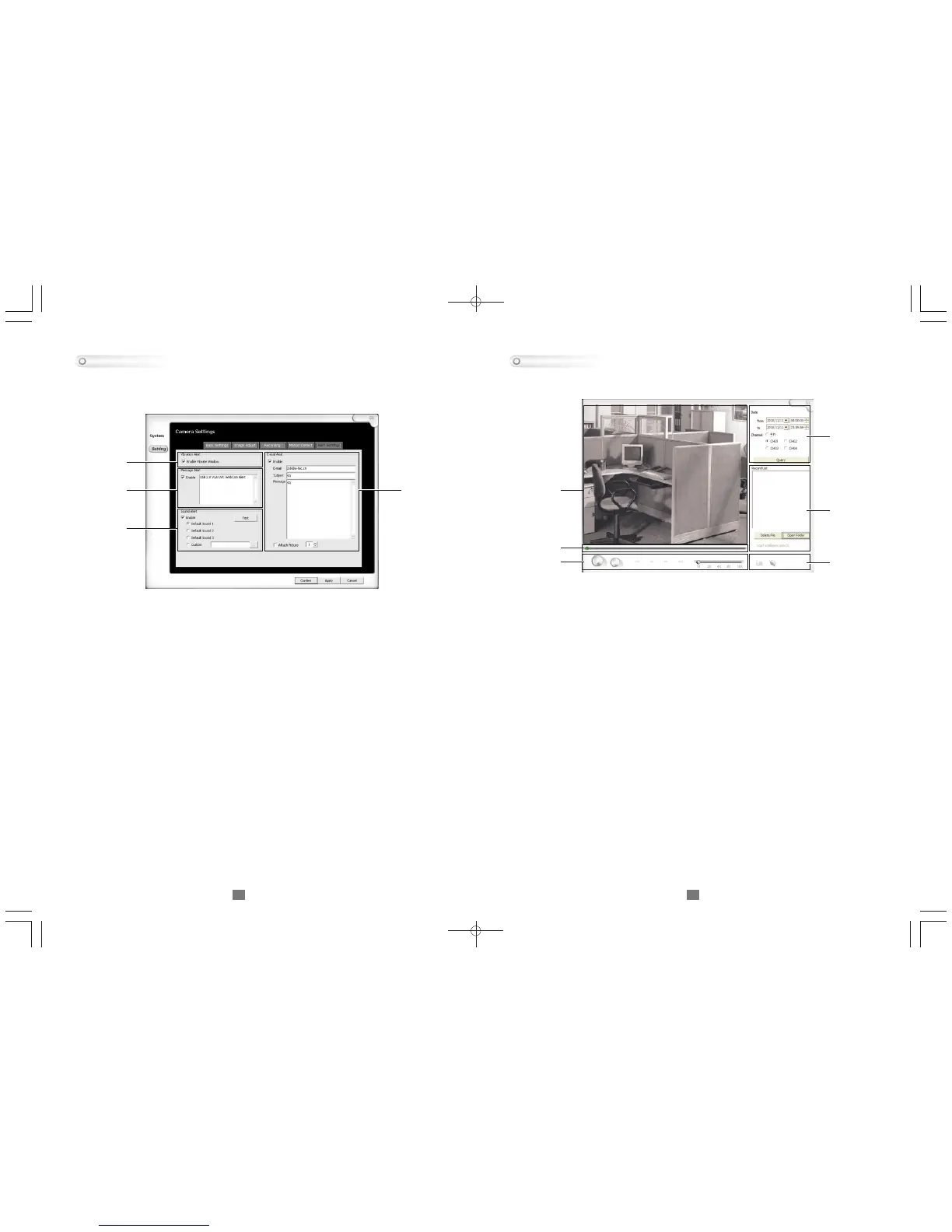
Alert Setting
This section will be available if the recording option is set to triggered, this
particular area allows the user to set notification options in the even the
viewer detects motion.
1. Vibrational alert: When enabled, it vibrates the whole viewer when motion
is detected
2. Message alert: When enabled, it prompts a message alert on viewer when
motion is detected
3. Sound alert: When enabled it will playback the chosen sound when motion
is detected
4. E-mail alert: When enabled, a message will be sent based on the
information filled out
1
2
3
4
This section allows users to playback and search through the recorded
videos.
1. Screen: This area will display the video output from the recording
2. Time and channel selection: This filters out when and which channel to be
listed in the Record List , hit the Query button to bring up the list once selected
the proper times and channel.
3. Record list: This area is where you choose the video and have the option to
delete it and open the file directory of your videos
4. Video tracker: Use this to track through your video
5. Playback controls: (From left to right)
Play / Stop / Previous track / Rewind / Fast forward / Next track
/ Playback speed (1x, 2x, 4x, 8x, 16x)
6. Capture options: Use the camera to capture a picture on the main display
screen and use the folder to access the captured picture(s)
Playback
1
2
3
65
4



 To Next Page