Integrity 150 User Manual
Confidential & Proprietary Information
9150-0126-01 R-2
GETTING
STARTED
THE Integrity 150 DEVICE
BATTERY PACK
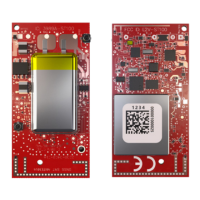
The Integrity 150 is powered by an internal Lithium-ion (Li-ion) battery pack. The battery pack is not accessible to the user and
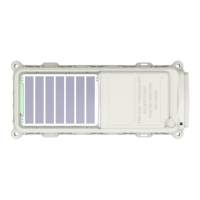
is not replaceable. The Integrity 150 is designed for the solar panels to
recharge
the battery pack.
A user may realize up to 10 years of maintenance-free operation based on adequate sun exposure to recharge the battery
pack.
TURNING ON AND OFF
The
Integrity 150
ships
powered off in an opaque container
.
Once the solar panel is exposed to sufficient light, the unit will power
on. A flashlight or the camera light on a mobile device is sufficient to turn on an Integrity 150. Upon
initial power up, the unit will
go into a Factory Power State. In this state the unit will behave just as it is in a normal mode except that it will automatically
enter the full off state if there has been no solar input for 4 hours. Once a configuration profile is applied to the Integrity 150 via
the mobile application, it will follow its power management state to normal operation and will never enter the Factory power
mode again.
Once a unit has been configured by applying a profile from the mobile application, it will remain on indefinitely. The unit can be
turned off through the mobile app via the “Power Off” button found at the top of the Scan screen. If storage is necessary, it
should be packaged in an opaque container and powered off.
The r
ecommended storage temperature is
ideally
between
-40
º
C and 85
º
C. The shelf life of the Integrity 150 is
1 year
and the maximum storage period is
5 years
.
COMMISSIONING
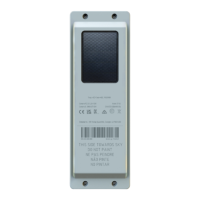
Before installing the Integrity 150, record the Unique Identifier (UID) and identify the asset to which it will be mounted. The UID
is etched on the top mounting surface of the Integrity 150, such that it will be visible after installation. There is also a bar code
that contains the UID on the device.
INSTALLATION
The
Integrity 150
must be mounted on the asset with a clear view of the sun and sky. The device requires a minimum flat surface area
of 24.4
cm x 8.61 cm (10.39” x 3.38”). The ideal configuration is facing up on a flat horizontal surface.
The
Integrity 150
can also be mounted on a flat vertical
surface
but this may reduce the communication reliability, decrease the maximum
sustainable messaging rate, affect the charging capability of the device, and may reduce the GPS location
accuracy. If the device must be
mounted vertically, it is recommended to point the device with the solar panel end upward towards the sky. This allows the
messages to be transmitted best in a vertical mount application as the batteries are located opposite the Solar panel which
reduces internal obstructions.


 To Next Page