27
elements (Es. Table or chairs).
Use
- Insert the power adapter supplied with the unit.
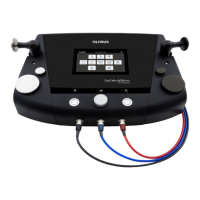
- Connect the cable supplied to the polar socket (see
picture pag.4) and
insert the electrodes in the specific plug. Apply the
electrodes on the dermis.
- Put some gel on the ultrasonic probe.
- Push the “Up” button to turn on the unit.
- Keep pushing the “Set” button for 2 sec.
- Push again twice the “Set” button.
- The notice “Es” flashes.
- With the “Up” button select one of the Combo programs
(P7 or P8 or P9)
- Push “Set” to confirm.
- Push “Up” or “Down” to set up the desired power.
- Choose the intensity level between the 9 available ones.
- To switch off the device, lead the intensity level to the 0
level and
push “Down”.
- To change the default settings push the “Set” button once,
the “Timer” will flash on the display.
- Push the “Up” or “Down” button to set up the desired time
(from 0 to 30 min.)
- When the time setting is complete, push “Set” once and
the notice “ES” will flash on the display.
- Push the “Up” and “Down” button to select the programs
“P4-P5-P6”. Confirm the program with the “Set” button.
- Push the “Up” or “Down” button to select the power.
- at the end of the program the device will automatically
switch off.
- to return to the Ultrasound mode, keep pushing the “Set”
button for 2 seconds



 To Next Page