R 22MAR23
PART No.
SHEET
ALL INFORMATION WITHIN ABOVE
BORDER TO BE PRINTED EXACTLY
AS SHOWN ON 8.5 x 11 WHITE 16
POUND
NON-BOND RECYCLABLE
PAPER.
PRINT ON BOTH SIDES,
EXCLUDING TEMPLATES. TO BE
UNITED IN ACCORDANCE
WITH
GMCCA SPECIFICATIONS.
Date Revision Auth DR
Title
Ultium PowerUP Charge Station
User Manual
13DEC22 Fourth Re l SAR
MB
22MAR23
Fifth Re l
SAR
MB
84922762
29NOV22
Third Re l
SAR
AH
8
EN
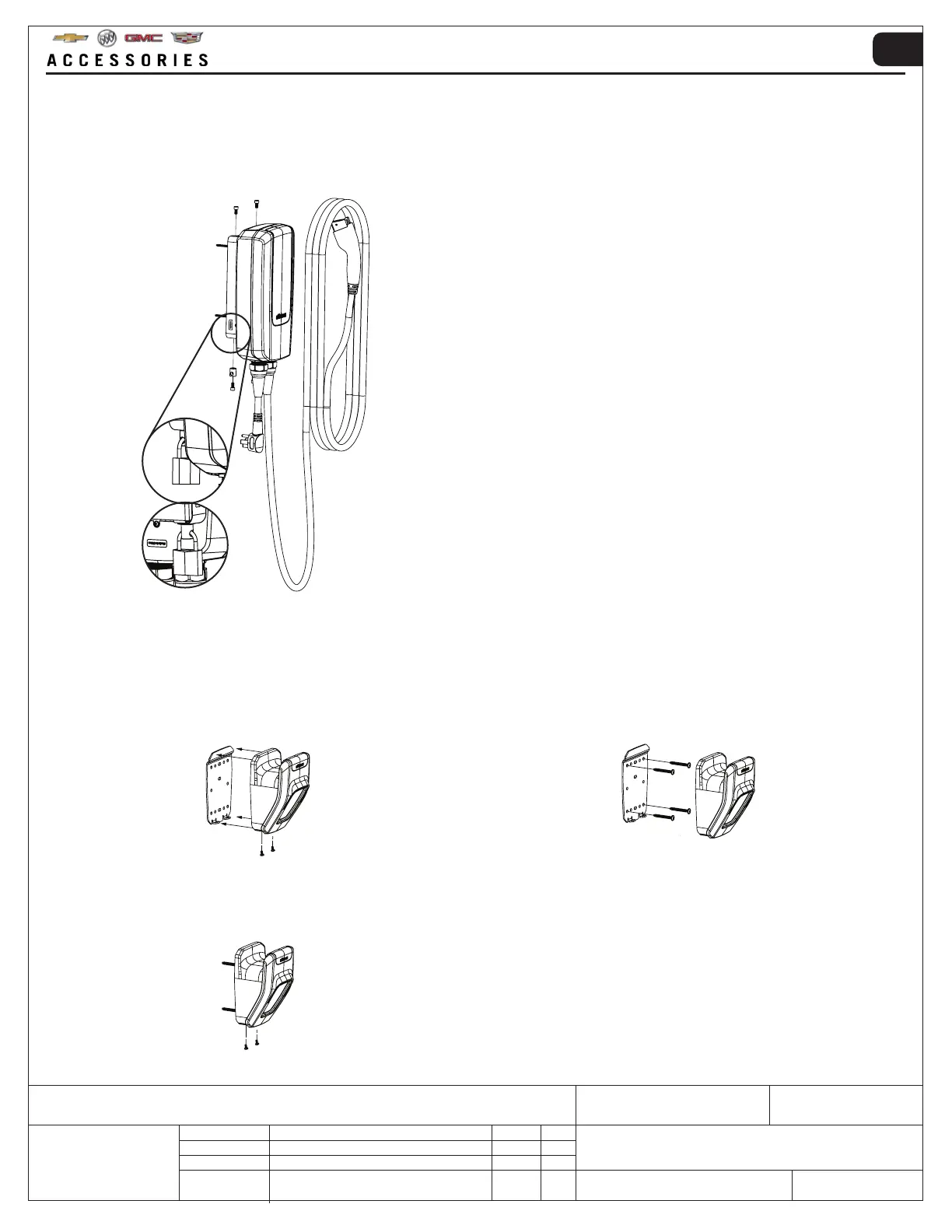
3. Reattach the Ultium PowerUP Charge Station on
the wall mount using the previously removed screws
from Step 1.
If a padlock has been purchased, secure the unit by
locking the padlock on the security nut.
1. Unscrew the two screws at the bottom to access the
mounting plate, keep the screws.
3.1.2 MOUNTING THE CABLE WALL MOUNT
3. Reattach the cable wall mount on the mounting
bracket using the previously removed screws (see
step 1).
2. Mount the mounting bracket to the intended surface,
using the screws provided (where applicable).
NOTE: a drilling template is provided to assist
installation.



 To Next Page