1-14 In Brief
Vehicle Features
Radio(s)
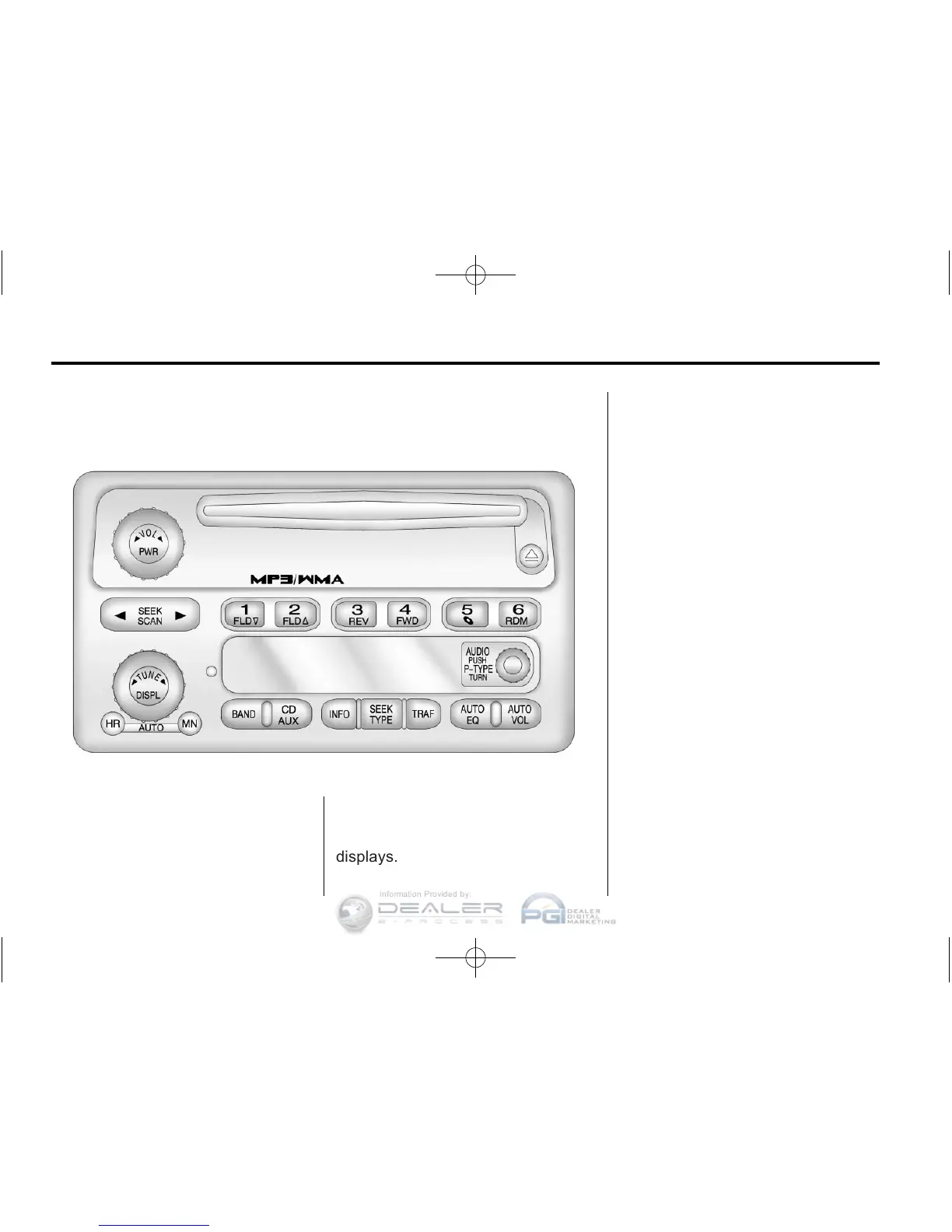
Radio with CD (MP3/WMA)
PWR: Press to turn the system on
and off.
q VOL r : Turn to increase or
decrease the volume.
BAND: Press to switch between
FM1, FM2, AM, or XM1 or XM2
(if equipped). The selection
displays.
q TUNE r : Turn to select radio
stations.
q SEEK r : Press to go to the
previous or to the next station and
stay there.
For more information about these
and other radio features, see
Introduction on page 7‑1.
Setting Preset Stations
Radio stations are stored as
presets.
For vehicles with an XM radio, a
maximum of 30 stations can be
stored as presets using the
six numbered pushbuttons.
If the radio does not have XM, up to
18 stations (six FM1, six FM2, and
six AM), can be programmed on the
six numbered buttons.
See “Setting Preset Stations” under
Operation on page 7‑3.












 To Next Page