GMC Acadia/Acadia Denali Owner Manual (GMNA-Localizing-U.S./Canada/Mexico-18281917) - 2025
Keys, Doors, and Windows 7
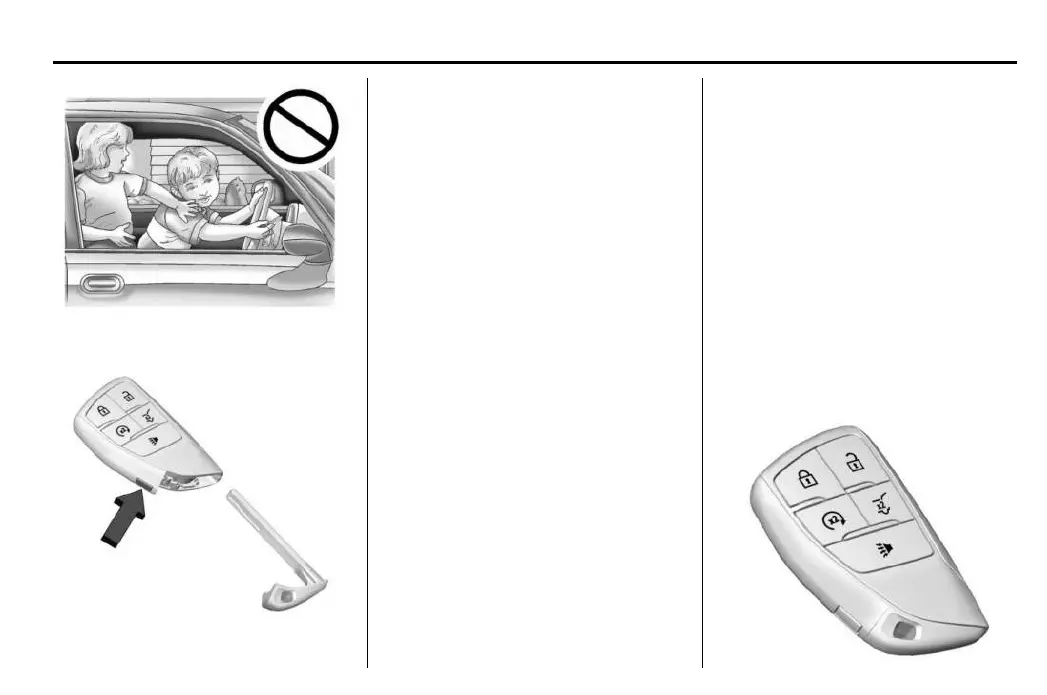
The mechanical key inside the remote key can
be used for all locks.
To remove the mechanical key, press the
bu
tton on the side of the remote key, and
pull the mechanical key out. Never pull
the mechanical key out without pressing
the button.
If it becomes difficult to turn the mechanical
key, inspect the key blade for debris.
See your dealer if anew mechanical key
is needed.
If you are locked out of the vehicle, see Roadside
Assistance Program 3346.
With an active OnStar or connected service
plan, an OnStar Advisor may remotely unlock
the vehicle. See OnStar Overview 3355.
Remote Key
See Radio Frequency Statement 3351.
If there is adecrease in the remote key
operating range:
•
Check the distance. The remote key may be
too far from the vehicle.
•
Check the location. Other vehicles or objects
may be blocking the signal.
•
Ch
eck the remote key’s battery. See
“Battery Replacement” under Remote Key
Operation 37.
•
If the remote key is still not working
correctly, see your dealer or aqualified
technician for service.
Remote Key Operation
The Keyless Access system allows for vehicle
entry when the remote key is within 1 m (3 ft).
See “Keyless Access Operation” following.
The remote key functions may work up to 60 m
(197 ft) away from the vehicle.
Other conditions can impact the performance
of the remote key. See Remote Key 37.


 To Next Page