Battery Replacement
To change the batteries, do the following:
1. Unclip the battery door located on the back of the
remote control.
2. Replace the two AAA batteries in the compartment.
Make sure that they are installed correctly.
3. Close the battery door securely.
If the remote control is to be stored for a long period of
time, remove the batteries and keep them in a cool,
dry place.
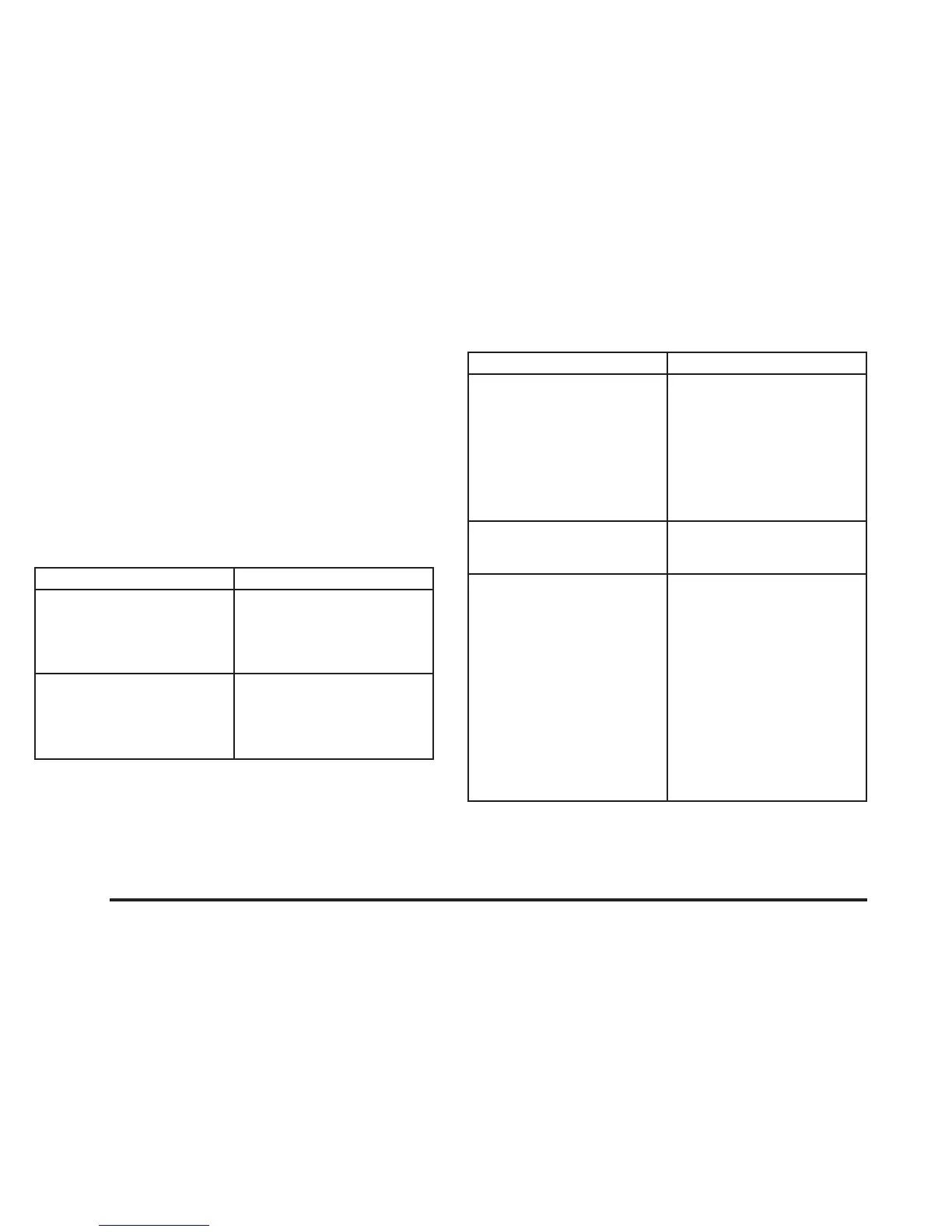
Problem Recommended Action
No power. The ignition might be off.
The parental control
button might have been
pressed. (The power LED
will flash.)
Disc will not play. The Input/Title on the
remote might be set for
auxiliary.
The disc is upside down
or is not compatible.
Problem Recommended Action
No sound. The volume on the
headphones could be too
low. Adjust it on the wired
headphones on the front
panel or the remote. For
the wireless headphones,
adjust the dial on the right
earpiece on the
headphones.
The picture is distorted
during fast forward or fast
reverse.
This is normal for this
operation.
The picture does not fill
the screen. There are
black borders on the top
and bottom or on both
sides or it looks stretched
out.
Quickly press and release
the SIZE/ANGLE button
on the remote. This will fill
the screen. If the screen
looks stretched out, press
and release the SIZE/
ANGLE button again. If
there are borders on the
top and bottom, the movie
may have been made that
way for a standard screen.
Pressing the SIZE/
ANGLE button should fill
the sides.
3-100














 To Next Page