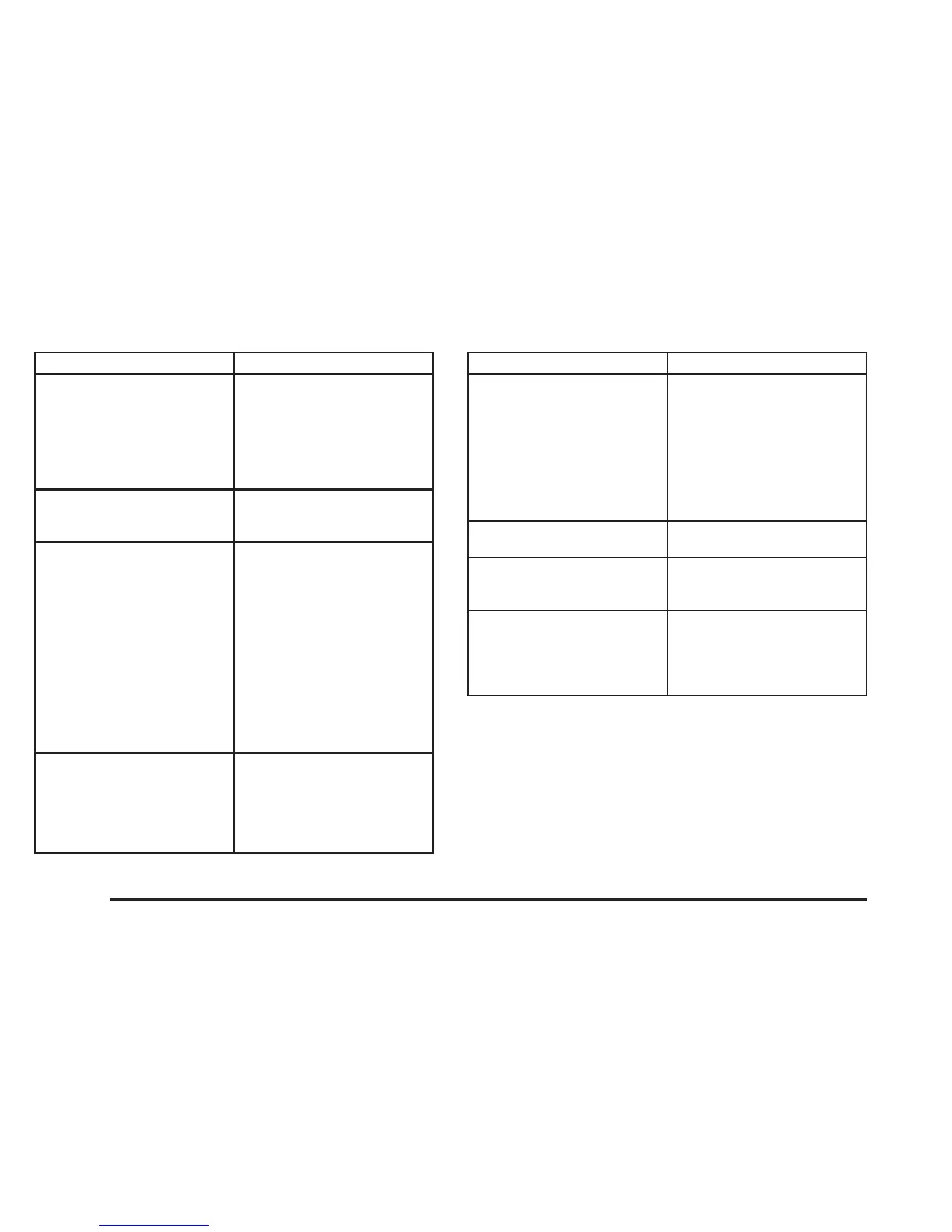
Problem Recommended Action
The DVD is playing but
there is no picture or
sound.
The auxiliary medium
(video game, camcorder,
etc.) is running but there
is no picture or sound.
Press the INPUT/TITLE
button on the remote to
get to auxiliary input.
The auxiliary medium’s
cords could be plugged
into the wrong jack.
The audio or video skips
or jumps.
The DVD could be dirty
or scratched. Try cleaning
the DVD.
When I return to the DVD
from the system menu,
sometimes it plays from
the beginning and
sometimes from where it
left off.
If the STOP button was
pressed once, it resumes
play from where it left off.
If the STOP button was
pressed twice, it will start
at the beginning of the
DVD.
However, if a change was
made to the menu, the
DVD will start from the
beginning, even if the
STOP button was only
pressed once.
The fast forward, fast
reverse, previous and
next functions do not
work.
Some commands that do
one thing for DVDs will
not always work or
perform the same
function for audio, CDs or
games.
Problem Recommended Action
My disc is stuck in the
player. The EJECT/LOAD
button does not work.
Press the EJECT/LOAD
button on the remote, or
the STOP/EJECT button
on the DVD player.
Turn the power off, then
on again.
Do not attempt to forcibly
remove the disc from the
player.
I lost the remote and/or
the headphones.
See your dealer for
assistance.
What is the best way to
clean the screen?
Pour some isopropyl or
rubbing alcohol on a
clean cloth and wipe.
Sometimes the wireless
headphone audio cuts
out or buzzes for a
moment then it comes
back.
This could be caused by
interference from cell
towers or by using your
cell phone in the vehicle.
3-102














 To Next Page