11
10
Fuse Replacement
If any of the fuses blow, replace them with a standard
30 mm 3 AG type of the same rating, if the fuse blows a
second time contact your Dealer.
The following fuse ratings are used:
- Yellow ‘Memory 12 V +’ lead: 15 Amp.
- Red ‘Ignition Switch ACC’ lead: 1 Amp.
MP3 FUNCTIONS
What is MP3?
MP3 (MPEG-1 Layer 3) is a format for the compression of
audio les to approximately 8% of its original size. This
allows a larger number of les to be stored on a CD-R
or CD-RW.
Precautions for CD-Rs and CD-RWs
The unit will not play a CD-R or a CD-RW that is not
nalised, please refer to the manual of the software or
recorder that you are using to write to these CDs for the
nalisation process.
To ensure a more reliable playback, please follow these
recommendations.
1. Use CD-RWs with a speed of 1x to 4x and write with a
speed of 1x to 2x.
2. Use CD-Rs with a speed of 1x to 8x and write with
speed 1x to 2x.
3. Do not play CD-RWs that have been written to more
than 5 times.
4. If a disc contains audio CD data and MP3 les, the unit
will only play which ever is rst on the disc. If the rst
track on the disc is an MP3 le then the unit will only
play the MP3 les from the disc, and will ignore all other
les and vice versa.
Precautions for MP3
The format of the disc must be ISO9660 level 1 or 2, or
Romeo or Joliet in the expansion format.
When naming an MP3 le, be sure the le name extension
is ‘.MP3’.
The unit will not recognise a non-MP3 le even though the
name extension is ‘.MP3’.
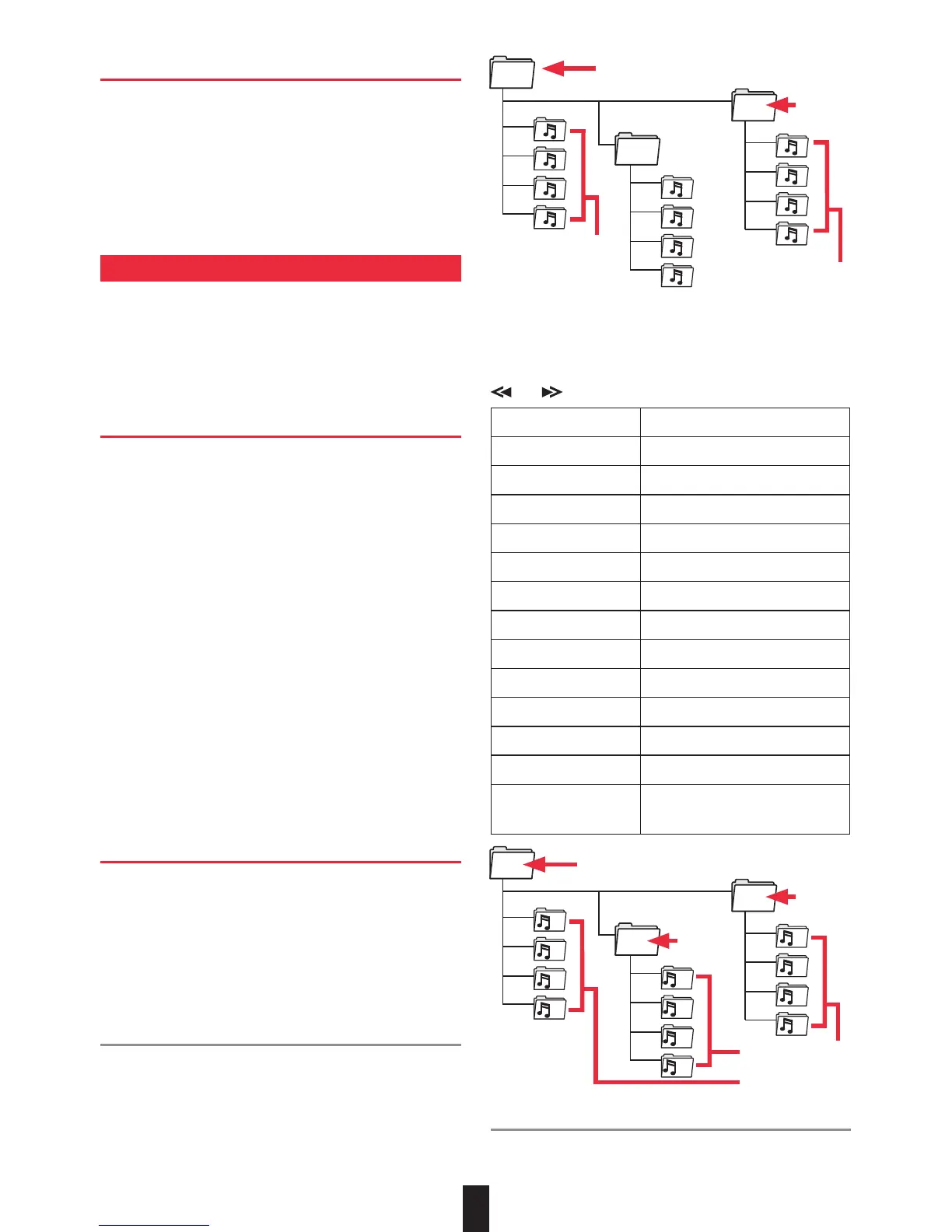
Searching for a File from Root Directory
Press the
AMS
button once to search for a le in the root
directory by it’s number. Enter in the number of the le you
are searching for (see table for assigned keys).
If you enter in 3 digits, the unit will start searching for the
selected le.
If you only enter 1 or 2 digits the unit will wait until you
press the
ENTER
button or will automatically search after 4
seconds for the selected le.
You can also manually search by using the
and buttons.
AMS Mode Select
BND/LOU ENTER
M1 A, B, C, 1
M2 D, E, F, 2
M3 G, H, I, 3
M4 J, K, L, 4
M5 M, N, O, 5/Directory DOWN
M6 P, Q, R, 6/Directory UP
MOD S, T, U, 7
MANU/SKIP DOWN V, W, X, 8
MANU/SKIP UP Y, Z, SPACE, 9
SEL CHARACTER SHIFT RIGHT
DSP _, -, +, 0
VOLUME UP/DOWN CHARACTER SELECT
(A, B~8, 9, 0)
Searching for a File or Directory by name
Press the
AMS
button twice to search for a le or directory
by name.
Root Directory
Directory
Files
Files in Root
Directory
Root Directory
Files
Directory
Search for a File
by number from
Root Directory
Directory
1
2
3
4
9
10
11
12
5
6
7
8


 To Next Page
 Loading...