Need help?
Do you have a question about the GME GX700 and is the answer not in the manual?
Transmit safety, explosive atmospheres, and unsupervised operation warnings.
Details required VHF marine radio operator certificates for Australia.
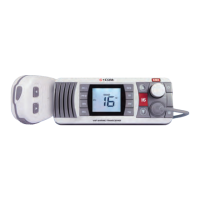
Congratulates purchase, describes GX700 as advanced VHF marine radio.
Lists compact design, channel sets, scanning, dual/triple watch, power, squelch.
Lists cabin cover, microphone bracket, mounting hardware, DC power lead, etc.
Explains factors affecting range and typical ship-to-ship/shore distances.
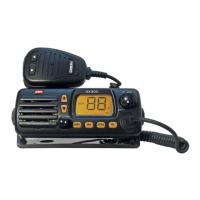
Identifies and describes front panel buttons, display icons, and their functions.
Instructions for powering the GX700 on and off.
How to adjust the audio volume using the control.
How to open, close, and set the preset squelch level.
How to select standard marine and weather channels using keys.
Instructions for using the PTT, microphone, and time-out timer.
How to switch to and from Channel 16, its priority function.
How to choose between International, USA, and Canadian channel sets.
How to adjust the LCD display brightness.
How to switch between high (25W) and low (1W) transmit power.
How to store and recall channels using PR1 and PR2 memory keys.
Introduction to the Dual Watch function for monitoring two channels.
Explains behavior when signals appear on selected channel or Ch 16.
How to transmit on selected channel or Ch 16 during Dual Watch.
How to change the secondary channel during Dual Watch.
Explains behavior when signals appear on Ch 16, priority, or selected channels.
How to transmit on selected channel, priority, or Ch 16 during Triple Watch.
How to add/remove channels from the scan memory using SCN key.
How to start, stop, and manage the scanning process.
Describes scan behavior, pausing, skipping, transmitting, and general notes.
How scanning interacts with Dual Watch and Triple Watch features.
Guidance on choosing an optimal mounting location for the GX700.
Instructions for mounting the unit using gimbal or flush mount kits.
How to connect the power supply (red and black leads) and fuse information.
Guidance on antenna connection, extension speaker placement, and noise suppression.
Covers compliance, frequency range, channel spacing, voltage, stability.
Details power output, frequency deviation, response, consumption.
Lists IF frequencies, sensitivity, squelch, rejection, audio output.
Provides dimensions, flush mounting depth, and weight.
Lists temperature range, vibration, solar radiation, and water resistance ratings.
Details the types and pin configurations for microphone, DC, and speaker.
Outlines consumer rights and guarantees under Australian law.
Details GME's warranty terms, limitations, and repair/replacement policies.
Lists warranty exclusions and specifies the product's warranty duration.
Step-by-step guide for installing the radio in a new location.
Instructions for using clamps if the existing hole is larger than the template.
 General
| Waterproof Rating | IPX7 |
|---|---|
| Voltage Range | 13.8V DC |
| Channel Spacing | 25kHz |
| Transmit Power | 1 W |
| Display | LCD |
| Battery Life | Not applicable (powered by 13.8V DC) |

 To Next Page