English
01
02 03 04 05 06 07 08 09 10
EQUIPMENT’S OPERATION
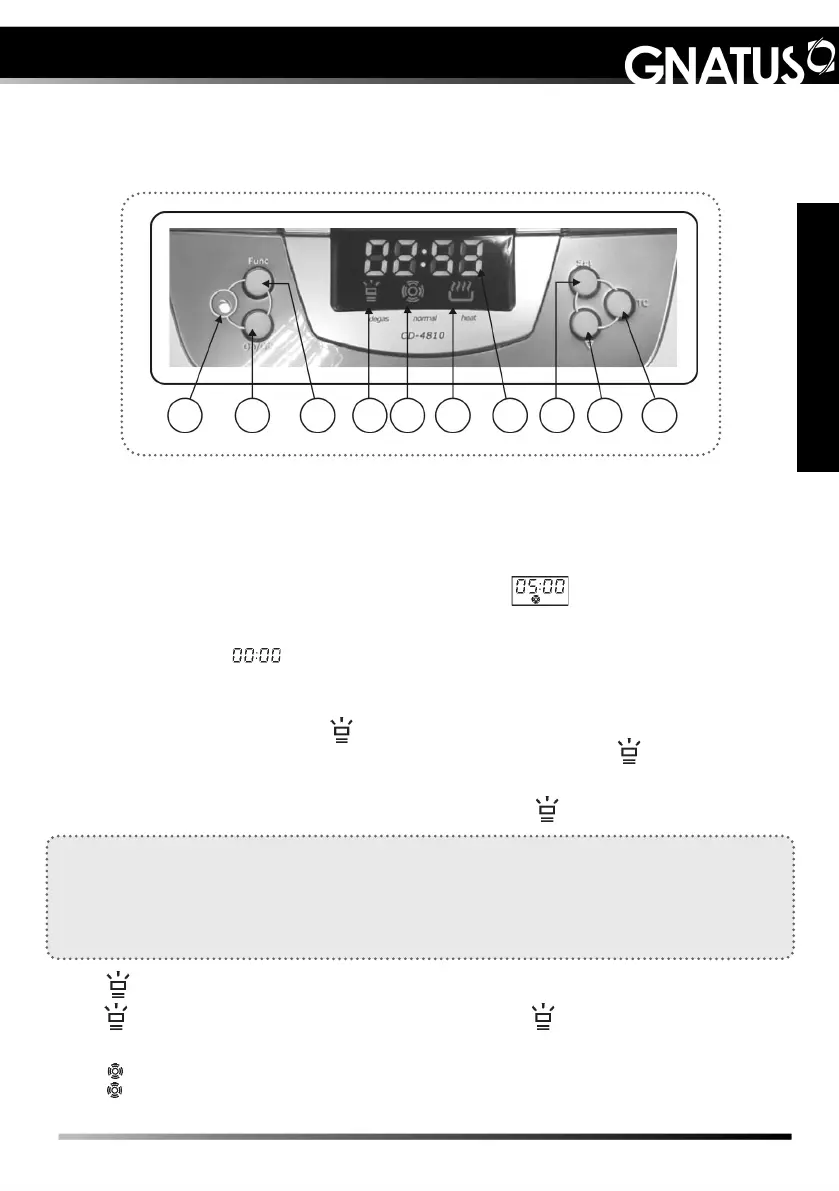
1. Indicator light – Working status
Green - Normal operating status, ready for use.
Red - Under the protection of overheating, it takes 15 minutes of waiting for the light
changes from red to green. The operation can be resumed later.
2. On/Off button – on/off switch on the unit
After turning on, the LED display, with standard time , and the unit will be ready
and with normal operating status.
Press the On/Off button once to start the operation of the machine. Cleaning stops when
the countdown stops . If the device needs to be stopped before the time runs out,
press the On/Off button.
3. Function button - Functions (Degassing/Normal)
Press the Function Button (03) , it lights up, indicating that the degassing function has
been selected. Press the On/Off button to start the degassing function . It illuminates for
about 90 seconds, then the unit will return to the normal cleaning function (05). Pressing
the On/Off button before the end will cause the degassing to be interrupted. If you need
additional degassing, press the Function Button again (03), .
Degassing
The newly added water can generate many air bubbles on the walls of the tank. This
circumstance reduces the effect of cleaning in the early phase of the ultrasonic cleaning.
Turning on the degassing function dissipates the droplets and bubbles of air, improving the
efciency of cleaning (approximate time, 90 seconds).
4. - Degassing status
- Illuminated, the degassing function is selected. - Blinking, the degassing is
in progress.
5. - Normal cleaning status
- Illuminated, normal cleaning is in progress.
Control panel and operations


 To Next Page