Cleaning methods
6. - Heater status
Press the TC button, it ashes indicating that the heater is on. Press the TC button
again, it turns off , indicating that the heater is off.
7. Time Display LED digital display operation. It counts down, after the
work is started.
8. SET button (conguration) – Clock quick setup button. Press the SET button,
the LED displays . Press the button again to set the clock. Each time it is pressed,
the button adds 5 minutes.
9. Button - Clock decrease button. Each time pressed, reduces the clock in 1
minute.
10. CT Button – Heater button. Press the TC button, when ashing , i, indicates
that the heater is on. To cancel the heat, press TC again, it turns off indicating that
the heater is off.
Only tap water is required.
Appropriate places: Optical stores, laboratories
chemical and dental clinics.
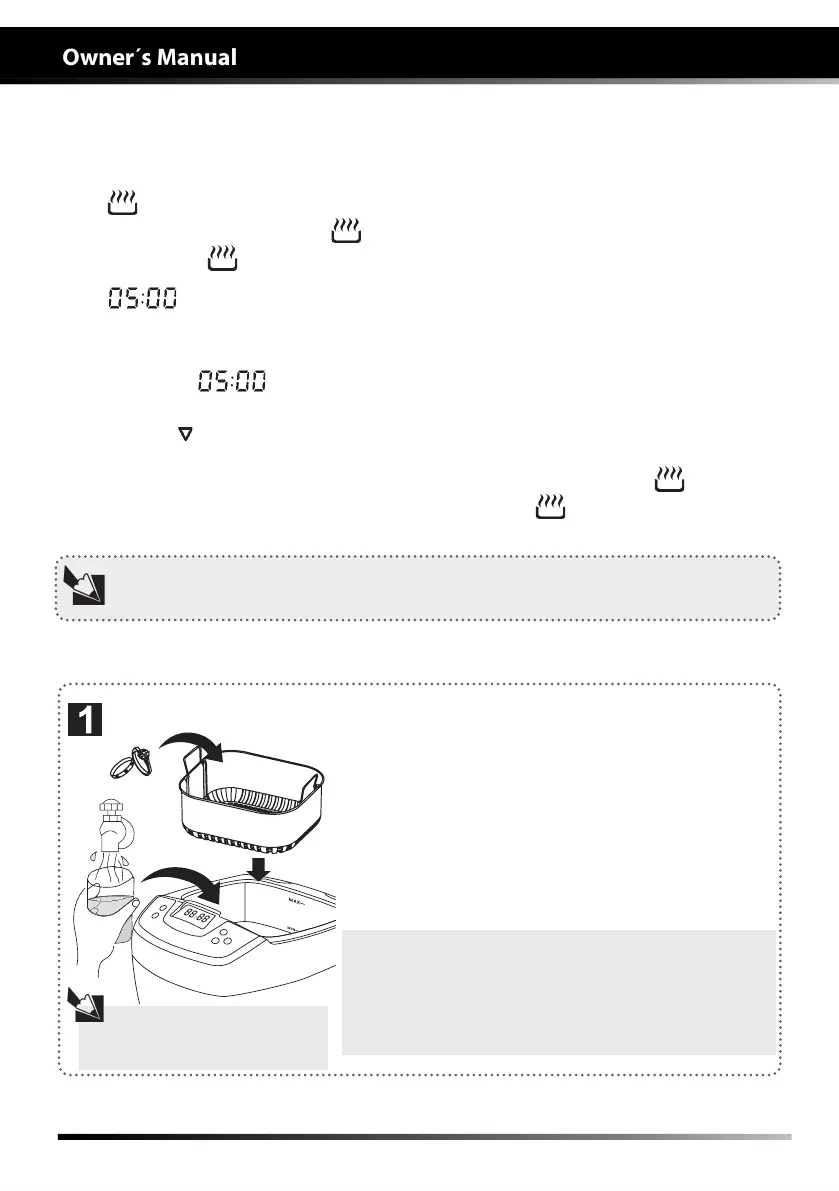
Cleaning methods:
1. Add water to the cleaning tank to a level between
the lines "MIN" and "MAX" and above the object.
2. Place the objects to be cleaned inside the basket
or directly into the cleaning tank.
3. Press the SET button to set the clock between 5
and 10 minutes. Press the On/Off button once to start
the cleaning.
Use tap water, chemical
solutions are unnecessary in
most cases.
Notes on the use of the basket:
1. The basket reduces friction between the objects
and the tank, but absorbs about 30% of ultrasonic
energy reducing the cleaning effect.
2. When objects are relatively large and with oily
residues, they can be placed directly into the tank.
When the water temperature reaches 60°C, the system turns off automatically.
EQUIPMENT’S OPERATION
Control panel and operations
Regular cleaning


 To Next Page