32
GET TO KNOW YOUR GEAR
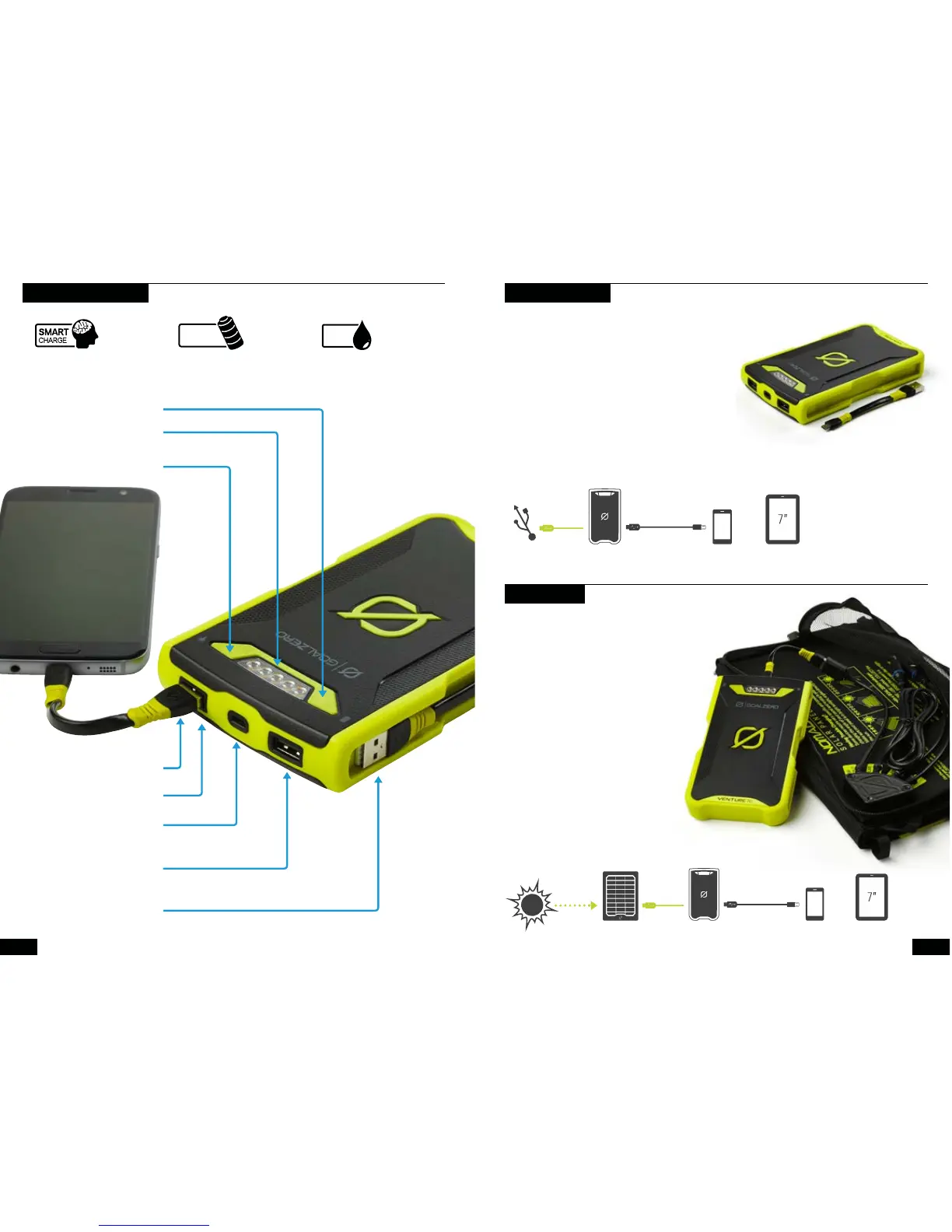
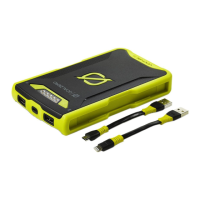
19,200 mAh
Advanced, long-lasting
lithium internal battery.
IP67 Waterproof,
shock-proof design.
Rugged DesignSmart 2.4A USB
Charge a phone and a
tablet – at the same time.
71Wh
19,200mAh
Battery Indicator
One-touch charge indicator +
65 lumen multi-mode flashlight
Charge It
Recharge from USB
or solar panel. Fast.
Included Micro USB
to USB Cable
USB Port
Recharge your device
USB Port
Recharge your device
Flashlight Button
Battery Button
Included USB to Micro USB Cable
or USB to Lightning
®
Cable
IP67
RATING
Use a micro-USB cable to charge up Venture 70 from a
live USB source.
1. Plug Venture 70 into any USB source using a
micro-USB cable, like the one included with Venture 70.
2. Know it’s charging when blue indicator lights on the top
illuminate and pulse. Each blue indicator light represents
20% battery capacity. Blue indicator lights will flash
according to how quickly Venture 70 is charging. A slow
flash indicates a slow charge, while quicker flashing
indicates faster charging.
3. Venture 70 is full and ready to go when all lights
are solid.
Venture 70 allows for pass-through power so you can charge your gear and Venture 70 at the same time.
When Venture 70’s battery is dead, the first blue indicator light will flash when the battery button is pushed
8 Hours
2.4 A USB Port
Nomad
®
20
Solar Panel
CHARGE BEFORE USE
Venture 70 is engineered to charge quickly from
Goal Zero Nomad Solar Panels.
4. Plug Venture 70 into the USB port on a
Nomad Solar Panel using a micro-USB cable.
5. Know it’s charging when blue indicator lights
illuminate and pulse. Each blue indicator light
represents 20% battery capacity.
6. Venture 70 is full and ready to go when all
lights are pulsing together.
7. Blue indicator lights will flash according
to how quickly Venture 70 is charging.
A slow flash indicates a slow charge,
while quicker flashing indicates faster
charging.
8. When charging from solar, angle your
panel toward the sun to see how it
affects charging.
SOLAR READY™
or
or
Phone
8 Hours
Full Sun
Phone Tablet
Tablet


 To Next Page