12
WARNING: Ensure that you only use Goal Zero products between
your Link and Alternator. Any other cables or wiring is not
supported or recommended as these cables need to be rated to
carry a minimum of 80A Max Current
Ensure cable is fully inserted and tightly in place before use.
Check upon subsequent uses. For questions, contact Solutions
Center at support@goalzero.com or 1-888-794-6250
4. Once Link is switched to Vehicle mode you will be able to connect to
your vehicles +/-battery or alternator. By using the Goal Zero EC8
Extension Cable.
Note: only use authentic Goal Zero cables to do this.
DO NOT use more than one Extension Cable
DO NOT have a secondary battery in between the Link Module
and the vehicle alternator or main battery
5. Connect the Ring Terminal Cable to the positive and negative terminals
on the either the main battery or the alternator.
6. Improper connections will damage the Yeti Link Module/Accessory
cables and/or cause serious injury or death. Be sure that all wiring is
connected to the appropriate polarity
7. Plug the Male end of the EC8 Ring Terminal cable into the Female end of
the EC8 Extension cable.
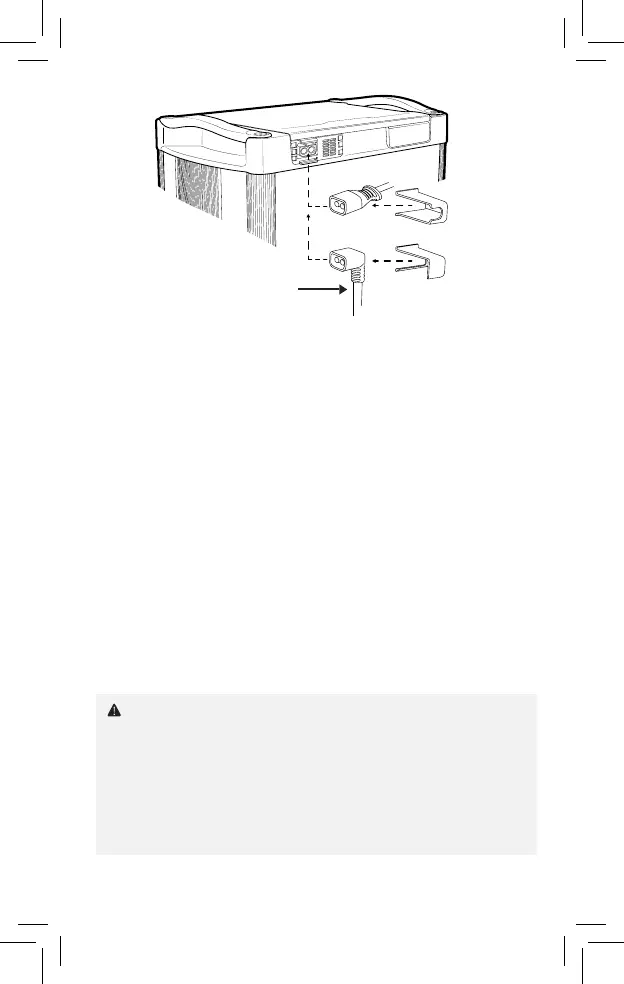
8. Plug male end of Extension Cable into the External EC8 port of the Link
Module and slide either the straight or the 90-degree EC8 cable holder
over the cable and into the slots of the Link Lock.
• Make sure cables are securely connected. Check cables
periodically especially before and after uneven roadways.
EC8 External
Battery Cable
or


 To Next Page