4 5
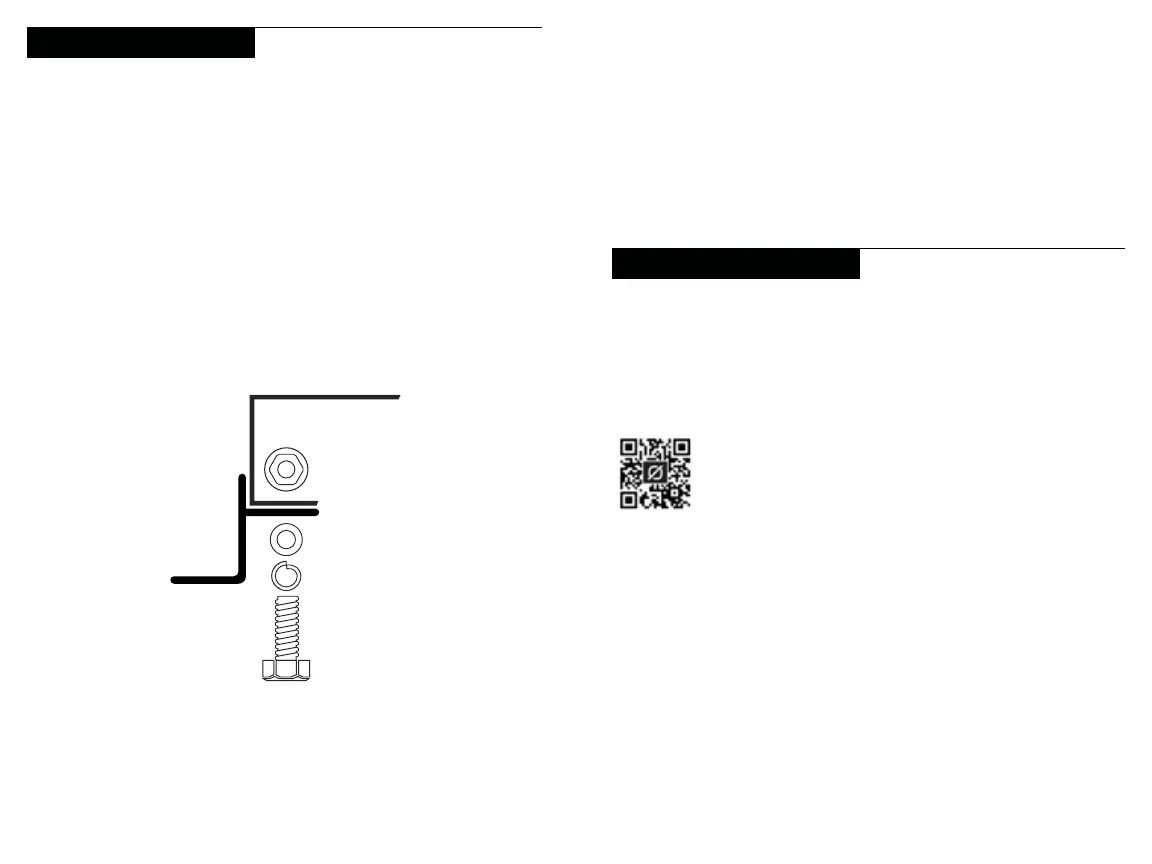
1. Secure the Z Brackets to the Solar Panel
a. Attach the Z-Bracket along the long side of the solar
panel frame near the corner. Be sure the mounting foot
of the bracket is facing away from the solar panel frame.
b. Line up the mounting hole on the Z-Bracket with the hole
on the solar panel frame.
c. Attach the Z-Bracket to the solar panel frame with the
M6 hex bolt, split lock washer, flat washer, and
hexagon nuts.
When connecting multiple panels, it is important to be mindful
of the voltage input limitations of the device you are charging.
The amount of input is impacted by whether you are connecting
panels in a series or parallel configuration. Visit the Goal Zero
website for more information about optimum solar panel setup:
How to Install Your Panel
Connecting Multiple Panels
2. Mount the Panel
a. Choose a location to install your solar panel. We
recommend picking a spot that is clear and will receive
maximum sun exposure.
b. Mount the panel as far away from rooftop obstructions
as possible.
Side View
Boulder 100i Top
d. Repeat for the other 3 brackets, placing one near each
corner of the solar panel.


 To Next Page