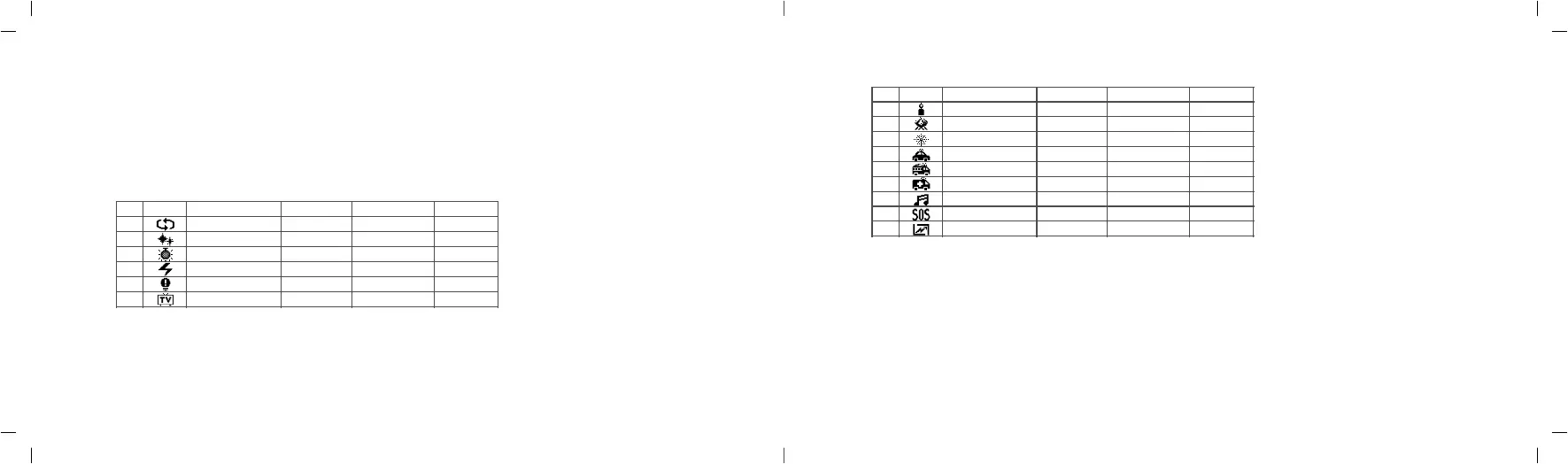
No.
Display
Situation
DisplayⅠ DisplayⅡ DisplayⅢ
1
2
3
4
5
6
Colorful lights recycle
Flash
Laser colorful lights
Lightning
Broken bulb
TV
4. FX Situational Special Effects Mode(40 kinds)
4.1 Turn the FN multifunctional select dial to choose different special effects modes from 1 to 15.
And the modes will display circularly.
4.2 After choosing the current mode, press down the FN multifunctional select dial from Ⅰ, Ⅱ and Ⅲ.
And the modes will display circularly when keeping pressing the FN multifunctional select dial.
4.3 Adjust light brightness: turn the light brightness select dial to adjust from 0 to 100%.
4.4 There’re 40 kinds of situational special effects mode which are divided into 15 categories for your choice.
Slow speed
Flash
Birthday party
Discontinuous
Discontinuous
Slow speed
Medium speed
Press conference
KTV
Frequent
Frequent
Medium speed
Quick speed
Paparazzi
Disco
Sustainable
Sustainable
Quick speed
No.
Display
Situation
DisplayⅠ DisplayⅡ DisplayⅢ
7
8
9
10
11
12
13
14
15
Candle
Fire
Firework
Police car
Fire truck
Ambulance
Music
SOS
Strong light (60s)
Discontinuous
Firewood
Brief
Strong flash
Strong flash
Strong flash
Music I
Frequent
Campfire
Continuous
Frequent flash
Frequent flash
Frequent flash
Music II
Sustainable
Fire hazard
Show
Quick flash
Quick flash
Note:
1. Choose the strong light mode and press the FN multifunctional select dial to power on/off the light. The light brightness and power will up
to max. in strong light mode. The duration of strong light mode is 60 seconds and the light will auto off after 60 seconds.
2. The light in strong light mode will be hot quickly for outputting high brightness. It is not recommended to use this function when the
environment temperature is high. Otherwise, high temperature warning will be activated.
- 29 - - 30 -



 To Next Page