Need help?
Do you have a question about the Godox ES45 KIT and is the answer not in the manual?
Lists key features like LED bulbs, brightness/color temp adjustment, battery life, and control methods.
Identifies components of the main unit, including LED beads, light board, and mounting holes.
Lists all included accessories like light body, panel, mounting rod, cables, and manual.
Details DC power supply via adapter, including input/output specifications for the main unit.
Explains two methods for powering the control panel: attached to the main body or via USB-C.
Step-by-step guide on inserting the adapter, powering on, and understanding indicator lights.
Instructions on adjusting light brightness using the DIM dial from 0% to 100%.
Guide on adjusting color temperature using the CCT dial from 2800K to 6500K.
Details how to set channel (1-32) and group (A, B, C) for wireless control via the panel.
Instructions for downloading the 'Godox Light' APP and connecting via Bluetooth for control.
Lists technical specifications like model, power, channels, color temperature, CRI, TLCI, and dimensions.
Provides the physical dimensions and weight of the product with and without the control panel.
Describes how the panel display dims after 1 minute and the light powers off after 1 hour of inactivity.
Details FCC compliance rules, conditions for operation, and measures to correct interference.
Instructions on contacting distributors or Godox for service, and required warranty card.
Lists situations voiding warranty: misuse, unauthorized repair, expired period, etc.
Details warranty periods and service types for product parts like circuit boards, batteries, and electrical components.
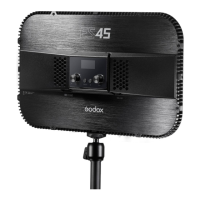
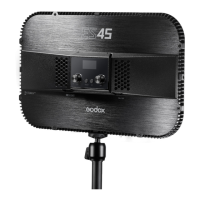
The Godox ES45 Kit E-sports LED Light is a versatile lighting solution designed for e-sports, live streaming, makeup tutorials, and video recording. It offers adjustable brightness and color temperature, along with wireless remote control via a smartphone app or 2.4G wireless connection. Its compact, lightweight, and portable design makes it convenient for various desktop applications.
The ES45 Kit features 176 premium LED bulbs integrated into an all-in-one light board, providing soft and non-blinding illumination. Users can precisely adjust the brightness from 0% to 100% and the color temperature from 2800K to 6500K. The device is powered by a built-in lithium battery, offering approximately 22 hours of continuous use on a full charge.
A key feature is its detachable control panel, which simplifies operation. This panel attaches magnetically to the main body and can be removed for remote control. It is powered either by the main body when attached or independently via a Type-C USB cable when detached. The control panel includes an OLED display that shows current settings, and all parameters are automatically saved.
The light supports two wireless control methods: 2.4G wireless remote control and Bluetooth connectivity via the "Godox Light" smartphone app. This dual control capability ensures strong anti-interference performance and allows for convenient adjustment of multiple LED lights simultaneously.
To begin using the ES45 Kit, insert the DC adapter into the DC port. Press the power switch on the main body to turn on the LED light. The indicator light will illuminate blue, and if the light's group matches the transmitter's and a signal is received, the indicator will blink red. Short pressing the power switch on the detachable control panel will power it on or off, displaying current information on the OLED panel.
In normal operating status, rotate the DIM select dial on the control panel. Turning it leftwards decreases brightness, while turning it rightwards increases it. Brightness can be adjusted from 0% to 100%, with common adjustments changing by 1 unit and quick adjustments by 10 units.
Similarly, rotate the CCT select dial on the control panel to adjust the color temperature. Leftward rotation decreases the value, and rightward rotation increases it. Color temperature can be set from 2800K to 6500K, with common adjustments changing by 100 units and quick adjustments by 500 units.
The detachable control panel offers 2.4G wireless remote functions. To use this, place the control panel onto the LED light and set the desired channel (CH) and group (GR) parameters. Once set, the panel can be detached to adjust brightness, color temperature, and other functions remotely. The channels and groups of the control panel and LED light are pre-matched by default, eliminating the need for resetting. The main body can only receive wireless signals when powered on. Multiple control panels can be used simultaneously to control several LED lights by matching their channels and groups.
The ES45 Kit supports smartphone app control via Bluetooth. Users can download the "Godox Light" app (available for Android and Apple systems) by scanning a QR code. After powering on the device, open the app to pair or network with the light. Detailed guidance for app operations can be found in the app's "help" section.
To conserve power, the display of the operate panel will automatically dim after one minute of being detached from the main light body without operation. If left detached and unused for one hour, the LED light will automatically turn off.
The main body is powered by a DC adapter (input: 100-240V 50/60Hz 1.3A, output: 14V 3.42A). When connected to DC power, the control panel's battery power will show as full. It is crucial to use the included Godox adapter to ensure consistent performance.
The operate panel has two charging methods:
These functions require the operate panel and main body to be turned on and successfully connected.
To maintain optimal performance and prevent dust accumulation, regularly wipe the product's exterior with a clean, damp cloth.
Always keep the product dry and avoid placing it in high-temperature or damp conditions. The device has built-in over-temperature protection; it will enter a protection state if the temperature becomes too high and will return to normal once the temperature decreases. Do not touch the product with wet hands, and as it lacks waterproof functionality, take precautions in rainy or damp environments.
This product, excluding consumables like the battery and adapter, comes with a one-year warranty. Maintenance must be performed by an authorized maintenance department using original accessories. Unauthorized service will void the warranty. If the product experiences failures or gets wet, do not use it until it has been repaired by professionals. Any changes to specifications or designs may not be reflected in this manual.
 General
| Model | ES45 KIT |
|---|---|
| Category | Lighting Equipment |
| CRI | 96 |
| TLCI | 97 |
| Operating Voltage | 100 to 240 VAC, 50/60 Hz |
| Power Consumption | 45 W |
| Cooling System | Passive |
| Type | LED |
| Color Temperature | 5600K |
| Dimming | 0 to 100% |
| Power Source | AC Adapter |
| Accessories Included | AC Adapter |
| Battery Compatibility | Built-in Battery |
| Control | Remote |

 To Next Page