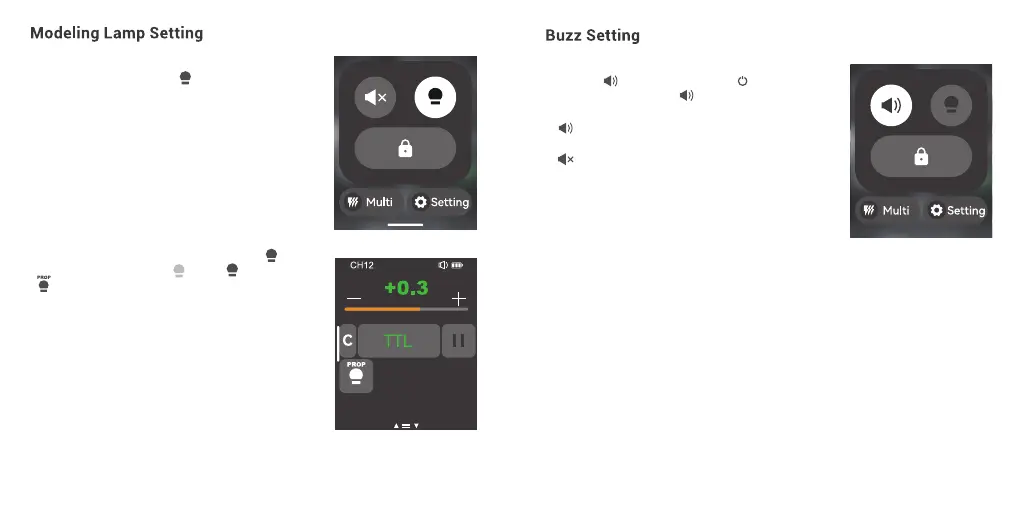
1. When displaying multiple groups, slide the screen
down from the top to display < >, press it to
control the ON/OFF of the modeling lamp.
Note: If the modeling lamp of a certain group is off(other
groups are on), then it can not be turned on or off along
with other groups.
In main interface, slide the screen down from the top
to display < >, or you can press <M/ > button
to make the panel display < >, then press to turn
on or off the buzz function.
< > means the buzz function of controlled flash
is on.
< > means the buzz function of controlled flash
is off.
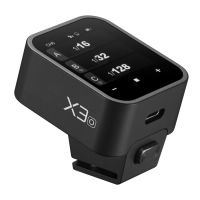
2. When displaying a single group, you can press < >
to switch among 3 statuses: < > off, < > on, or
< > PROP auto mode.
When the modeling lamp is on, press <+> to increase
its brightness value, press <-> to decrease its
brightness value, or you can also slide the progress bar
to quickly adjust the brightness from 10 to 100.
Note: When the modeling lamp is set to PROP auto mode,
its brightness will be change along with the brightness of
the flash.
Note: The models that can use the modeling lamp are as follows:
GSII, SKII, SKIIV, QSII, QDII, DEII, DPII series, DPIII series, etc. The
outdoor flash AD200 and AD600 can use this function after
upgrade. The new arrivals with modeling lamps can also use this
function.
67 68


 To Next Page